
How to Install Carbon on Your Rust Server

Carbon is a modern Rust modding framework — a faster, actively developed alternative to Oxide (uMod) that runs the large majority of existing uMod plugins. If you want better performance and newer features, Carbon is worth a look. On gamever you enable it with a single toggle. Here's how.
Enable Carbon in the panel
Use either entry point:
- Settings → Mods Settings → Install Carbon → Yes, then Save.
- Or Startup → Enable Carbon → Enable, then Save.
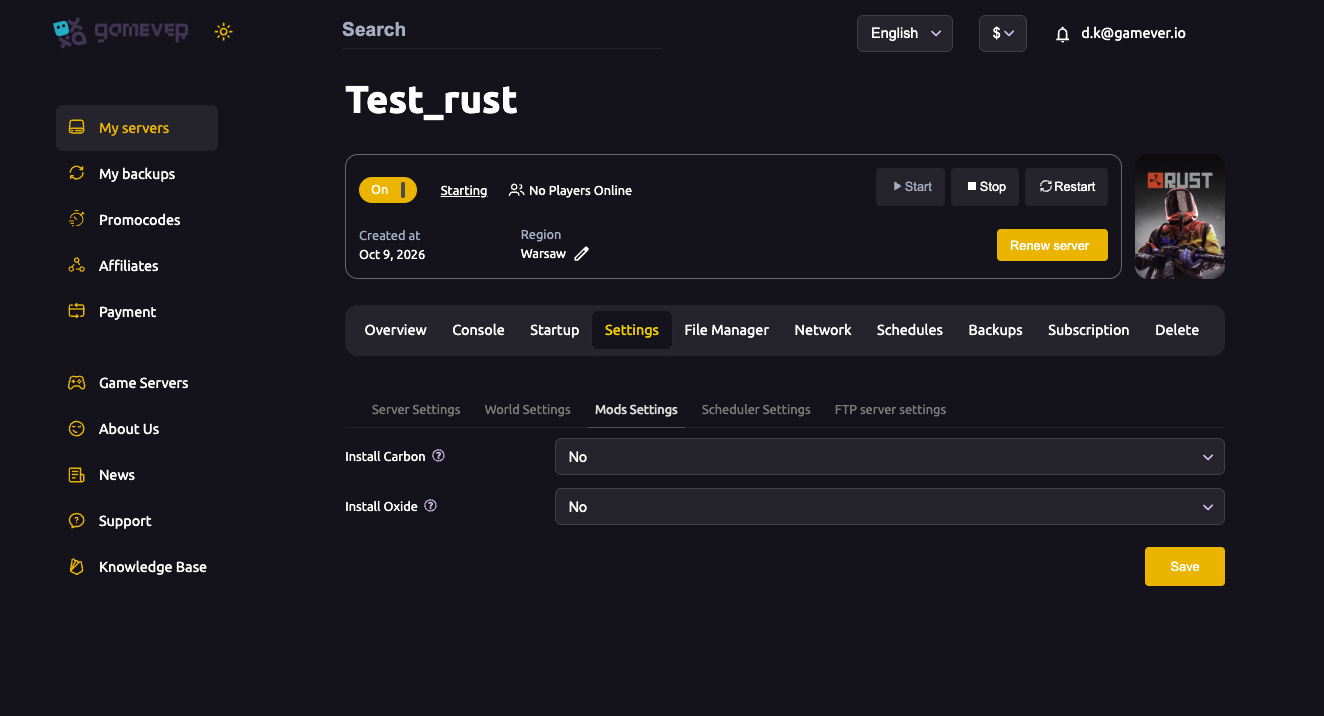
Applied on reinstall/restart. After enabling Carbon, Restart the server so the framework installs (the Startup tab notes you'll need to reinstall to apply the change).
Carbon or Oxide — never both. They're competing frameworks and will conflict. If Install Oxide is on, turn it off before enabling Carbon.
Where your plugins go
Once Carbon is installed and the server restarts, a carbon folder appears in your server's identity folder (next to cfg/):
| Folder | What it holds |
|---|---|
carbon/plugins | Plugin files — drop .cs files here. |
carbon/configs | Per-plugin JSON configs. |
carbon/data | Plugin data. |
carbon/lang | Language files. |
Upload plugins to carbon/plugins via the File Manager (or FTP). Carbon hot-loads them within seconds.
Managing plugins from the console
Carbon uses the c. command prefix in the Console (or RCON):
| Command | What it does |
|---|---|
c.reload <PluginName> | Reloads a plugin after a config edit. |
c.unload <PluginName> / c.load <PluginName> | Turns a plugin off / on. |
c.plugins | Lists loaded plugins. |
c.grant group <group> <permission> | Grants a permission to a group. |
c.version | Shows the Carbon build. |
Carbon or Oxide — which?
Both run the uMod plugin ecosystem. Choose Carbon for performance and the newest features; choose Oxide for the longest track record and maximum plugin compatibility. You can switch later — just disable one before enabling the other and restart.
Additional Tips
- Restart after enabling so Carbon actually installs.
- One framework only — disable Oxide first.
- Plugins go in
carbon/plugins, configs incarbon/configs. - Use the
c.prefix for Carbon commands (notoxide.). - After a Rust update, update Carbon and your plugins if something stops loading.
Conclusion
Installing Carbon on gamever is a single toggle: set Install Carbon to Yes under Mods Settings (or Enable Carbon on Startup), save and restart. Plugins live in carbon/plugins, and you manage them from the console with c. commands — modern Rust modding with almost no setup.
Rent your Rust server at gamever.io — one-click Carbon or Oxide, full file access and a built-in console. Free trial, promo code WELCOME.