
How to Install a Custom Mod Map on Your ARK Server

Beyond the official maps, ARK has a thriving scene of community map mods from the Steam Workshop — custom biomes and whole new continents to explore. Running one on a gamever ARK server takes three fields in the control panel. This guide shows exactly which ones, using the Map Mod Id setting. (For regular content mods — stacks, structures, dinos — see the mod installation guide.)
You'll need two things from the Workshop
A custom map is really two pieces of information:
- The map mod's Workshop ID — the number in its Steam Workshop URL.
- The map's name — the exact level name the mod uses (the mod's Workshop page lists it; it's case-sensitive).
Grab both before you start.
Set it up in Mod Settings
Open your server and go to Settings → Mod Settings. There are three fields here:
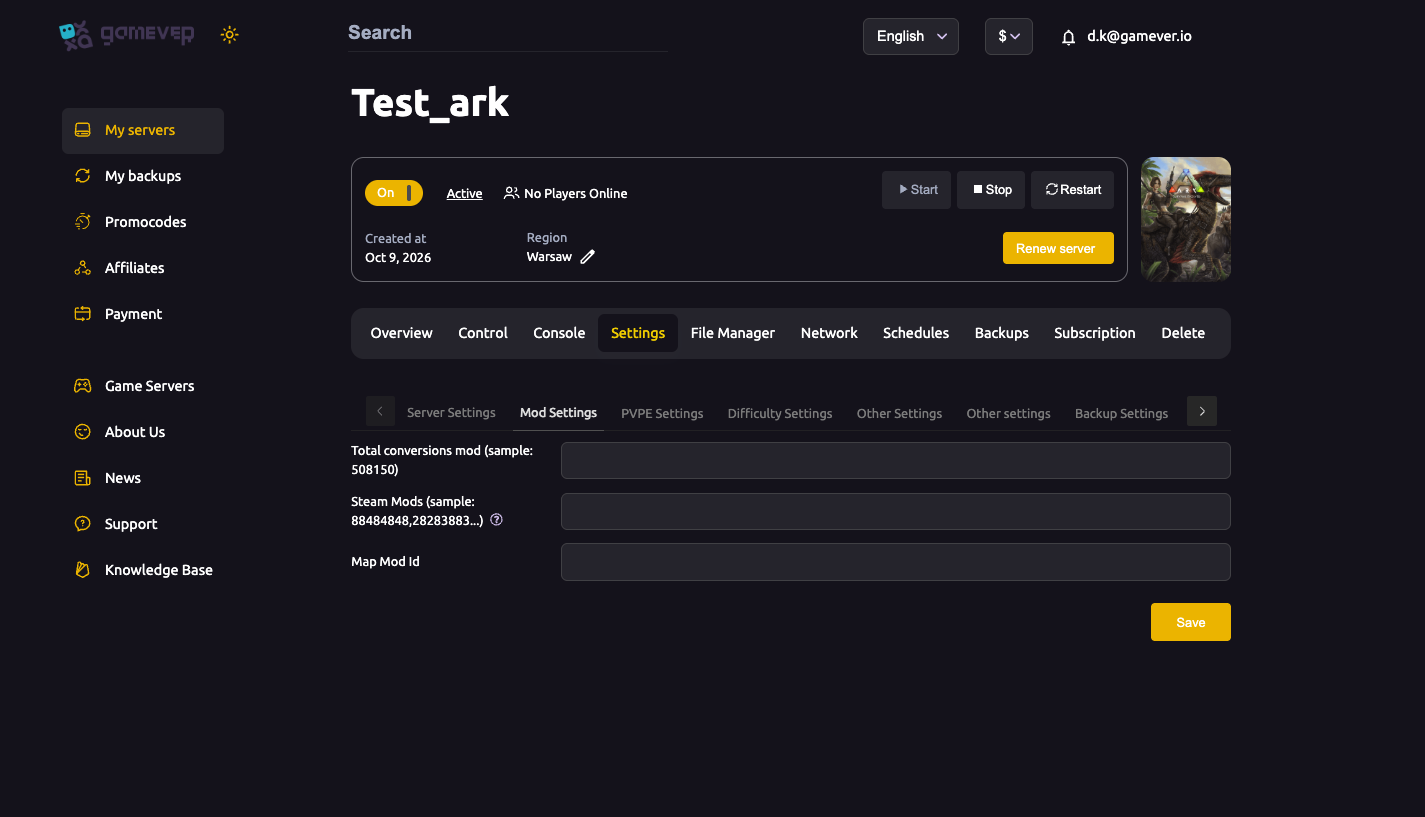
| Field | What goes here |
|---|---|
| Steam Mods | Comma-separated Workshop IDs of content mods (e.g. 88484848,28283883). |
| Total conversions mod | The ID of a total-conversion mod, if you're running one. |
| Map Mod Id | The Workshop ID of your custom map. |
For a custom map:
- Put the map mod's Workshop ID in Map Mod Id.
- Go to Settings → Server Settings and set Server Map to the map's exact level name (from the mod's page).
- Click Save on both, then Restart the server.
On the next boot the server downloads the map mod and loads your new world.
Give it time on first load. The server has to download the map mod before it can start, so the first boot after adding a big map takes longer than usual. Watch the Console — you'll see the mod install, then "The server is starting…".
A clean map switch
Because a custom map is a different world, treat it like any map switch: your existing official-map saves are kept separately and untouched, and the mod map starts fresh the first time. Back up first if you're attached to your current world — see backups & schedules.
Additional Tips
- Use the exact level name for Server Map — it's case-sensitive; a typo loads the default map instead.
- First boot is slow — the map mod downloads before launch; don't panic if it takes a few minutes.
- Keep the map mod updated — after an ARK patch, a map mod may need its own update; restart again once it's current.
- All players need the map mod too — the Workshop subscribes them automatically when they join a modded server, but they must let it download before connecting.
- One map at a time — set a single Map Mod Id and the matching Server Map name.
Conclusion
Running a community map on gamever comes down to one field: drop the map mod's Workshop ID into Mod Settings → Map Mod Id, set Server Map to the map's level name, save and restart. Your official worlds stay safe, and your tribe gets a brand-new continent to tame.
Rent your ARK server at gamever.io — install Workshop mods and custom maps from the panel, with the power and RAM big maps need. Free trial, promo code WELCOME.