
How to Install a Custom Map on Your Rust Server
Beyond procedural maps, Rust has a huge scene of custom (RustEdit) maps — hand-built worlds with unique monuments, biomes and arenas. Running one on gamever takes a single field: Level Url. This guide shows how to point your server at a custom map and what to expect.
You need a direct link to the .map file
A custom map is a .map file hosted somewhere your server can download it. You'll get a direct download URL from wherever the map lives — a map marketplace/host, or your own file host. The link must point straight at the .map file (not a web page about it).
Set the Level Url
- Go to Settings → World Settings.
- Paste the map's direct URL into Level Url.
- Click Save, then Restart the server.
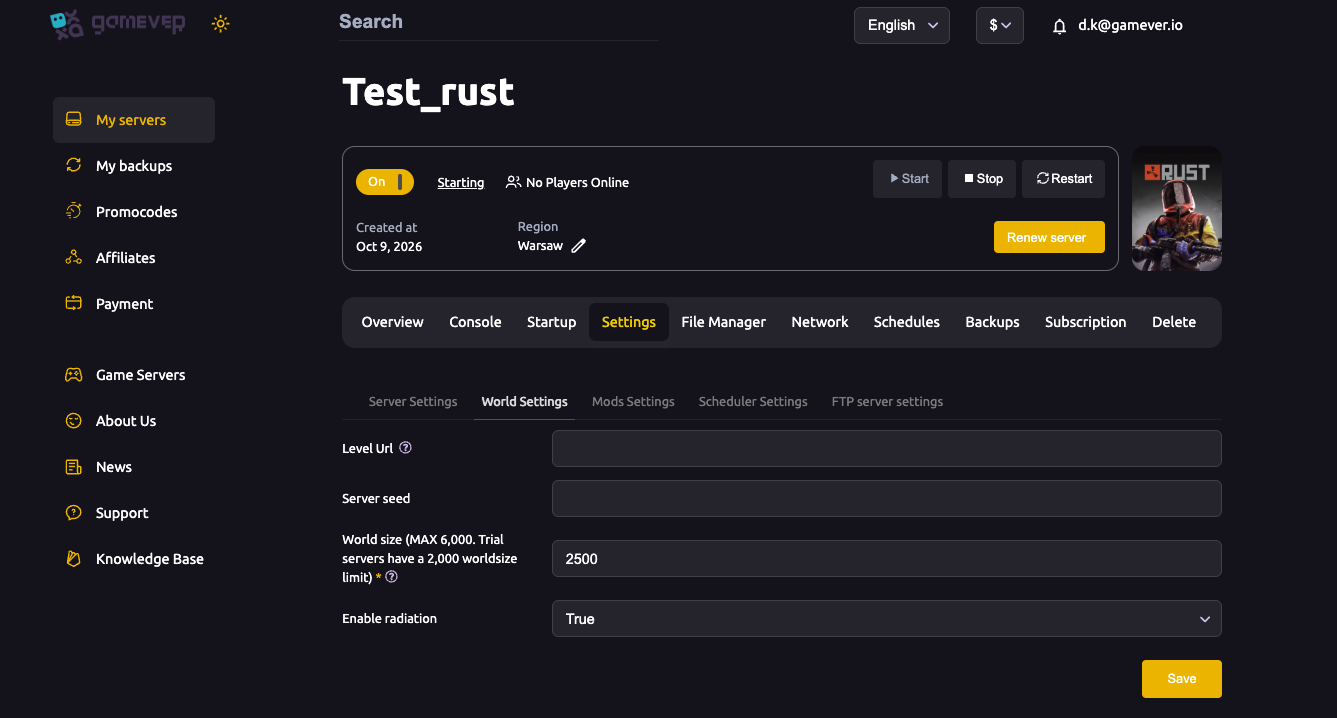
(You can also set it on the Startup tab as +server.levelurl "<url>" — but the World Settings field is the simple way.)
On restart, the server downloads the custom map and loads it instead of generating a procedural one. World size and seed are ignored while a Level Url is set — the map file defines the world.
What players experience
When a player joins a custom-map server, their client downloads the map first (a progress bar on the loading screen). Bigger custom maps mean a longer first join, but it's a one-time download per wipe.
Switching back to procedural
To go back to a normal procedural map, clear the Level Url field, set your World size and seed again, Save and restart. The server generates a procedural world as usual — and because the map definition changed, this acts as a fresh map wipe.
Additional Tips
- Use a direct link to the
.mapfile — a link to a web page won't load. - First join is a download — large custom maps take longer for players to enter; mention it in your description.
- Some custom maps need specific plugins (for custom monuments/puzzles) — check the map's page.
- Match your plan — big, dense custom maps still want decent RAM/CPU.
- Changing or clearing Level Url = fresh map — treat it like a wipe and back up first.
Conclusion
Running a custom Rust map on gamever is one field: paste the map's direct .map URL into Settings → World Settings → Level Url, Save and restart. The server downloads and loads it, world size and seed step aside, and your community gets a hand-crafted world no procedural seed can match.
Rent your Rust server at gamever.io — set a custom Level Url from the panel, with the power big maps need. Free trial, promo code WELCOME.