
How to increase the baby dino growth in ARK: Survival Evolved
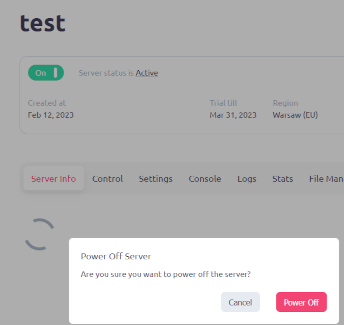
Step 1: Stop the server
Before you start making any changes to the server, it is important to stop the server. This will ensure that any changes you make to the server are applied properly and that no data is lost. Open the game server page and choose "Stop" from the menu to shut off the server.
Step 2: Download Game.ini file
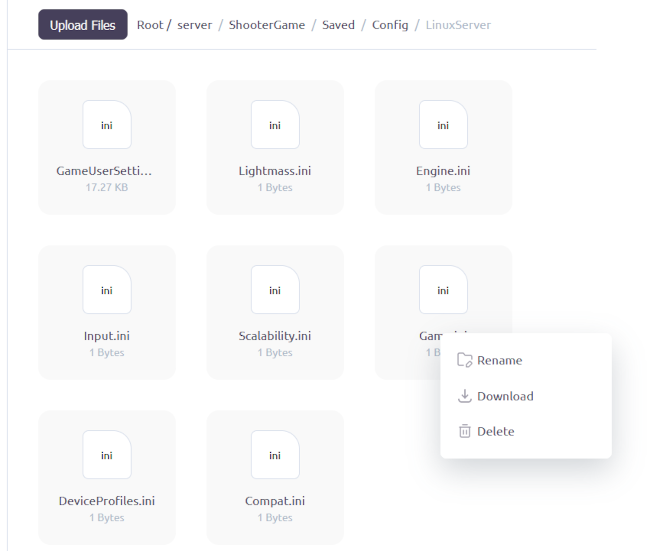
The Game.ini file needs to be downloaded from the ShooterGame/Saved/Config/LinuxServer/ directory next. The settings for the game, including those for the baby dino's growth, may be found in this file. Simply right-click the file and choose "Download" to download it.
Step 3: Add parameters
Once you have downloaded the Game.ini file, open it in a text editor and add the following strings headed with [/script/shootergame.shootergamemode] parameters:
BabyMatureSpeedMultiplier =2.0
EggHatchSpeedMultiplier =2.0
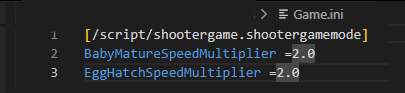
These parameters will decrease time needed for baby dino to mature and time needed for fertilized egg to hatch.
| Multiplier | Description |
|---|---|
| EggHatchSpeedMultiplier=1.0 | Time needed for fertilized egg to hatch |
| BabyMatureSpeedMultiplier=1.0 | Time needed for baby dino to mature |
| MatingIntervalMultiplier=1.0 | Interval between which dinosaurs can mate |
| BabyImprintingStatScaleMultiplier=1.0 |
How much of an effect on stats the Imprinting Quality has. Set it to 0 to effectively disable the system. |
| BabyCuddleIntervalMultiplier=1.0 |
How often Babies wanna cuddle. More often means you'll need to cuddle with them more frequently to gain Imprinting Quality. |
| BabyFoodConsumptionSpeedMultiplier=1.0 | The speed that baby dinos eat their food |
Step 4: Upload file to the server
You must upload the Game.ini file to the server after you have added the settings. Open the File Manager and choose "Upload" to accomplish this. After choosing the Game.ini file, click "Upload."
Step 5: Start your server
Starting your server is the last step. Open the server page and choose "Start" to get started. The modifications you have made to the Game.ini file will take effect as soon as your server is started.
Congratulations! You have successfully increased the baby dino growth in ARK: Survival Evolved. Enjoy watching your baby dinos grow faster!