
How to Hack Money in Farming Simulator 25 on PC Using Save File Editing
If you’re playing Farming Simulator 25 on PC and want to pump up your balance without spending hours farming, there’s a simple way to edit your save file to add as much cash as you want. This method skips mods and works entirely within the game files, making it a quick hack for an unlimited budget. Here’s exactly how to do it step-by-step.
Step 1: Save and Close the Game
Before you jump into file editing, make sure Farming Simulator 25 is completely closed. This ensures that any changes you make to the save file will apply when you load the game again. So, exit the game fully and get ready to tweak the files.

Step 2: Find Your Save File
Once the game is closed, head to your save files:
1. Open ‘Documents’ on your computer.
2. Navigate to ‘My Games’ > ‘FarmingSimulator25’.
3. Open the folder for the specific save you want to edit (for example, ‘savegame4’, the number depends on the slot you’ve saved the file in).
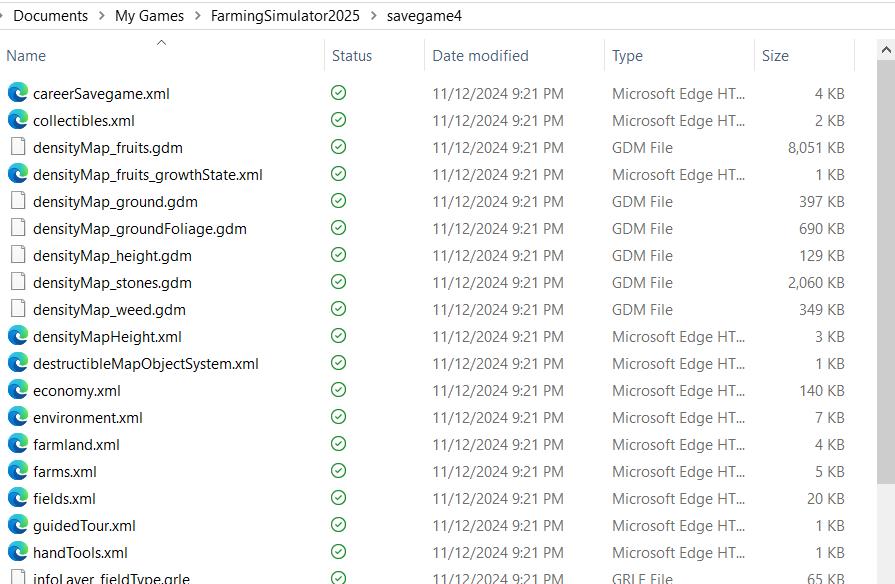
This folder contains all the data for your specific game save, including finances, equipment, and farm stats. Here, you’ll find the file you need to edit to increase your funds.
Step 3: Open the Farms.xml File in a Text Editor
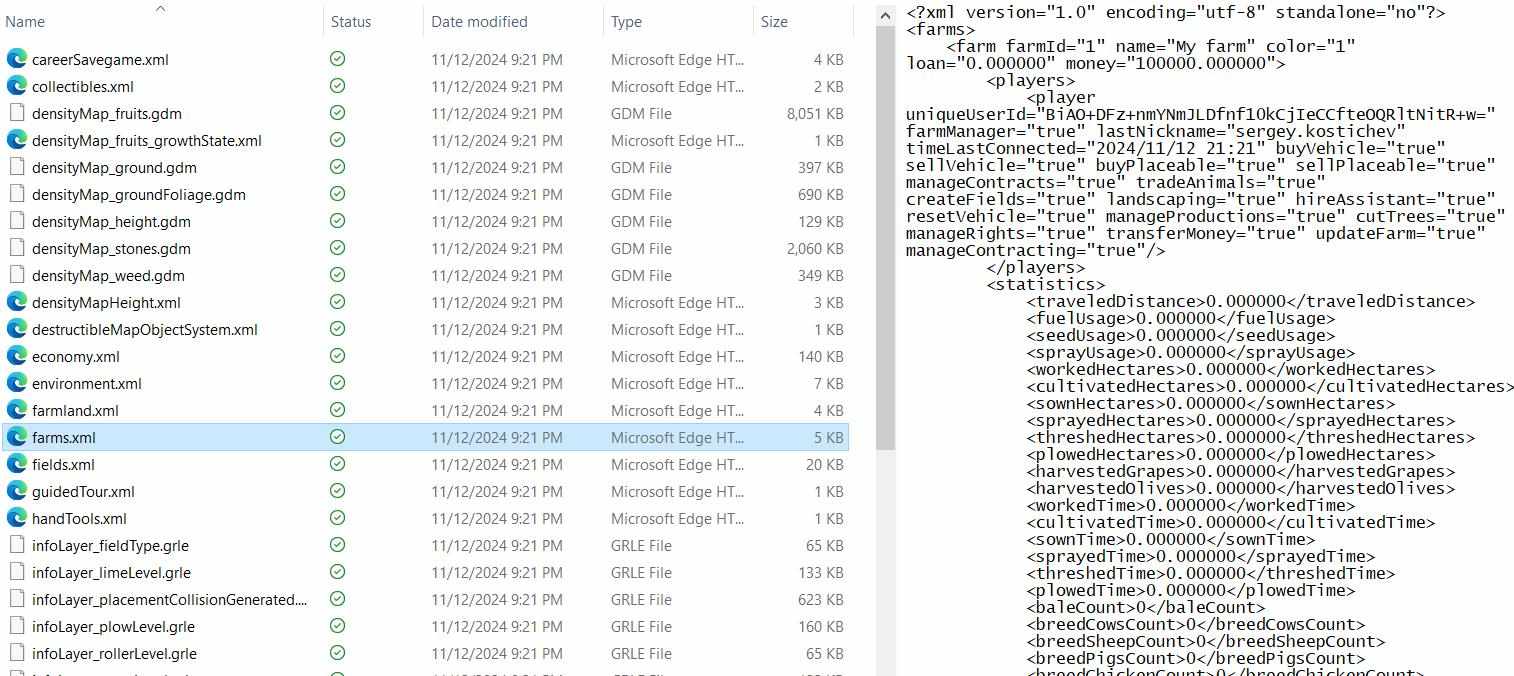
In your save folder, look for a file named ‘Farms.xml’. This file holds information about your farm’s finances, including your current balance. To edit this, do the following:
1. Right-click on ‘Farms.xml’.
2. Choose “Open with” and select a text editor like Notepad or Notepad++.
Once it’s open, you’ll see lines of code that define various settings for your farm. At the top, there’s a line that specifies your current balance.
Step 4: Change Your Balance
Now it’s time to add some cash:
1. Look for the line with ‘<money>‘ at the top of the text in ‘Farms.xml’.
2. Replace the current amount with any number you want. For example, if you want nearly unlimited money, type in ‘100000000’ or more. Or, if you just need an extra $50 to rent that old grandpa’s machine, you can enter a smaller amount.
3. Make sure you don’t delete any extra characters, and just change the numbers within the ‘<money>‘ tag.

This sets your balance to whatever amount you typed, so feel free to add as much as you need to buy every tractor, field, and upgrade your heart desires.
Step 5: Save and Close the File
Now that you’ve set your balance, it’s time to lock in the changes:
1. Go to “File” in the text editor and choose “Save” (do not use “Save As”—just “Save”).
2. Close the text editor to finish.
Saving the file directly overwrites the old version, so when you load the game, it will pick up on the new balance.
Step 6: Reopen Farming Simulator 25 and Load Your Save
Now that everything is set up, open Farming Simulator 25 and go to Career Mode to load the save you just edited. You may not immediately see the balance update in the menu, but don’t worry—there’s a quick way to confirm it.

Step 7: Save Your Game to Lock in the New Balance
Once your save loads, check the top right corner to see your cash balance. To make sure the game fully registers your new total, go back to the menu and hit “Save Game” one more time. Now, the next time you open this save file, the game will recognize your balance as the new amount you set.

Editing the save file is a simple and effective way to hack your balance on PC in Farming Simulator 25, allowing you to play the game with a full bank account right from the start. It’s perfect if you want to test equipment, experiment with large-scale farming, or skip the grind and enjoy the freedom of a massive budget.