
How to fix "Failed to connect" error on Valheim server
1. Check the Server and Client Versions:
Make sure that the server and client versions are the same. If they are not, then the client will not be able to connect to the server. You can update valheim server by restarting it.
You can check server version here:
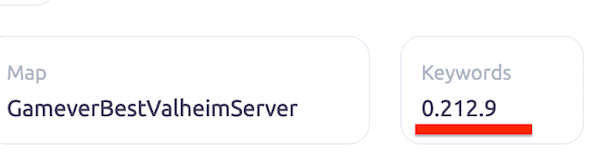
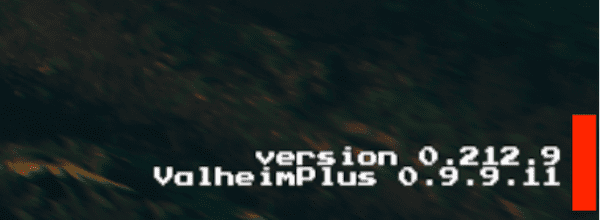
And client version in game menu:
2. Check if Bepinex or Valheim Plus is Installed.
If the server has Bepinex or Valheim Plus installed, then the client must also have it installed in order to connect.

In the logs screenshot, the server version is 0.212.9@0.9.9.11. This means - 0.212.9 is the version of the game server and 0.9.9.11 is the version of BepInEx installed on the server. But "remote" - (this is client) does not have a BepInEx version because it's not installed.
3. Check Installed Mods:
If you have installed any mods on the server, make sure that the client also has the same mods installed. Otherwise, the client will not be able to connect to the server.
You can check installed mods on the client by checking the plugins directory in the game folder. Or by checking your mod manager.
4. Check IP Address:
Make sure that the IP address of the server is correctly entered in the Steam server list. If it is not, check server address on server page on gamever.io.
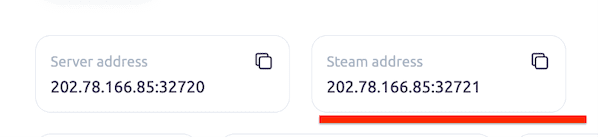
Add this address to your Steam server list. It should display the name of your server, the map name and the number of players online.

5. Check Firewall Settings:
Make sure that your firewall is not blocking connections from the client to the server. If it is, then you will need to add an exception for Valheim in your firewall settings.
6. Check Server Settings:
Make sure that all of the necessary server settings are configured correctly. For example: if you are playing the xbox version of valheim, you need to enable crossplay.
7. Restart Your Server:
If all else fails, try restarting your server. This can often resolve a variety of issues.
8. Contact Support:
If none of the above steps have worked, contact our support for assistance. They should be able to help you resolve the issue.