
How to Fix "Connection Timed Out" on Your Palworld Server
Few things are more frustrating than everyone being ready to play and the game answering with "connection timed out." The good news: on a gamever Palworld server the cause is almost always one of a short list of things, and each is quick to check. This guide walks through them in order, from the most common to the rarest.
1. Is the server actually on and Active?
Start at the Overview tab. The server must be powered On and fully started — not mid-boot:
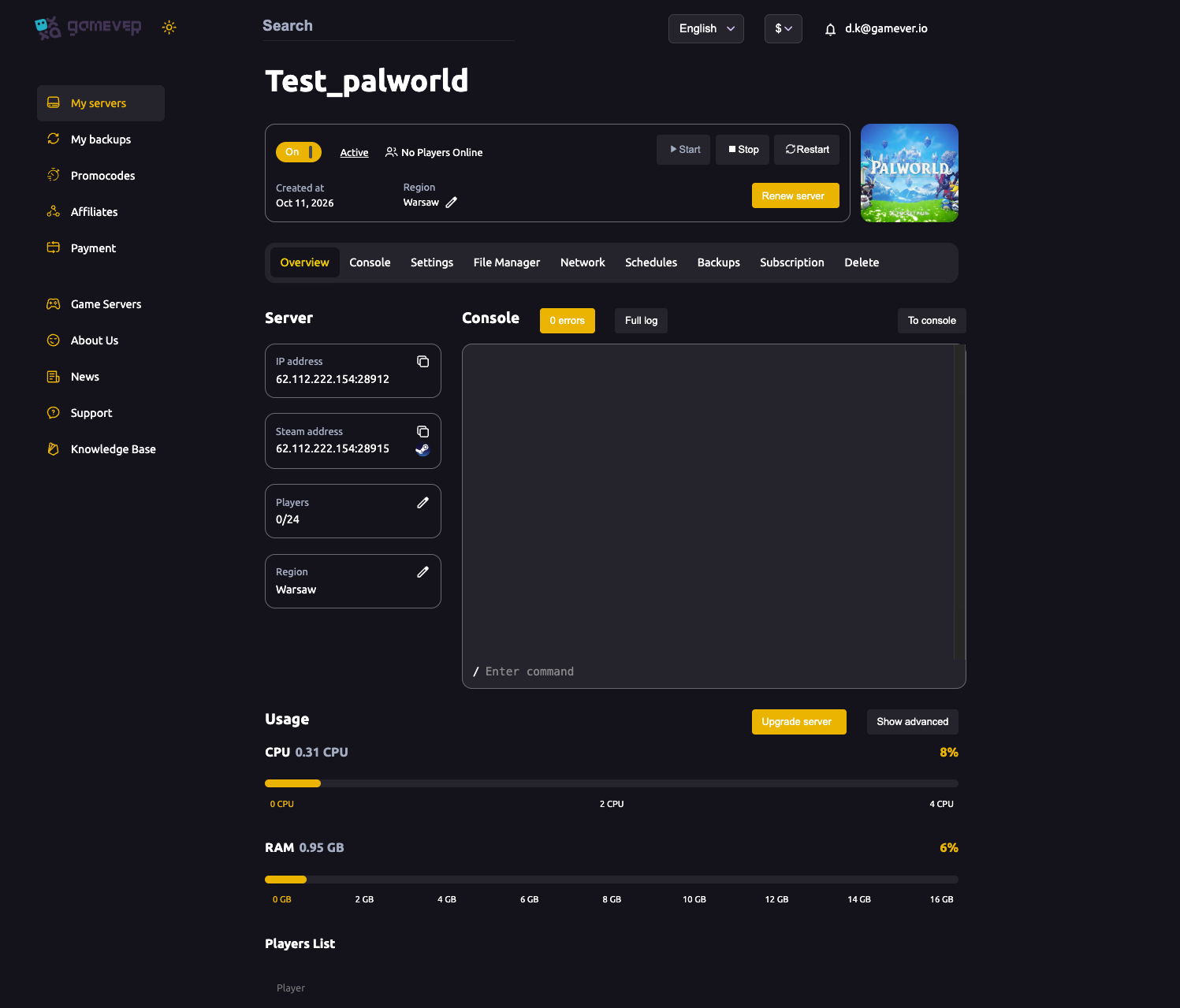
- If it's Off, hit Start and wait for it to reach Active.
- If it just started, give it a minute — a server that's still loading the world will refuse connections.
- A quick Restart clears most transient states if it's been up a long time.
2. Are you joining the right address and port?
A timeout very often means the client is knocking on the wrong door. Use the exact address from Overview:
| Client | Address to use | Port |
|---|---|---|
| Steam | the Steam address | 28915 |
| Game / server address (reference) | the Server address | 28912 |
Steam clients should connect with the Steam address (port 28915). Copy it from Overview rather than typing it — a wrong port is one of the most common timeout causes.
3. Community listing vs. direct join
If you're trying to find the server in the in-game Community Servers browser and it times out or doesn't appear, try a direct join by IP instead (the Steam address from Overview). Direct join doesn't depend on the community list at all. If direct join works but the browser doesn't show the server, that's a listing issue, not a connection one — see server not showing in the community list.
4. Client and server version match
Palworld clients must be on the same build as the server. After a Palworld update, a client on a newer (or older) version than the server will fail to connect, often as a timeout. Make sure:
- Your Palworld game is fully updated in Steam.
- The server is updated to the matching version.
If a patch just dropped, a version mismatch is the likeliest culprit.
5. Password and the rest
- Password — if you set a Server Password, an attempt without it (or with the wrong one) can fail. Re-enter it carefully.
- Region / ping — a very distant region means high latency; a player on a poor connection can time out where others connect fine. Check the server Region on Overview against where your players are.
- One player only — if just one person times out while everyone else is in, the problem is on that client's end (their game version, their network), not the server.
Additional Tips
- On + Active first — never debug a client before confirming the server is up.
- Steam clients use the Steam address (port
28915) — copy it, don't type it. - Direct join to isolate — if IP join works but the browser doesn't, it's a listing issue.
- Match versions after any Palworld patch — mismatch reads as a timeout.
- One player failing = their end; everyone failing = the server or address.
- A Restart clears most transient timeout states.
Conclusion
"Connection timed out" on a Palworld server almost always comes down to: the server not being fully On and Active, the wrong address or port (Steam clients want the Steam address on port 28915), a version mismatch after a patch, or a password/region issue. Work down the list from the Overview tab, use direct join by IP to isolate listing problems, and the timeout usually clears in a minute or two.
Rent your Palworld server at gamever.io — reliable 24/7 uptime, clear copyable join addresses, and a one-click restart when you need it. Free trial, promo code WELCOME.