
How to Configure map-settings.json on Your Factorio Server (Pollution and Biter Evolution)
Your Factorio server rented from gamever already runs the headless game for you — there's no dedicated server to download or compile. What you do control is how the world behaves, and one of the files that decides that is map-settings.json. Where map-gen-settings.json describes the terrain, ore and water that are baked in when a map is first created, map-settings.json controls the ongoing dynamics of a map that is already running: how pollution spreads, how fast the biters evolve, and whether they expand to new nests. This guide explains the key sections and how to edit the file safely from the control panel.
Where the file lives and why it's different
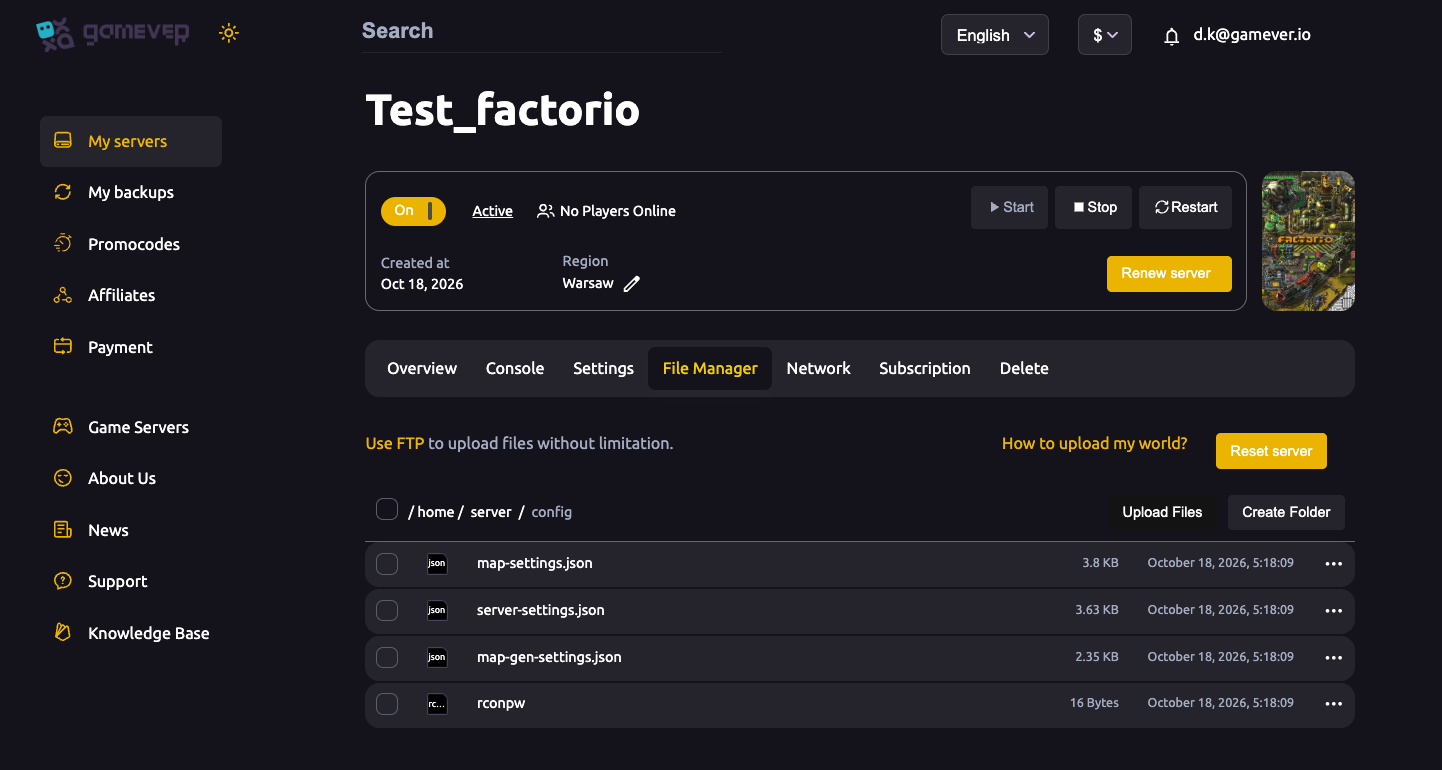
map-settings.json sits in the File Manager under /home/server/config/, alongside server-settings.json, map-gen-settings.json and the rconpw file. Open the panel, click the File Manager tab, and browse to that path.
The important distinction: map-gen-settings.json is only read when a brand-new map is generated, so editing it does nothing to a world that already exists. map-settings.json is different — it describes the live rules of the game. Factorio's own engine treats these values as runtime settings; the official modding API notes that updating pollution, enemy evolution and enemy expansion "will immediately take effect in the game engine." In practice, the supported way to apply a change through the panel is to stop the server, edit the file, and start it again so the new values are loaded cleanly.
The key sections
map-settings.json is a single JSON object made up of several named blocks. The ones most worth knowing are below.
| Section | Controls | Notable fields |
|---|---|---|
pollution | Whether pollution exists and how it spreads and decays | enabled, diffusion_ratio, min_to_diffuse, ageing |
enemy_evolution | How quickly biters grow more dangerous | enabled, time_factor, destroy_factor, pollution_factor |
enemy_expansion | Whether biters found new nests over time | enabled, max_expansion_distance, min_expansion_cooldown, max_expansion_cooldown |
unit_group | How biters gather into attack and settler groups | group size and gathering timing fields |
steering | Low-level movement/separation of biters in a group | movement tuning fields |
path_finder | The pathfinding engine biters use to reach your base | cache and search tuning fields |
Most servers only ever touch pollution, enemy_evolution and enemy_expansion — the other three are advanced tuning you can safely leave at their defaults.
pollution
The pollution block decides how your factory's output spreads across the map. enabled switches pollution on or off entirely. diffusion_ratio sets how much pollution bleeds into neighbouring chunks each cycle — lower values keep the cloud tight around your factory, higher values push it outward faster. min_to_diffuse is the threshold a chunk must reach before it spreads at all, and ageing controls how fast pollution naturally decays over time. (These rates are applied per 60 ticks in the engine.) Because pollution reaching biter nests is a major driver of attacks, tuning this block changes the whole rhythm of your game.
enemy_evolution
This block governs the "evolution factor" — a number from 0 to 1 that decides which biter and spawner tiers appear. Three drivers add to it:
time_factor— a small amount of evolution simply from time passing (default0.000004).destroy_factor— evolution gained each time you destroy a biter spawner (default0.002), so clearing nests makes the survivors tougher.pollution_factor— evolution from pollution being absorbed by nests (default0.000015), usually the largest contributor on a busy factory.
Setting enabled to false, or all three factors to 0, keeps biters present but frozen at their current strength — a common choice for a relaxed server.
enemy_expansion
When enabled, biters periodically send out settler groups to build new nests, which is what makes them reclaim ground near your pollution cloud. max_expansion_distance limits how far from existing bases they will settle, while min_expansion_cooldown and max_expansion_cooldown set how often expansion attempts happen. Disable this block if you want the biter map frozen to the nests that already exist.
Editing it safely
Factorio uses strict JSON — a single trailing comma or missing bracket will stop the server from booting. Work carefully:
- Stop the server from the Overview tab.
- Open File Manager →
/home/server/config/map-settings.json(or pull it down over FTP — the FTP host is on the Network tab, credentials under Settings → FTP server settings). - Change only the values you mean to; keep every quote, comma and brace intact. Download a copy first as your backup.
- Save the file, then Start the server.
- Watch the Console tab — if the server loads the map without a JSON error, your settings are live.
Additional Tips
- Edit a copy first. Download map-settings.json before changing it, so a bad edit is one upload away from being undone.
- Validate your JSON. Paste the file into any JSON validator before saving — it catches the trailing-comma mistake that silently breaks boot.
- Change one block at a time. Tune pollution or evolution in isolation so you can tell what actually changed the game's feel.
- A fresh map re-reads everything. If you generate a new map, both map-settings.json and map-gen-settings.json are applied from scratch.
- Keep names and passwords elsewhere. Server name, visibility and max players live in server-settings.json, not here — see server settings.
- Use RCON for quick tests. With RCON enabled on the panel you can probe or tweak live map settings via console commands without a full restart; verify exact command syntax on wiki.factorio.com.
Conclusion
map-settings.json is where your Factorio world's living rules sit — the pollution that drifts from your factory, the evolution that sharpens the biters, and the expansion that keeps them pressing in. Because these are runtime settings rather than one-time map-generation inputs, you can retune the whole challenge of an existing save: stop the server, edit the JSON in the File Manager, and start it again. Pair it with your map generation settings and server settings for full control of the game.
Rent your Factorio: Space Age server at gamever.io — pollution, biter evolution and expansion all a File Manager edit away, with RCON and backups built in. Free trial, promo code WELCOME.