
How to Configure Autosave and AFK Auto-Kick on Your Factorio Server
Your gamever Factorio server already runs a headless build, so there is nothing to install — the behaviour you want to tune lives in a single config file that you edit through the control panel. Autosave frequency, how many rollback points the server keeps, whether idle players get kicked, and whether the game pauses when the server empties are all set in server-settings.json. This guide walks through each of those keys, what the Factorio wiki says they do, and the safe way to edit the file from your panel. For the broader tour of that same file, see Factorio server settings.
Where the settings live
Factorio reads its multiplayer configuration from server-settings.json, which on your server sits in the File Manager at /home/server/config/. The file is strict JSON — a single trailing comma or missing quote will stop the server from booting — so edit carefully and always keep the braces balanced.
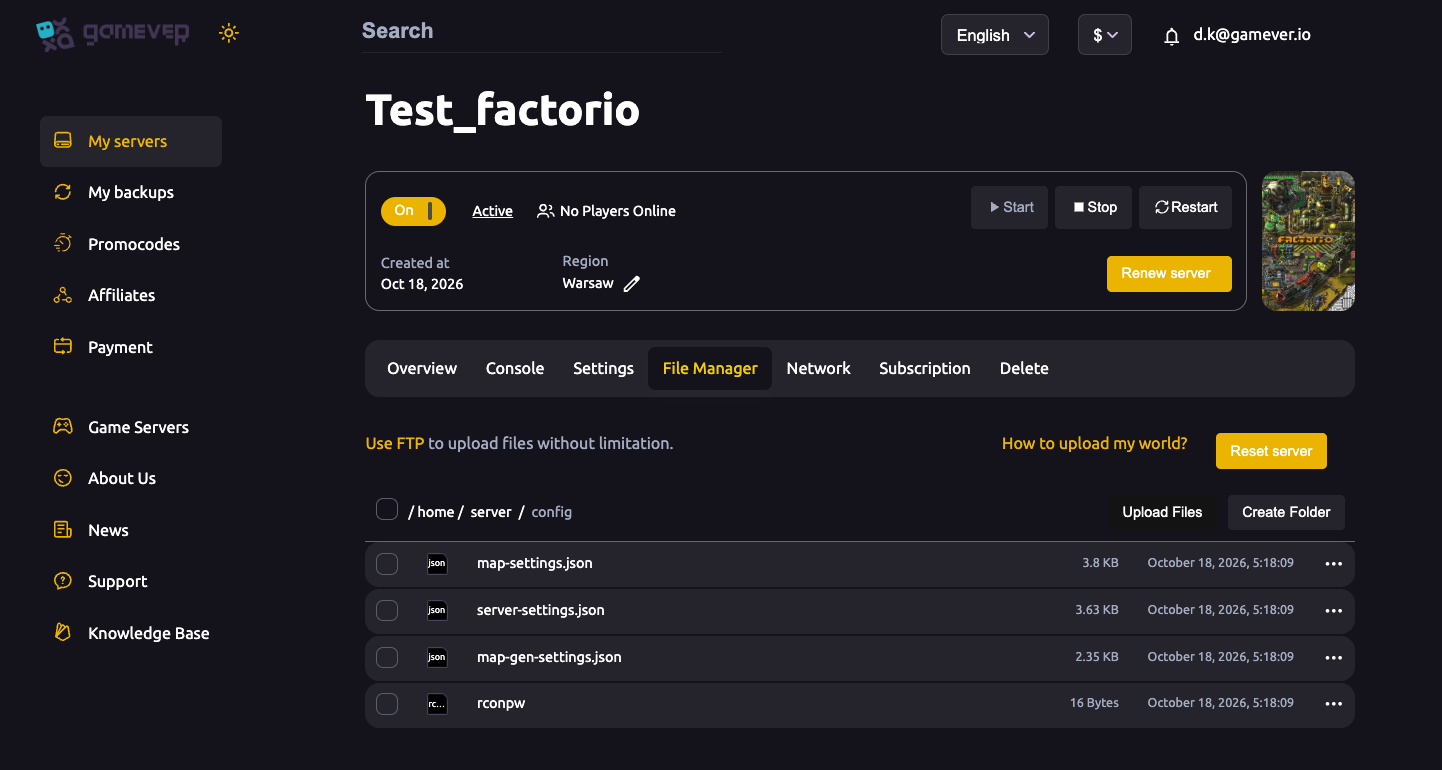
The server only reads this file at startup, so the workflow is always the same:
- Stop the server (Overview → Stop).
- Open File Manager →
/home/server/config/→server-settings.json(or pull it over FTP using the login on Settings → FTP server settings). - Edit the keys below, keeping the JSON valid — no trailing commas.
- Save the file.
- Start the server and watch the Console for a clean boot.
The autosave keys
These four keys control how and when the server writes a save. Add or edit them inside the top-level object of server-settings.json.
| Key | Value | Behaviour (per the Factorio wiki) |
|---|---|---|
autosave_interval | number (minutes) | How often the server writes an autosave, measured in minutes. A smaller number means more frequent saves and less lost progress after a crash. |
autosave_slots | number | How many autosave files the server keeps. Autosaves are cyclic — once this many exist, the oldest is overwritten by the newest, so this is effectively how many rollback points you keep on disk. |
autosave_only_on_server | true / false | When true, autosaves are written on the server only, not pushed to every connected client. Added as a multiplayer option in 0.14.14; leaving it true avoids a save pause on every player's machine. |
non_blocking_saving | true / false | An experimental option that lets the game keep running while a save is written instead of briefly freezing. The wiki flags it as highly experimental — leave it off unless you understand the risk. |
A couple of behaviours are worth knowing. In headless mode the server saves the game on exit and autosaves normally, so a clean stop keeps your latest state. And with more than ten players in one game, Factorio deliberately reduces how often it writes the save to the server — expect autosaves to space out on a busy world.
The AFK auto-kick key
| Key | Value | Behaviour |
|---|---|---|
afk_autokick_interval | number (minutes) | How long a player may sit idle before the server kicks them. 0 means never — and never is the default, so an idle player is only removed if you set this to a positive number. |
This is purely a housekeeping tool: on a small private server you will usually leave it at 0, while a busy public server might set a value to free up a slot from someone who wandered off. It does not affect saves or gameplay in any other way.
The auto-pause key
| Key | Value | Behaviour |
|---|---|---|
auto_pause | true / false | When true, the game is paused while no players are connected, and resumes the moment someone joins. Set it to false (the "no auto-pause" behaviour described in the wiki) to keep the factory running — and the biters attacking — even with nobody online. |
For most groups, leaving auto_pause on is the right call: your factory and your defences are frozen while you are away, so you never log back in to a base that has been overrun. Turn it off only if you specifically want the simulation to keep ticking around the clock.
Additional Tips
- More
autosave_slotsmeans more safety but more disk. Each slot is a full copy of your save, and a large factory can run to hundreds of megabytes. Keep enough slots to roll back a few saves, not so many that you fill the disk. - Pick an interval that matches your factory's size. A frequent autosave (a few minutes) is cheap early on, but on a sprawling late-game base each save takes longer and can cause a brief hitch — stretch the interval out as the factory grows, or lean on
autosave_only_on_serverto keep the pause off the clients. - Validate your JSON before you start. Paste the file into any JSON linter after editing; a trailing comma is the single most common reason a Factorio server refuses to boot.
- Back up before big edits. Download a copy of
server-settings.json(and your latest world save) via File Manager or FTP before changing several keys at once, so you can revert in seconds. - Watch the Console on first boot. A bad value or malformed file shows up immediately in the Console tab — if the server never comes up, check there first.
- Leave
non_blocking_savingoff unless you accept the risk. The wiki marks it experimental; a steadyautosave_only_on_server: truegets you a smooth save on most servers without it.
Conclusion
Tuning Factorio's save and idle behaviour is a five-minute job once you know the keys: autosave_interval and autosave_slots decide how often you save and how many rollback points you keep, autosave_only_on_server and the experimental non_blocking_saving smooth out the save itself, afk_autokick_interval (0 = never) clears idle players, and auto_pause freezes the world when everyone logs off. Edit them in /home/server/config/server-settings.json through the File Manager, keep the JSON strictly valid, stop before you edit and start after — and confirm a clean boot in the Console. For the rest of the file and the public-listing settings, see Factorio server settings.
Rent your Factorio: Space Age server at gamever.io — full File Manager and FTP access, RCON, and one-click restores when an autosave saves the day. Free trial, promo code WELCOME.