
How to Change Your Valheim Server Name and Password

The two things every Valheim server owner sets first are the server name (what shows in the browser) and the password (what players type to join). On gamever both live on one sub-tab, with a couple of Valheim-specific rules worth knowing so a change doesn't lock your server out of starting. This guide covers both, plus the crossplay toggle that sits alongside them.
Where they are
Open Settings → Server settings:
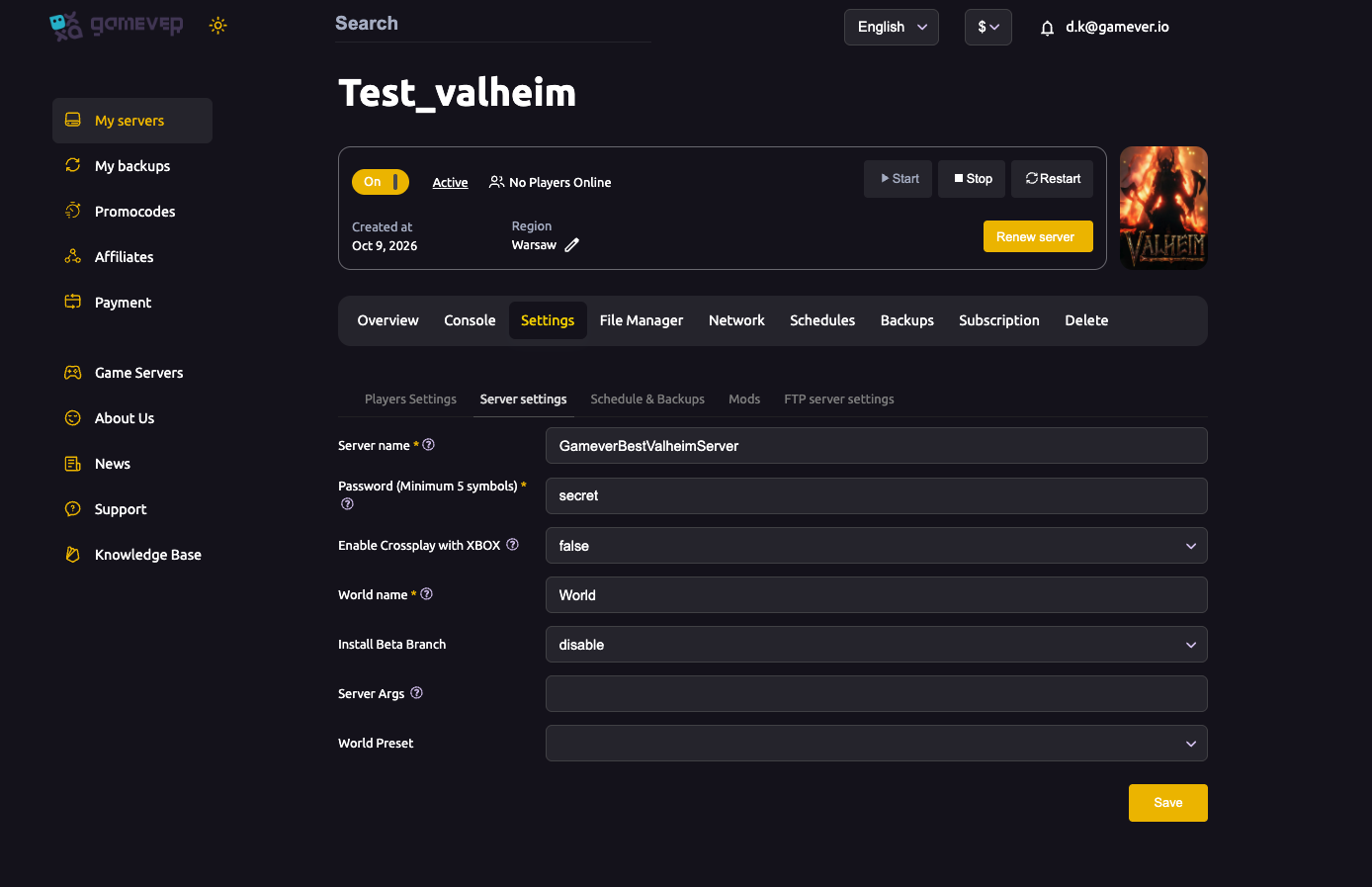
| Field | What it does |
|---|---|
| Server name | The name shown in the server browser / that players search for. |
| Password (Minimum 5 symbols) | The join password. At least 5 characters, and it must not be contained in the server name, or the server refuses to start. |
| Enable Crossplay with XBOX | true lets Xbox/PC Game Pass players join (via the cross-platform list). See crossplay. |
| World name | Which world the server loads — change this to switch/create worlds (see reset/wipe). |
Change the server name
- Edit Server name.
- Make sure your password is not a substring of the name (a classic Valheim gotcha — e.g. name "secretbase" + password "secret" will fail).
- Click Save, then Restart.
The new name appears in the browser after the server restarts and re-registers.
Change the password
- Edit Password — minimum 5 characters.
- Keep it different from any word in the server name.
- Save and Restart.
Everyone currently connected keeps playing until the restart; after it, they'll need the new password to rejoin. There's no "no password" option in the vanilla dedicated server — a password is required (if you want an effectively open server, share the password publicly).
The two Valheim password rules (don't trip on these)
- At least 5 characters. Shorter = server won't boot.
- Not part of the server name. The server treats this as a security risk and refuses to start. The Console will show the error if you hit it.
Additional Tips
- 5+ chars, and not in the name — the two rules that cause "server won't start".
- Restart to apply — name and password changes take effect on restart.
- Rotate the password if it leaks — change it and tell your players the new one.
- Crossplay = bigger audience — flip it on if you want Xbox/Game Pass friends in.
- Check the Console if a save fails — it names the exact rule you broke.
Conclusion
Naming and securing your Valheim server is two fields on Settings → Server settings: a name for the browser and a password (5+ characters, not contained in the name) to control who joins. Save, restart, and your server reappears with its new identity. Mind the two password rules and you'll never hit the dreaded "server won't start".
Rent your Valheim server at gamever.io — name it, lock it, enable crossplay, all from one panel. Free trial, promo code WELCOME.