
How to Change Your Icarus Server Name

Your Icarus server already runs with us — you rent it from gamever and manage it through the control panel, so there's no dedicated-server app to install or launch flags to wrangle. Renaming it is one of the first things most people do, because the Server name is exactly what shows up in the in-game server browser when your friends go looking for the session to join. This guide covers how to set that name from the panel, why we steer you to the panel field rather than the config file, and how to pick a name that's easy to find.
Set the name on the Settings tab
Open your server in the gamever panel and go to the Settings tab. Icarus keeps its settings on a single page, and the Server name field is the last of the three main fields, below the two password fields.
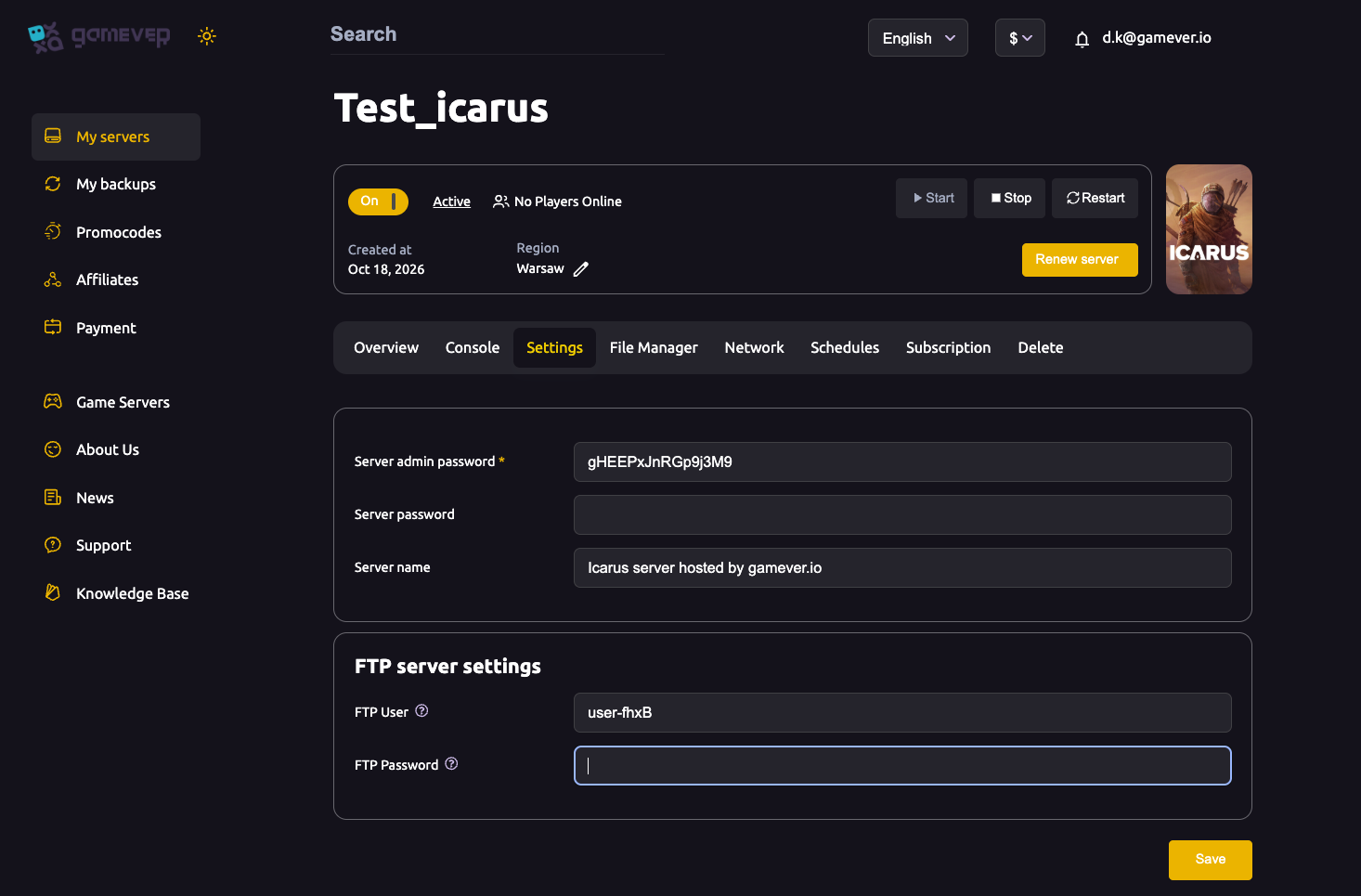
| Field | Type | What it does |
|---|---|---|
| Server admin password | text | The in-game admin password. Blank means any joiner can claim admin — always set it. |
| Server password | text | The join password; leave blank for an open server. |
| Server name | text | The display name shown in the server browser, e.g. "Icarus server hosted by gamever.io". |
To rename the server:
- Type your new name into the Server name field.
- Scroll down past the FTP server settings and click Save.
- Go to the Overview tab and click Restart so the new name is applied.
That's all it takes. Once the server is back up and has re-advertised itself to Steam, the new name appears in the browser. Give it a minute or two — the listing isn't always instant.
Why the panel field, not the config file
If you've read older Icarus server guides, you may have seen people editing SessionName inside ServerSettings.ini. On a gamever server you don't need to, and historically you shouldn't rely on it.
Icarus stores its server config under /home/config/Saved/Config/WindowsServer/ (reachable through the File Manager), where ServerSettings.ini lives alongside GameUserSettings.ini and Engine.ini. The [/Script/Icarus.DedicatedServerSettings] section holds settings such as MaxPlayers, JoinPassword and AdminPassword. It also contains a SessionName key — but in practice the community has long reported that SessionName doesn't reliably change the name shown in the browser. The name players actually see has historically been driven by a startup parameter (-SteamServerName) rather than by that .ini value.
That's the reason the panel exposes a dedicated Server name field: it's the supported, reliable way to name the server, and it saves you from editing a value that may not take effect. So for naming, use the Settings field — not the config file.
A second trap makes editing the file by hand even less appealing: Icarus rewrites ServerSettings.ini when it shuts down. Any change you make while the server is running gets overwritten. If you ever do edit that file for other settings, you must stop the server first, make the change, save, then start it again. For the name, the panel field avoids the whole issue.
Additional Tips
- Keep it short and searchable. The browser truncates long names, so put the distinctive word first — a clan tag or a short label beats a long sentence buried at the end.
- Make it unique. Avoid generic names like "Icarus Server"; a name friends can type into the browser's search filter and find on the first try saves everyone time.
- Note your map. If your prospect is on a DLC map (Styx, Prometheus or Elysium), hinting at it in the name helps — joiners need that DLC to play, so it sets expectations up front.
- Always restart after saving. The name only updates once the server restarts and re-advertises to Steam; a save alone won't change the browser entry.
- Skip emojis and odd symbols. Plain text is the most reliable across the server list and search; fancy characters can display unpredictably.
- Don't confuse the name with the password. The Server name is public; it's the Server password field that keeps strangers out, and the admin password that must never be left blank.
Conclusion
Renaming your Icarus server is a two-step job on a gamever server: type the new name into Settings → Server name, click Save, then Restart from the Overview tab. Because SessionName in ServerSettings.ini has never been a dependable way to set the browser name — and because Icarus overwrites that file on shutdown — the panel's dedicated field is the supported route, and you never have to touch a config file just to rename your world. For the rest of your server's options, see our guide to all the Icarus server settings, and when the name is set, point your friends to how to connect and join.
Rent your Icarus server at gamever.io — a clean control panel, friendly support and one-click restarts. Free trial, promo code WELCOME.