
How to change the map seed on the Minecraft server?
You may add new terrain, obstacles, and resources to your gameplay by changing the map seed on your Minecraft server. This tutorial will show you how to change your Minecraft server's map seed in an efficient manner so that switching to a new world goes smoothly. We'll also talk about how changing seeds might improve your Minecraft experience, particularly if you play with buddies on Gamever servers.
Understanding Map Seeds in Minecraft
A map seed is a string of numbers and letters that Minecraft uses to generate the world. Each seed creates a unique world layout, including biomes, structures, villages, and more. Changing the seed allows players to explore new terrains and experiences without changing servers.
Why change your Minecraft server's map seed?
There are several reasons to consider changing your server's map seed:
Fresh Start : Starting anew can reinvigorate your interest in the game.
Exploration : Discover new landscapes, structures, and resources.
Challenges : Different seeds can offer new challenges, enhancing gameplay.
Community Engagement : Keep your server interesting for players by regularly updating the world.
Preparing to Change the Map Seed
Before changing the map seed, ensure you've backed up important data. This process will delete your current world, so save any builds or items you wish to keep.
Step-by-Step Guide to Changing Your Minecraft Server's Map Seed
Step 1: Access Your Server Files
Log in to your server's control panel or access its files via an FTP client. This access allows you to download, modify, and upload files directly to your server.
Step 2: Download the "server.properties" file.
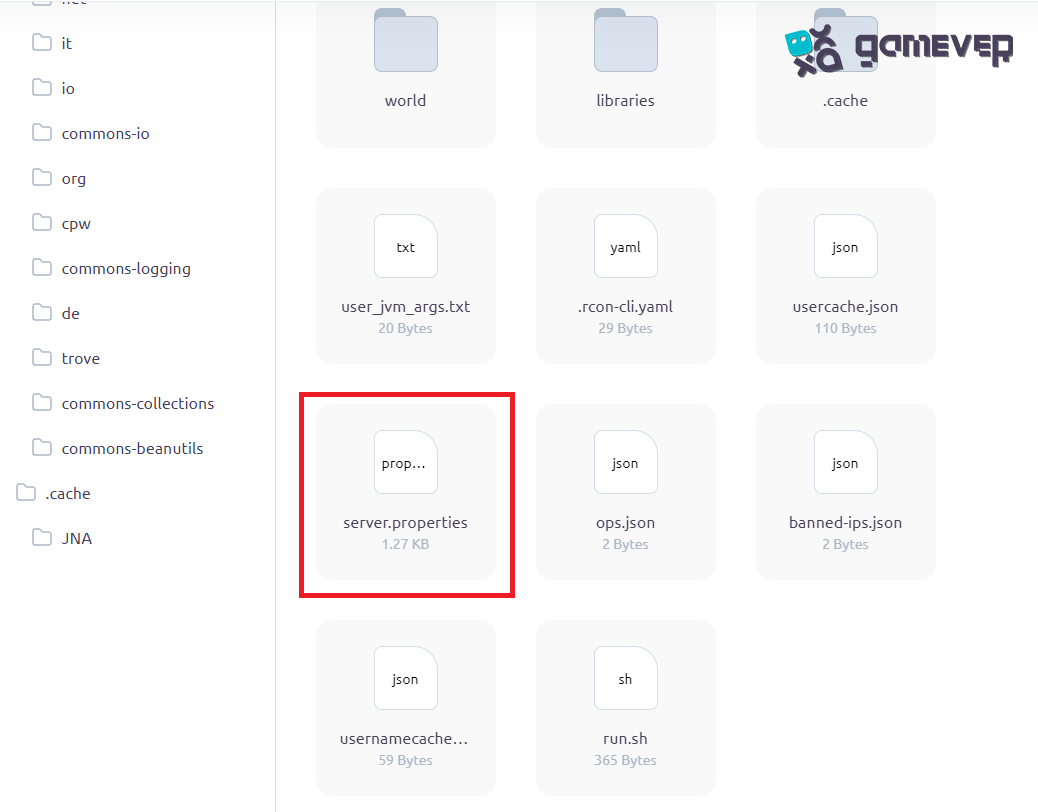
Locate and download the "server.properties" file. This file contains essential settings for your Minecraft server, including the current map seed.
Step 3: Modify the Map Seed
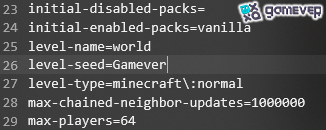
Open the downloaded "server.properties" file with a text editor. Look for the line starting with "level-seed" and change the value to your desired new seed. If there's no seed specified, you can add one directly after the equals sign.
Step 4: Delete the Existing World Folder
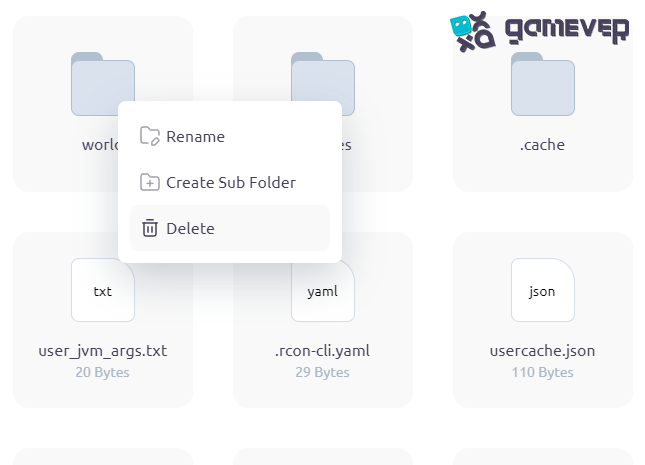
Back in your server files, locate and delete the "world" folder. This action removes the current world, making way for a new one generated with the updated seed.
Step 5: Upload the modified "server.properties" file.
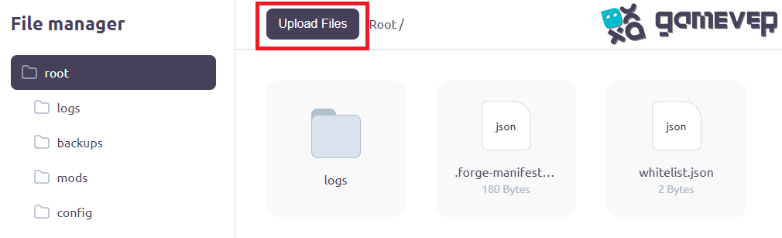
After changing the seed, upload the modified "server.properties" file back to the server, replacing the old one.
Step 6: Restart Your Server
Finally, restart your server. Upon reboot, it will generate a new world based on the updated seed.
Tips for a Smooth Transition
Communicate : Inform your server's players about the change in advance.
Backup : Always backup your server before making significant changes.
Test : Consider testing the new seed in a single-player world to ensure it meets your expectations.
Leveraging Gamever Servers for an Enhanced Experience
Switching seeds can revitalize your Minecraft experience, especially when playing on a dedicated server. Gamever servers offer a stable and customizable platform for you and your friends to explore new worlds together. With Gamever, managing server settings, including changing the map seed, is straightforward, ensuring you spend less time on setup and more on gameplay.
Conclusion
It's easy to change the map seed on your Minecraft server, which can drastically change the game world and bring new challenges and experiences. You may easily go to a fresh seed and give your players engaging new content by following the instructions provided in this article.
Think about the advantages of hosting your server on Gamever as you set out on new adventures in your updated Minecraft realm. With Gamever's dependable servers, you may play and explore with friends more easily and enjoy a better gaming experience. Take the first step toward endless Minecraft adventures on a server you manage by signing up with Gamever today.