
How to Change Sandbox (Difficulty) Settings on Your Project Zomboid Server
Project Zomboid's difficulty is deeply customisable — zombie population and speed, how tough the dead are, loot rarity, XP multipliers, day length and dozens more knobs. On a server these live in the sandbox file, <Server name>_SandboxVars.lua. The panel doesn't expose every sandbox knob as its own field, so you edit this file directly through the File Manager or over FTP. This guide shows you where it is and how to change it without losing your work.
Where the sandbox file lives
Open the File Manager and go to /home/configs/Server/:
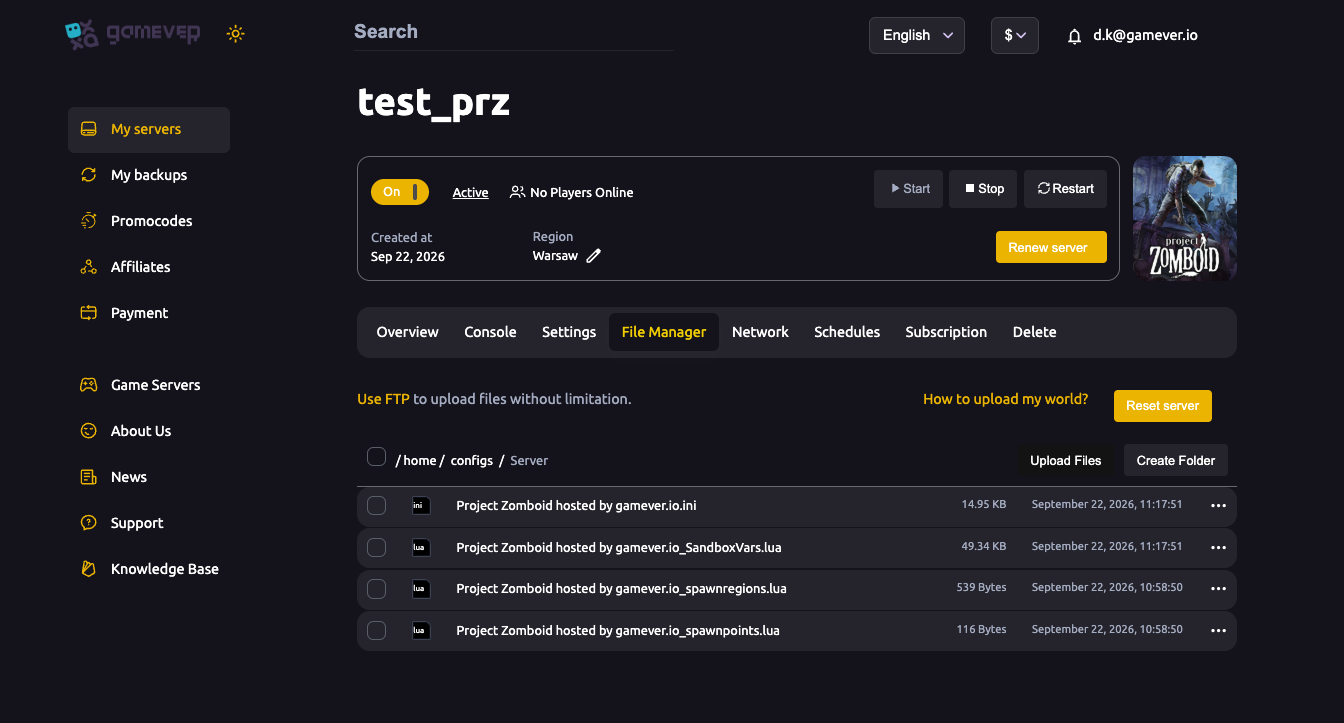
Inside /home/configs/Server/ you'll find:
| File | What it holds |
|---|---|
<Server name>.ini | The main server config. |
<Server name>_SandboxVars.lua | The sandbox / difficulty settings (zombie count, speed, strength, loot, XP, day length, and more) — around 49 KB of values. |
_spawnregions.lua | Which map regions players can spawn in. |
_spawnpoints.lua | Specific spawn points. |
What you can tune in the sandbox file
The _SandboxVars.lua file is where you shape the survival experience. Common things people change:
- Zombie population — how many zombies spawn overall.
- Zombie speed — shamblers, sprinters, or a mix.
- Zombie strength / toughness — how hard they are to kill.
- Loot rarity — abundant to extremely rare.
- XP multiplier — faster or slower skill progression.
- Day length — how long an in-game day lasts.
Because there are so many values, a safe way to get the numbers you want is to configure a sandbox in single-player (which produces the same settings), then copy the values across.
Editing it safely
- Back up first — copy a working world over FTP before changing difficulty, see backup & restore.
- Stop the server (Overview → Stop) so your edits aren't overwritten while it's running.
- Open
<Server name>_SandboxVars.luain the File Manager editor, or download/upload it over FTP. - Change the values you want, keeping the Lua syntax intact — don't delete commas or braces.
- Save, then Start the server.
Keep the file valid: a stray comma or missing = can stop the server loading the sandbox.
Additional Tips
- Stop the server before editing so changes aren't lost.
- Back up first — difficulty changes are easy to get wrong.
- Keep the Lua valid — one typo and the file won't load.
- Some changes need a fresh area — zombie population changes apply fully in regions you haven't explored yet.
- Tune in single-player first, then copy the numbers, if you're unsure.
Conclusion
All of Project Zomboid's deep difficulty lives in <Server name>_SandboxVars.lua under /home/configs/Server/. Edit it through the File Manager or FTP with the server stopped, keep the Lua valid, and back up first. That one file lets you dial Knox County from a relaxed sandbox to a brutal sprinter apocalypse — exactly how your group likes it.
Rent your Project Zomboid server at gamever.io — a browser file editor and full FTP so you can tune every sandbox value. Free trial, promo code WELCOME.