
How to Build and Use the Junk Turret in 7 Days to Die
Players still call it the Junk Turret — the wiki's own article for that name redirects straight to the item's current in-game entry, "Robotic Turret," so the two names refer to the same piece of gear. It's a placeable, automated ranged weapon built around the Intelligence attribute, and per the wiki's own description it "can be fired and reloaded like a gun" while also being deployable on the ground for hands-off defense. This guide covers what the facts source documents about crafting it, feeding it ammo, running it in manual vs. sentry mode, and the Robotics Inventor perk that upgrades it — with an explicit "undocumented" flag anywhere the source didn't give a resolved number.
What Is the Robotic (Junk) Turret?
The infobox lists the Robotic Turret under group Ammo/Weapons, category Ranged Weapon, type Robotic, with its attribute focus on Intelligence — so investment in that attribute and its perks, not Strength or Agility, is what improves it. The wiki's Description section says plainly: "The Robotic Turret is the second form of a turret that can be used automatically or manually for defense. It can only be reloaded by hand. The Robotic Turret is only active when the owner moves within range of the turret." That same section adds that "the perk Robotics Inventor, one of the Intellect skills, can be upgraded to improve the use of the Robotic Turret" — more on exactly what that perk unlocks in the placement section below.
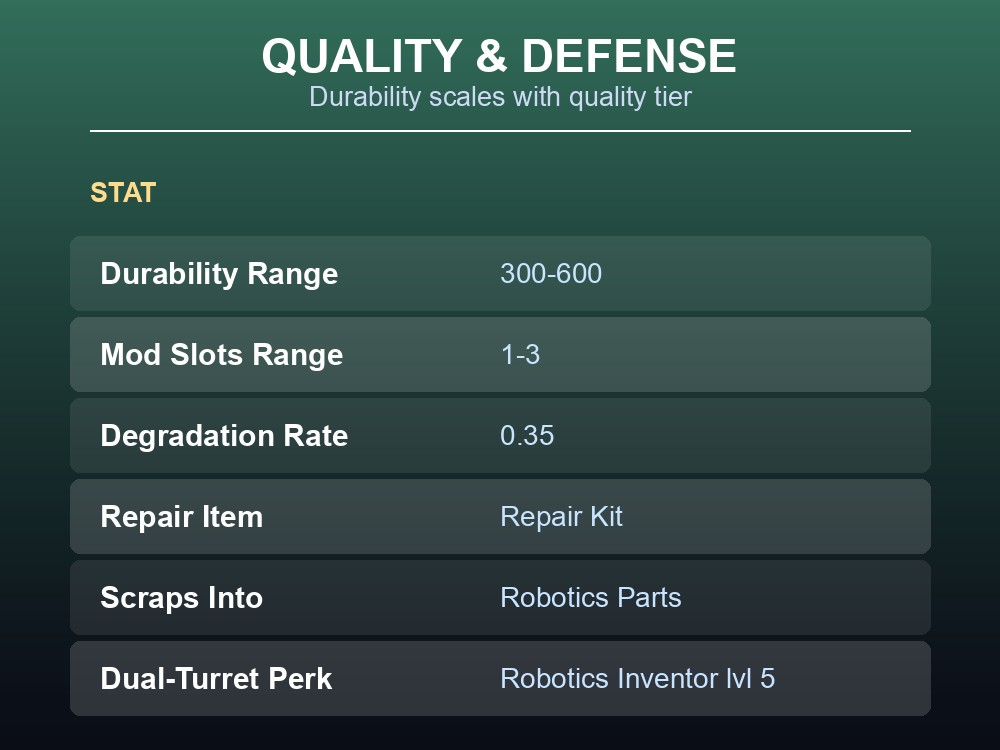
It can be scrapped (the infobox marks scrappable: yes), breaking down into Robotics Parts, and it's obtainable three ways per the source: Crafting, Looting, or Trading. It is not meltable, and it can't be disassembled with a tool (disassemble_tool: no) — Repair Kits are the documented repair method, covered in the quality section below.
Crafting the Junk Turret
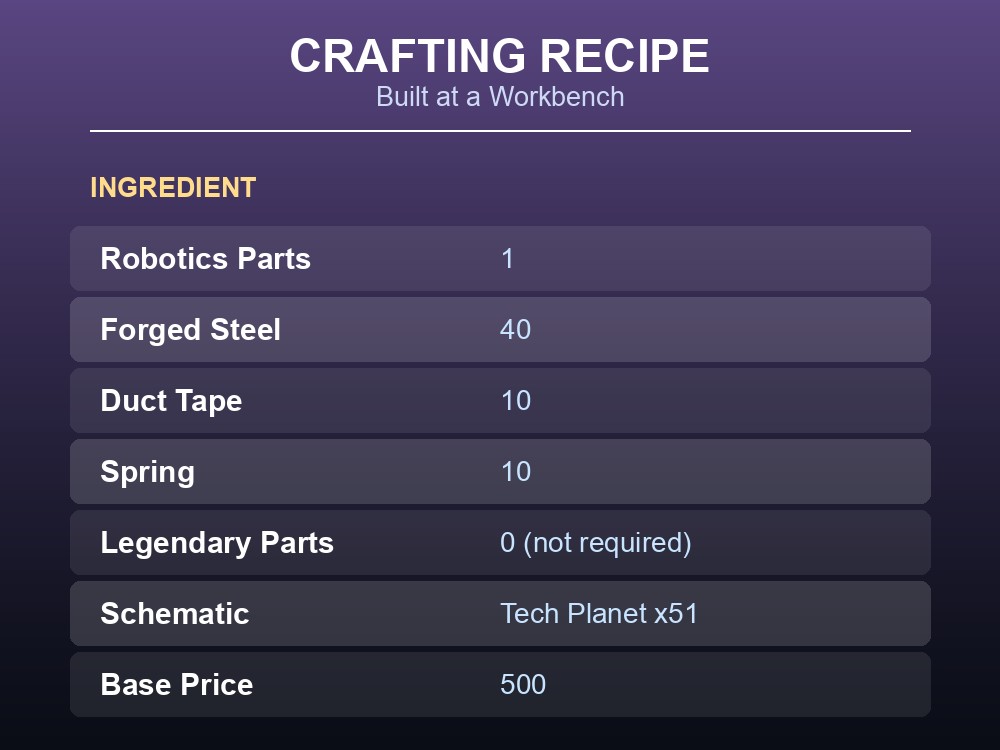
The recipe is built at a Workbench, per the wiki's Crafting section, from:
- Robotics Parts × 1
- Forged Steel × 40
- Duct Tape × 10
- Spring × 10
The recipe template also lists a "Legendary Parts" line at a quantity of 0 — meaning, as documented, no Legendary Parts are actually required to craft it, unlike some higher-tier robotic gear. The recipe is gated behind a schematic: the source's magazinetype field is Tech Planet, with a magazinecount of 51 — so reading (or otherwise acquiring copies of) the Tech Planet magazine toward that count is what unlocks the recipe, per the wiki's own crafting template data. The item's base trader price is listed as 500, and it stacks at 1 per inventory slot.
Ammo, Reload, and Combat Stats
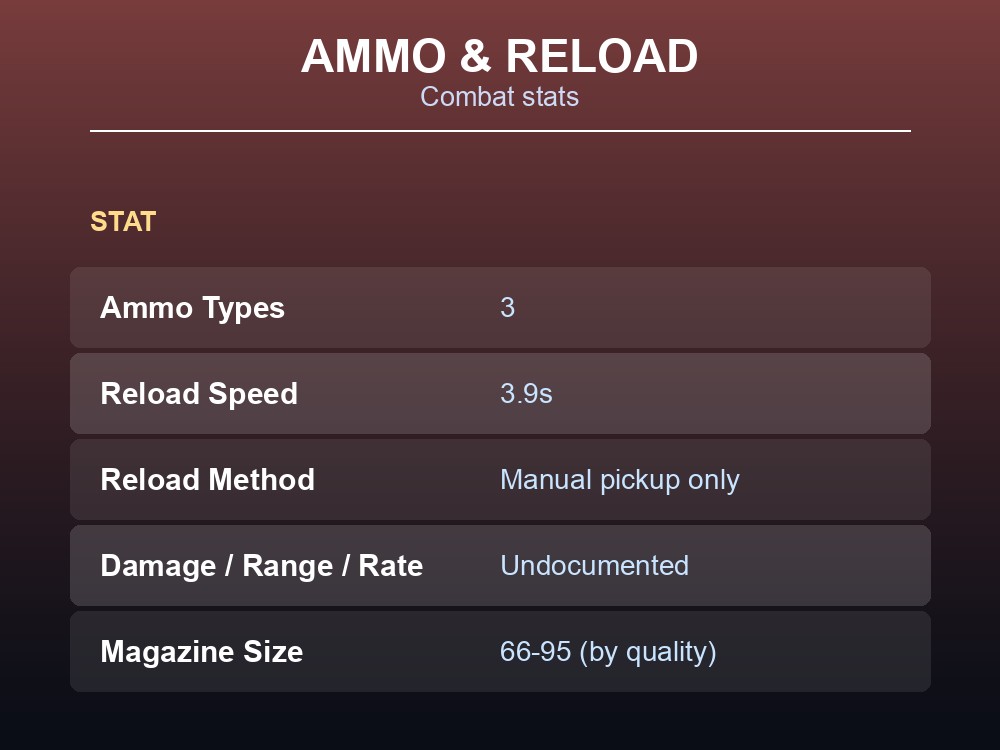
The infobox lists three compatible ammo types: Robotic Turret Ammo, AP Robotic Turret Ammo, and Robotic Turret Shells. Reload speed is documented as a flat 3.9 seconds. Beyond that, the actual per-shot damage, block damage, effective range, and rate of fire fields are all undocumented in the source data — the wiki's infobox templates those four stats through a nested AmmoDmg lookup keyed to each ammo type, and the fetched page text contains only the unresolved template call, not the resulting numbers. Rather than guess at plausible-sounding figures, treat those four stats as open until a source resolves them.
Magazine capacity is templated too, through a QualityValues call listing six raw numbers: 66, 75, 66, 75, 85, 95. The wiki's own quality system runs items on a 1–6 tier scale, but the source data doesn't label which of those six numbers maps to which tier, and the sequence itself isn't strictly ascending — so treat the set of values as confirmed (magazine size does vary by quality) while the exact tier-to-value mapping stays undocumented.
Placement, Quality Tiers, and Horde Defense
Manual mode is straightforward: per the wiki, "the Robotic Turret can be used manually like other weapons by firing with the left mouse button" — you hold and aim it like any other gun.
Sentry mode is where the automation lives, and the source spells out the mechanics in detail: right-click to enter placement mode, right-click again to confirm the spot (it shows green when the location is valid, red when it isn't), and press "e" to pick it back up. That pickup step matters because, per the source, the turret must be picked back up by the player to reload it — there's no remote reload. It also only actively defends while its owner is nearby, temporarily switching off if the owner leaves range and back on when they return. Normally only one placed turret is active per player at a time; place two far enough apart and they'll hand off activity based on which one you're closer to, and if the active turret runs dry on ammo, the other one takes over automatically. Reaching level 5 of the Robotics Inventor perk raises that cap, letting a player run two turrets active simultaneously.
On quality: the source's QualityValues template gives a clean, ascending durability curve across the same six tiers — 300, 360, 420, 480, 540, 600 — and mod slot counts of 1, 1, 2, 2, 3, 3, so a top-tier unit roughly doubles a base-tier one's durability and carries three times the mod slots. Degradation rate is listed flatly at 0.35. Repair uses a Repair Kit, per the infobox's repair field. The wiki also notes, under its Notes section, that "Entity and Block damage are always randomized thanks to Quality, since it applies a hidden modifier to the base value" — so even at a fixed quality tier, expect some shot-to-shot damage variance.
Push Robotics Inventor to level 5 before a horde night if you want two active turrets covering separate approach lanes. Keep spare Repair Kits on hand — quality-scaled durability means a lower-tier turret will need attention mid-fight. Remember you have to physically retrieve a sentry-mode turret to reload it, so don't place one somewhere you can't safely reach when it runs dry. And because the effective range, damage, and rate-of-fire figures aren't resolved in the source data, test a turret's actual reach against your base layout rather than assuming a specific number.
Running your own 7 Days to Die server
A turret's automated coverage is only as good as the base layout and horde-night settings it's defending — and both of those are easiest to tune on a server you control. Running your own instance means you set the horde frequency, zombie count, and difficulty your group actually wants, keep the world persistent between sessions, and let everyone log defenses like a Robotics Inventor build without waiting on a single host's PC. Config files, launch arguments, and difficulty/PvP settings are all yours to adjust once the server's up.
Conclusion
The Robotic Turret — "Junk Turret" to most of the community — is a Workbench-crafted, Intelligence-focused sentry weapon: one Robotics Parts, 40 Forged Steel, 10 Duct Tape, and 10 Spring, gated behind 51 copies of the Tech Planet schematic. It takes three ammo types, reloads only by hand after you retrieve it, and scales its durability and mod slots across six quality tiers. Sentry mode's proximity-based activation and the Robotics Inventor perk's dual-turret unlock at level 5 are the two mechanics worth planning a horde-night layout around — just don't expect a specific damage or range number from the wiki's own data until it resolves those template fields.
Ready to put one to work defending your own horde night? Get your own 7 Days to Die server running in minutes and use code WELCOME for a discount on your first month.