
How to Back Up and Restore Your Sons of the Forest Server
A Sons of the Forest world is a lot of building and progression, and things go wrong: a bad update, a griefer, a corrupted save. gamever keeps backups you can restore from, and you can download your world files yourself over FTP for an off-server copy. This guide covers both, and how to restore.
Two layers of protection
- gamever backups — point-in-time snapshots managed from the sidebar's My backups. This is what saves you when the current world is the problem.
- Your own FTP copy — the world lives in the
Saves/folder in the File Manager, which you can download for a copy you keep off the server entirely.
You want both: backups let you roll back in a couple of clicks, and an FTP copy means you always have the files, even if you move hosts.
Using My backups
Open My backups in the panel sidebar:
- Snapshots give you a point-in-time copy of the server you can restore to.
- Take an on-demand backup before anything risky — an update, a config change, or a wipe.
- To roll back, pick the backup from before things went wrong and restore it. A restore overwrites the current world, so if you might want "now" back, take a fresh backup first.
Where the world lives (for manual copies)
Your world saves are in the Saves/ folder in the File Manager at /home/server/userdata/:
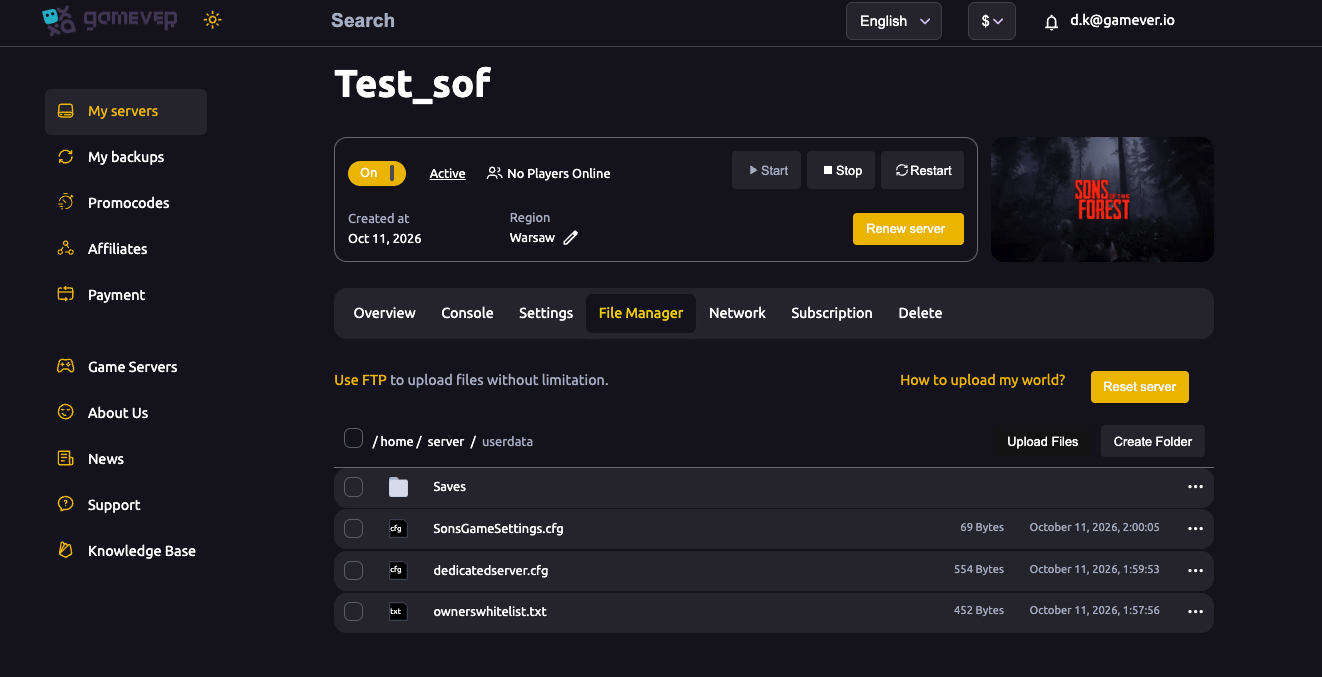
To keep an off-server copy:
- Stop the server (Overview → Stop) so the files are consistent.
- Connect over FTP (address on the Network tab, login on Settings → FTP server settings).
- Download the
Saves/folder.
That folder is exactly what you'd re-upload to restore manually or move hosts.
Back up before anything risky
Always snapshot before:
- A game update.
- Editing
dedicatedserver.cfgor changing difficulty/world settings. - Resetting or wiping the server.
Additional Tips
- Use My backups day one — a quick restore point costs nothing.
- Restore from before the problem — pick the right snapshot.
- A restore overwrites now — snapshot first if unsure.
- Stop the server before copying
Saves/over FTP, so the files are consistent. - Keep an off-server copy of
Saves/for real peace of mind.
Conclusion
Protecting your Sons of the Forest world on gamever is two layers: My backups for one-click point-in-time restores, and a manual Saves/ download over FTP for an off-server copy. Snapshot before anything risky, keep your own copy of the saves, and a bad update or a griefer is never more than a restore away from undone.
Rent your Sons of the Forest server at gamever.io — backups and full FTP access to your saves, all from one panel. Free trial, promo code WELCOME.