
How to Back Up and Restore Your Project Zomboid Server
Knox County is unforgiving, and so are mistakes — a bad mod, a sandbox edit gone wrong, or a corrupted save. The fix is a backup you can roll back to. On gamever you have two ways to protect your world: the panel's My backups feature and a manual FTP download of your save data. This guide covers both and how to restore.
Panel backups: "My backups"
Your gamever account has a My backups area in the sidebar, where server backups are listed and managed. Use it as your first line of defence:
- Back up before any risky change — adding mods, editing the sandbox, changing the map.
- A listed backup gives you a restore point to roll back to if something breaks.
This is the quickest safety net because it's built into the panel — no files to move by hand.
Manual backup over FTP
For a copy you keep yourself, download your world data over FTP. Your save data lives with the server's data files, and the config lives under /home/configs/:
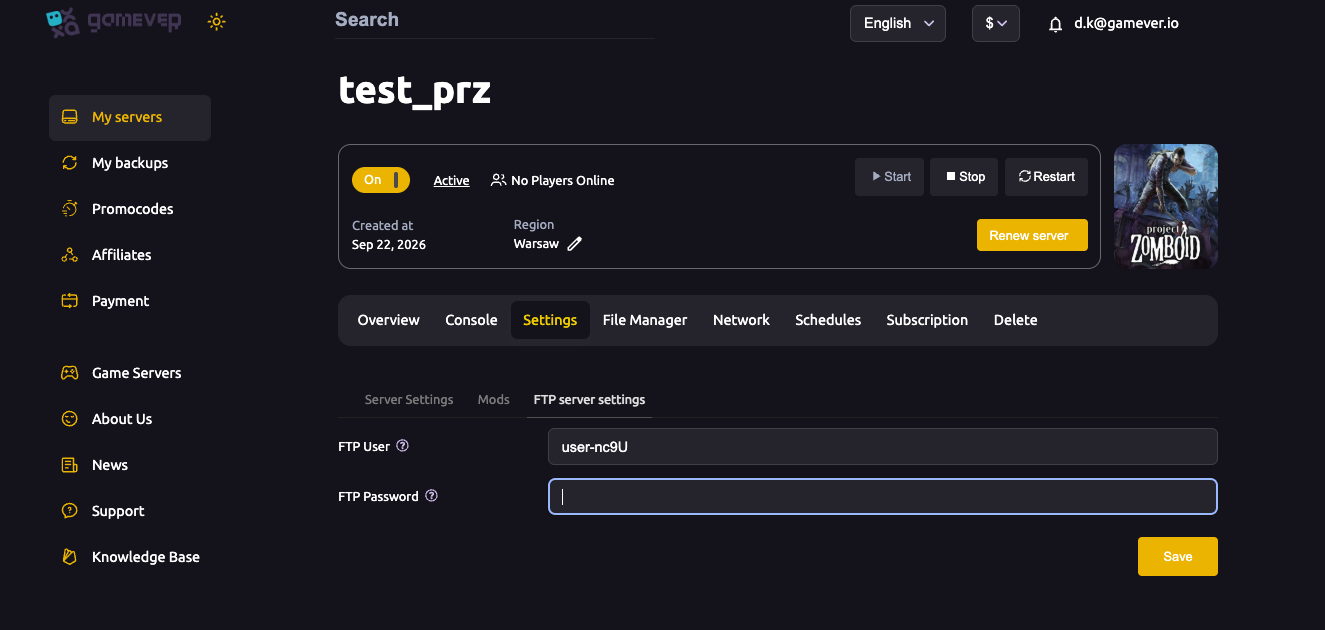
- Open Settings → FTP server settings and note the FTP User and FTP Password; the FTP address is on the Network tab (port
28811), see ports & connection. - Connect with any FTP client.
- Download the save data (the
Saves/data) and your config from/home/configs/to keep a local copy. - Store it somewhere safe.
Do a manual download before big changes so you always have your own copy, not just the panel's.
Restoring
- From a panel backup — use the My backups area to restore the backup you want.
- From your FTP copy — stop the server, upload your saved files back over FTP (replacing the current ones), then start the server. See upload a world for the mechanics of uploading save/config files.
Always restore with the server stopped so files aren't being written while you replace them.
Additional Tips
- Back up before every risky change — mods, sandbox, map.
- Use both — the panel's My backups for speed, an FTP copy you control for safety.
- Stop the server before restoring so files aren't in use.
- Keep more than one copy — the newest backup isn't always the one you want.
- Test big edits knowing you can roll back.
Conclusion
Protecting your Project Zomboid world is two habits: use the panel's My backups as your quick restore point, and pull a manual FTP copy of your Saves/ data and /home/configs/ before anything risky. Restore with the server stopped, and a bad night never costs you the whole world.
Rent your Project Zomboid server at gamever.io — panel backups plus full FTP access so your world is always safe. Free trial, promo code WELCOME.