
How to Back Up and Restore Your Icarus Server

Your Icarus server with gamever runs one prospect (the game's word for a loaded world) at a time, and all of your group's progress lives inside that prospect's save. Lose it and you lose the lot, so a backup habit matters more here than on games that juggle many worlds. The good news is you never touch a self-installed server to do this — everything is handled from the gamever control panel, either through automated backups or by downloading the save file yourself over the File Manager or FTP. This guide covers both ways to back up, how to restore, and the one rule that saves the most grief: always back up before an update or a wipe.
Where your save actually lives
Icarus stores each prospect as a single .json file. On your server the prospects folder sits at:
Icarus/Saved/PlayerData/DedicatedServer/Prospects/
Every world your server has run shows up as its own .json in that folder. That one file is the entire save — copy it somewhere safe and you have a complete backup; drop it back in and the world returns exactly as it was. Because the game only writes the prospect cleanly when it shuts down, timing matters for the manual method below.
Method 1 — Managed backups (My backups + Schedules)
The simplest route is the one built into the panel. Backups are managed from My backups in the left sidebar, not from a per-server tab — open it to take a snapshot of your server or to roll back to one you took earlier.
| Where | What it does |
|---|---|
| My backups (left sidebar) | Create a backup on demand and restore your server from any saved snapshot |
| Schedules tab (per server) | Set up automated recurring tasks such as scheduled backups and restarts |
For a hands-off setup, use the Schedules tab to run backups on a regular cadence so you always have a recent restore point without remembering to click anything. To roll back, open My backups, pick the snapshot from before things went wrong, and restore it. This is the cleanest option because it captures the server state for you rather than relying on you to grab the right file by hand.
Method 2 — Manual backup via File Manager or FTP
When you want a copy on your own machine — before a risky change, or just as an off-server archive — download the prospect .json yourself. The File Manager opens on your server's files, with Upload Files, Create Folder and a breadcrumb path; the same files are reachable over FTP (get your login from Settings → FTP server settings, and the FTP host and port from the Network tab).
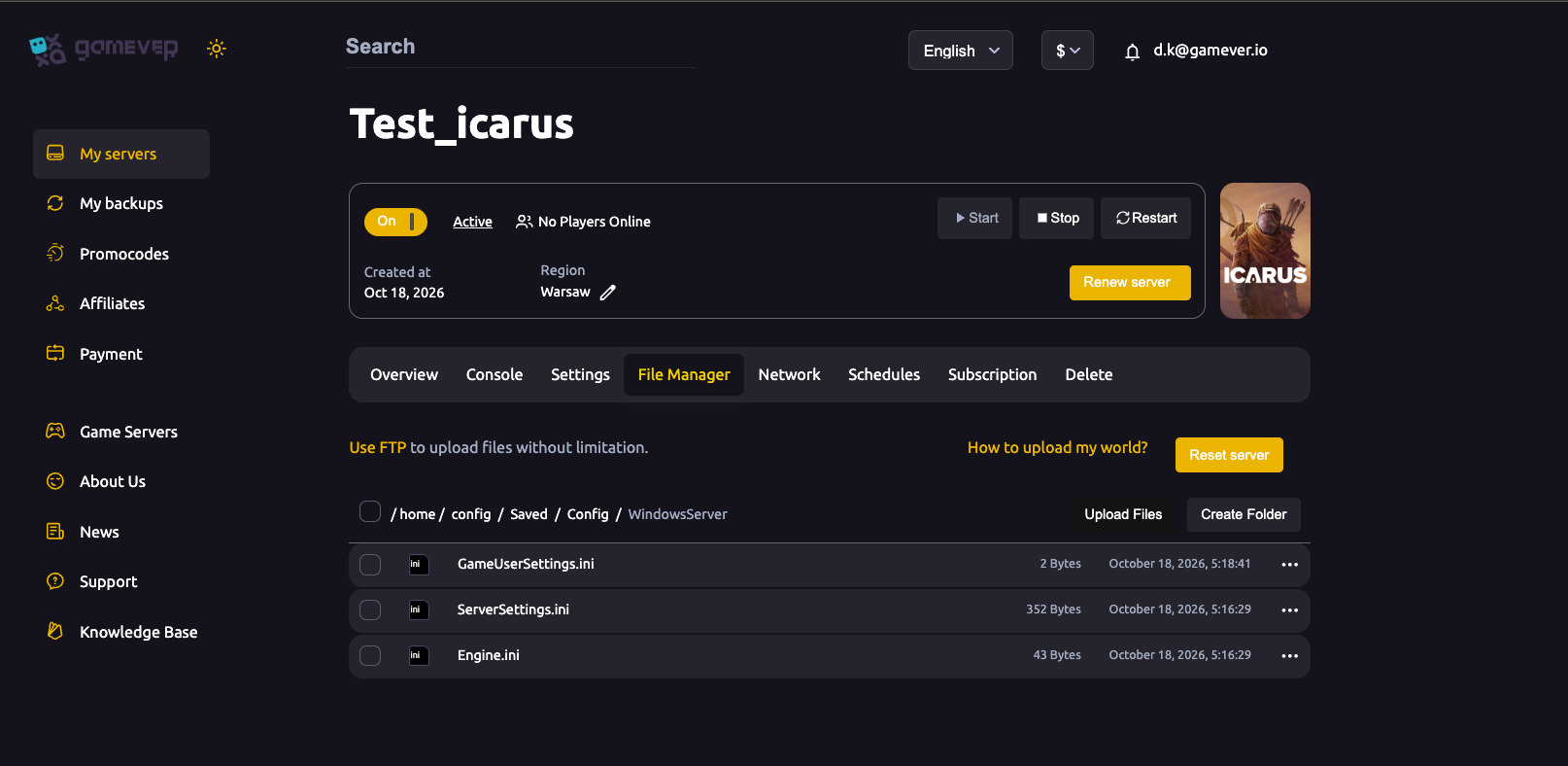
To take a manual backup:
- Stop the server (Overview → Stop). Icarus writes the prospect on shutdown, so stopping first guarantees the
.jsonon disk is current and not mid-write. - In the File Manager or your FTP client, browse to
Icarus/Saved/PlayerData/DedicatedServer/Prospects/. - Download the prospect
.jsonto your computer. Keep the filename exactly as it is — do not rename it. - Start the server again.
Store that file somewhere safe and date your copies. For large saves or bulk transfers, FTP is more reliable than the browser uploader — the File Manager even notes you can "use FTP to upload files without limitation".
Restoring a save
There are two ways back, depending on how you backed up:
- From My backups: open My backups in the sidebar and restore the snapshot you want. This reverts the whole server to that point.
- From a downloaded prospect: stop the server first, then upload your saved
.jsonintoIcarus/Saved/PlayerData/DedicatedServer/Prospects/via the File Manager or FTP, overwriting the current one if prompted. Start the server and the world loads from your file.
A few cautions worth respecting. Never rename a prospect file or edit its contents — RocketWerkz warns that doing so can corrupt the save beyond recovery, so move the file whole and leave it untouched. And mind the game version: a prospect remembers the build it was created on, and loading a save made on a much newer build than your server can trip the server at start, so keep the server updated before restoring an old world.
Additional Tips
- Back up before every update, wipe or reset. This is the single most valuable habit — a snapshot before a change means a bad patch or a mistaken reset costs you nothing.
- Automate it. Set a recurring backup on the Schedules tab so a fresh restore point always exists, even when nobody remembers to make one.
- Stop the server before manual copies. The prospect is written on shutdown; grabbing the file on a running server risks an incomplete save.
- Keep an off-server copy. Download the prospect
.jsonover FTP now and then so a backup also lives on your own machine, not only on the host. - Don't rename or hand-edit the
.json. Keep the original filename and leave the contents alone to avoid corrupting the world. - Test big restores on a throwaway world. If you're moving or recovering an important prospect, confirm it loads cleanly before relying on it.
Conclusion
Protecting an Icarus server comes down to protecting one prospect .json. Use My backups and the Schedules tab for managed, automated snapshots and one-click rollbacks, or download the prospect yourself from Icarus/Saved/PlayerData/DedicatedServer/Prospects/ over the File Manager or FTP for an off-server copy — always stopping the server first so the save is complete. Restore the same way you backed up, never rename the file, and take a backup before any update or wipe. For moving a world onto the server in the first place, see how to upload a prospect; to start fresh on purpose, see how to reset or wipe.
Rent your Icarus server at gamever.io — managed backups, full File Manager and FTP access, and easy restores when a world needs rescuing. Free trial, promo code WELCOME.