
How to Add Admins and Use Server Console Commands on Your Factorio Server
On a Factorio server rented from gamever, you don't touch a command line or install anything yourself — the server is already running in our control panel, and you administer it from the Console tab and the File Manager. This guide covers how to make another player an admin, where the admin list is stored, and which server commands are safe to use day to day. It also explains the important difference between ordinary admin commands and Lua "cheat" commands, which permanently disable achievements for a save.
Who counts as an admin
Factorio keeps its admins in a plain text file called server-adminlist.json, which lives in your server's config folder — /home/server/config/ — reachable from the panel's File Manager (or over FTP). The file is simply a JSON array of player names:
[ "user1", "user2" ]
There are two ways to populate it. You can create or edit the file yourself in the File Manager, or you can promote a player live from the console — Factorio creates and updates server-adminlist.json for you when you do. Admins can run the moderation commands below; non-admins cannot.
Because server-adminlist.json is strict JSON, the same rule applies as to every other Factorio config file: no trailing commas, matched brackets and quotes. One stray comma stops the server from booting. If you edit the file by hand, stop the server first, make your change, then start it again so the file is read cleanly. Promoting through the console avoids this entirely — it takes effect immediately on the running server.
The Console tab
The Console tab is a live view of the server console with a / Enter command box at the bottom. Anything you'd type at a Factorio server prompt goes here. The Overview page also shows a smaller console preview with an error counter and a Full log link, which is useful for spotting problems at a glance.
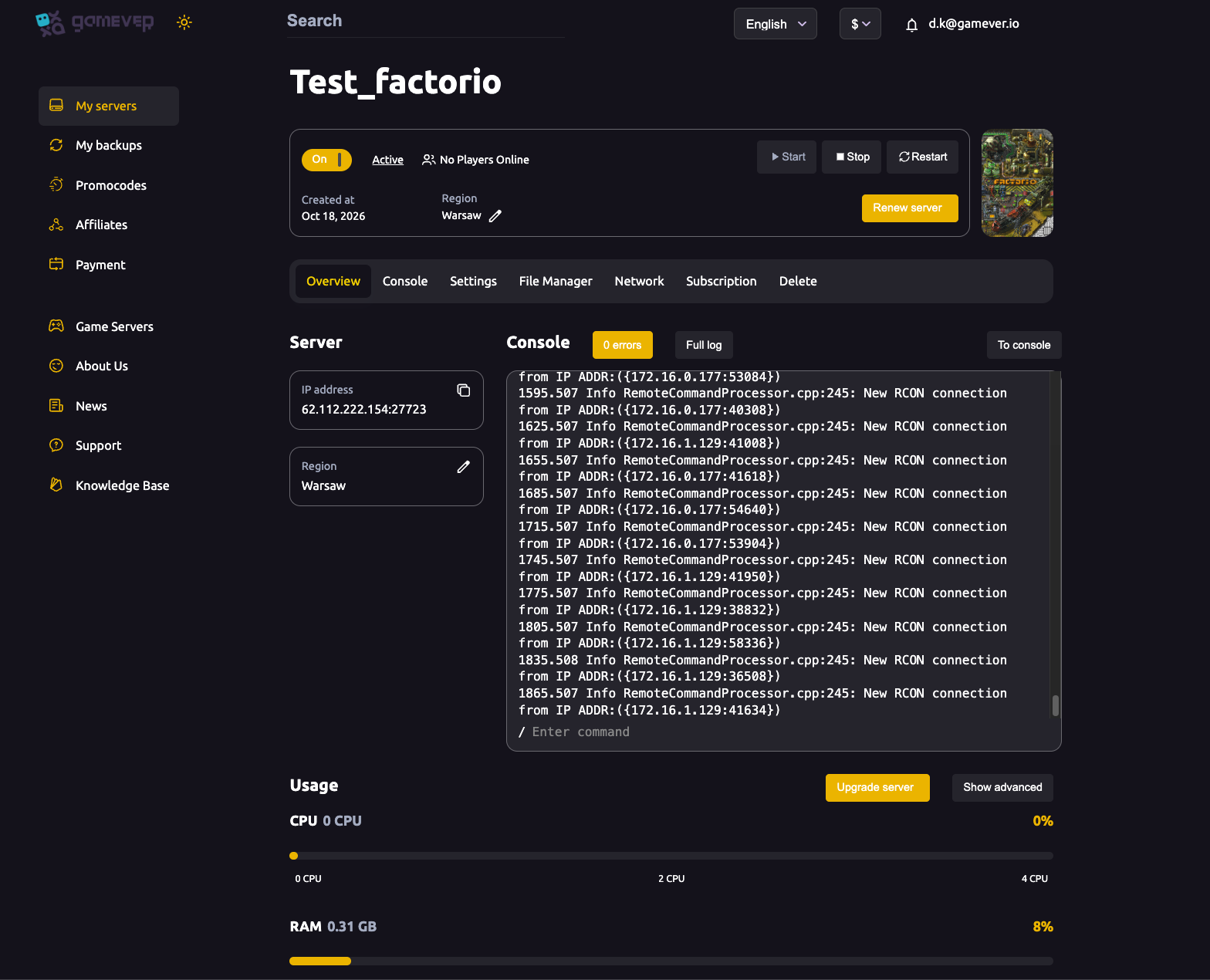
To make someone an admin, have them join once so their name is known, then type:
/promote <player>
That adds them to server-adminlist.json and grants admin rights straight away. To take the rights back, use /demote <player>.
Verified admin and server commands
These are the moderation and housekeeping commands confirmed on the official wiki (wiki.factorio.com/Console). Replace <player> with the player's in-game name.
| Command | What it does |
|---|---|
/promote <player> | Promote a player to admin (admin only). |
/demote <player> | Remove a player's admin rights (admin only). |
/ban <player> <reason> | Ban a player, with a reason (admin only). |
/unban <player> | Lift a ban (admin only). |
/kick <player> <reason> | Kick a player from the server, with a reason (admin only). |
/mute <player> | Stop a player from chatting (admin only). |
/unmute <player> | Allow a muted player to chat again (admin only). |
/whitelist <add/remove/get/clear> [player] | Manage the whitelist. get lists whitelisted players; an empty whitelist turns whitelisting off. |
/admins | List the server's admins. |
/players [online/count] | List players; online shows only those connected, count shows just the number. |
/server-save | Save the game on the server (admin only). |
A few notes on the ones that trip people up. /ban and /kick expect a reason after the name — the reason is shown to the player and recorded. The whitelist is a separate list from the admin list: adding your first name with /whitelist add <player> turns whitelisting on, so only listed players may join; clearing it turns the restriction back off. If you want to run a closed, invite-only server, the whitelist is the tool for that.
Note that the wiki documents the live save command as /server-save (not /save), so that is the spelling to use on a dedicated server.
Admin commands versus Lua "cheat" commands
This is the single most important distinction to understand. The commands in the table above are ordinary admin/multiplayer commands — they moderate the game and are completely safe to use.
Factorio also has scripting commands, which run arbitrary Lua against the game:
/command <command>
/c <command>
(/c is the shorthand for /command.) These are powerful — they can spawn items, edit the map, or change the research state — but there is a catch the wiki is explicit about: using a scripting command permanently disables achievements for that save, as soon as you run one. There is no way to re-enable them for that save afterwards. Keep /c off any world where you still care about progression, and only reach for it on a throwaway or sandbox map. Everything in the admin table above is safe and leaves achievements intact.
RCON and remote administration
The same commands can be issued remotely over RCON, which our panel enables for you. The RCON address appears on the Network tab and the password is set from the Rcon Password field under Settings → Server Settings. That lets an external tool or a bot send console commands without being in-game. Setting that up — connecting a client, choosing a password, and testing the connection — is covered separately in Factorio RCON setup.
The File Manager
When a change isn't exposed as a command — editing the admin list by hand, adjusting server settings, or managing mods — you use the File Manager, a web file browser rooted at your server files.
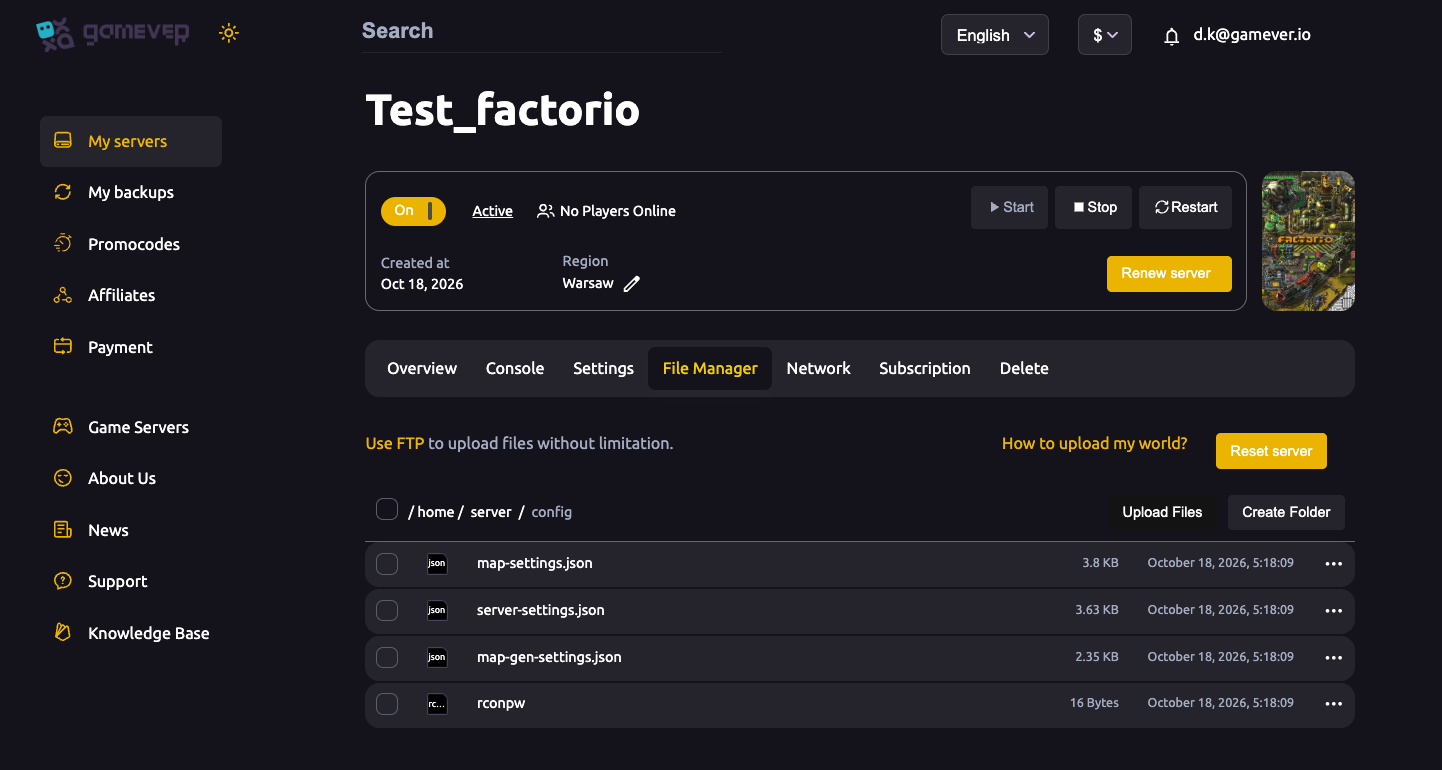
The config folder /home/server/config/ holds server-adminlist.json alongside server-settings.json and the map files. Every one of these is strict JSON, so the stop-edit-start rule and the no-trailing-comma rule apply to all of them. You can also upload larger files, such as saves or mods, over FTP using the credentials under Settings → FTP server settings.
Additional Tips
- Promote through the console, not the file, when the server is live — it applies instantly and avoids a restart.
- Always include a reason with
/banand/kick; it's shown to the player and keeps your moderation log clear. - Use the whitelist for private servers:
/whitelist add <player>for each trusted player switches on invite-only joining. - Keep
/caway from real worlds — one scripting command permanently kills achievements for that save. - Validate your JSON after any hand edit to
server-adminlist.json; a trailing comma will stop the server booting. - Check the Overview error counter and Full log after changes to catch a bad edit before players notice.
Conclusion
Administering a Factorio server comes down to two places: the Console tab for live commands like /promote, /ban and /whitelist, and the File Manager for the server-adminlist.json file behind them. Stick to the verified admin commands for day-to-day moderation, keep the Lua /c command off any world where achievements matter, and lean on RCON when you want to manage the server from outside the game — see Factorio RCON setup for that.
Ready to build your factory? Rent your Factorio: Space Age server at gamever.io — free trial, and use promo code WELCOME for a discount on your first term.