
How Structural Integrity Works in 7 Days to Die
Structural Integrity is, per the game's own wiki, "a critical component of building in 7 Days to Die, influencing how structures stand or collapse under their own weight and additional loads." Every block you place is checked against three stats — Mass, Vertical Support, Horizontal Support — and the game doesn't warn you twice: "If instability is created by the block placement, all now-unstable blocks will immediately collapse and fall to the ground." It recalculates in reverse too, re-checking "previously supported blocks" whenever one is removed or destroyed. This guide covers the three stats, the placement preview colors, and the Wood- and Concrete-Block numbers the wiki uses to demonstrate the math, arithmetic shown not asserted. (The page's own structured infobox data is undocumented in this source snapshot — every figure below comes from the article body and its worked examples.)
The Three Stats Behind Every Block
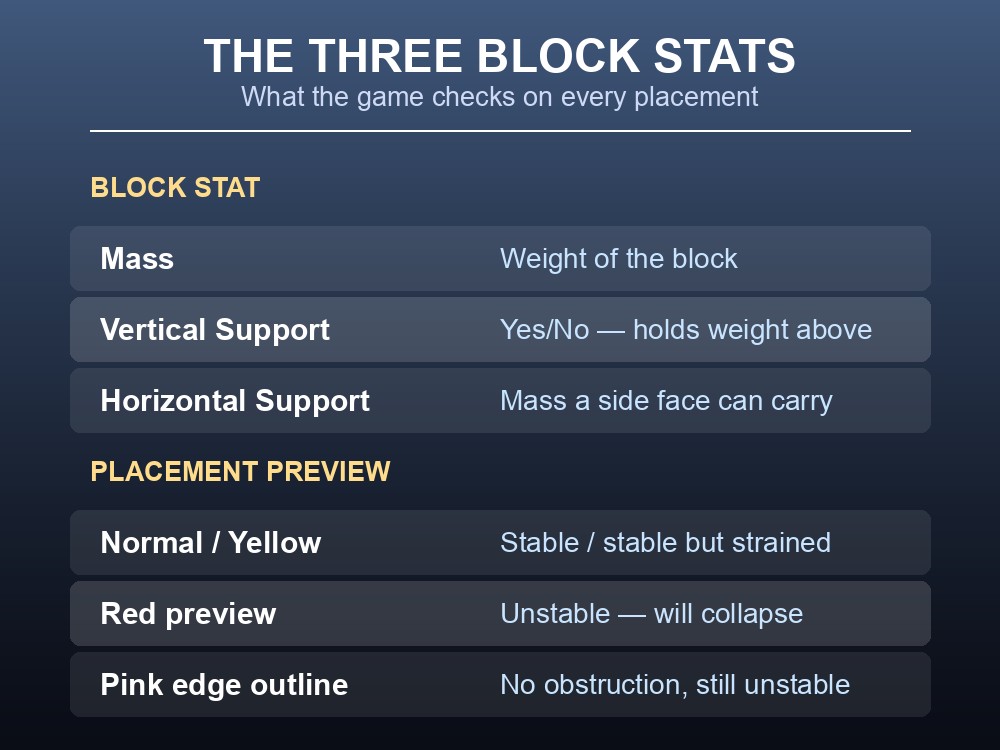
The wiki defines all three plainly. Mass: "A measure of the mass or weight of the block." Vertical Support: "Whether or not the block is able to vertically support blocks placed above it" — a Yes/No attribute, not a number. Horizontal Support: "The total mass able to be supported on any side face of the block."
Before you place anything, the game shows the outcome in color. The block preview: normal means "stable if placed here," yellow means "stable, but is showing some strain of its support," red means "expected to be unstable" and will collapse on placement. The edge outline layers on obstruction info: white/red flag a clear or blocked spot, and pink is the trap state — "there are no obstructions to placing the block, but the block is expected to be unstable." Pink still lets you place it; it just means the block is about to fall.
Vertical Support: How Blocks Stay Up
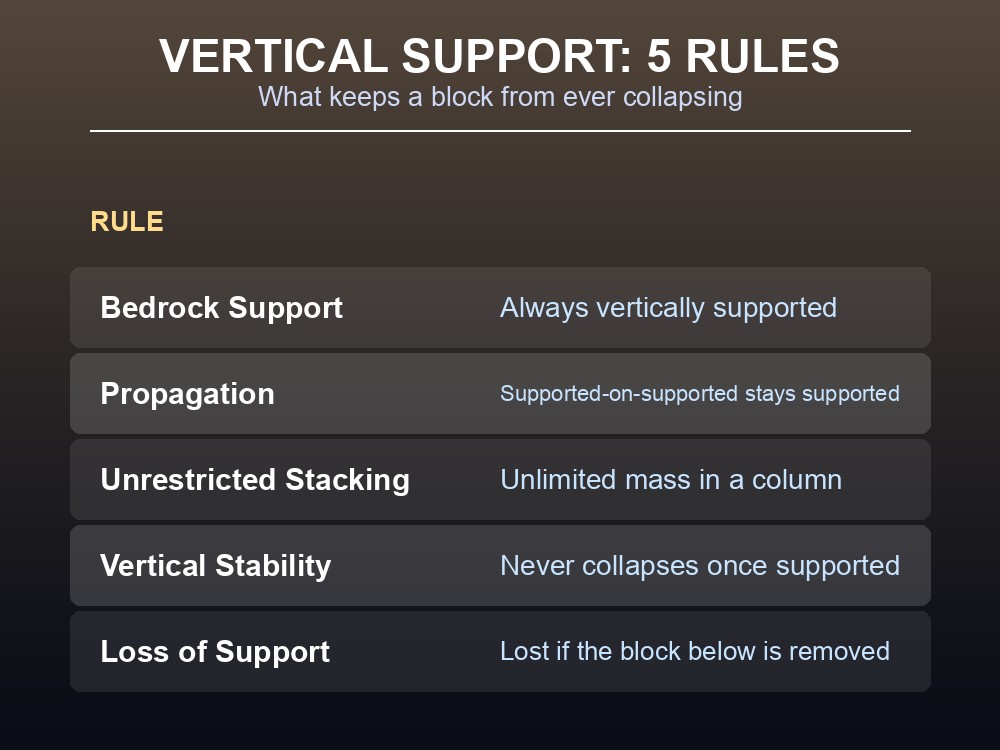
Five rules govern it. Bedrock Support: "Blocks placed on the game's Bedrock layer are always considered vertically supported." Propagation: a block on top of another vertically supported block is also supported, and since surface terrain normally connects to Bedrock, "a block placed on the ground terrain will almost certainly be a vertically stable block" unless someone has dug underneath. Unrestricted Stacking: such blocks "can hold an unlimited number and mass of blocks in a column above them." Vertical Stability: a vertically supported block "will not collapse regardless of the material from which it is made, the shape of the block, or the mass of any blocks placed on top of it." Loss of Support: it "loses its vertical support if any vertically supporting block beneath it is removed or destroyed." A block on top of a non-vertically-supported block is instead "considered attached to that block, not vertically supported by it." The wiki's own examples show the failure directly: a Wood Block column, captioned "but oh no! Someone appears to have dug under the structure!"
Horizontal Support and the Numbers Behind It
Horizontal Support is "typically determined by the material from which a block is made, regardless of the shape of the block or how damaged the block is," and applies "to each side face" of a vertically supported block independently. Exceed a face's rating with an attached chain and "the entire series of blocks is considered unstable and will fall immediately" — the anchor is unaffected, "as vertically supported blocks are always stable themselves." Spread the chain across two or more supported faces and the load is shared between them.
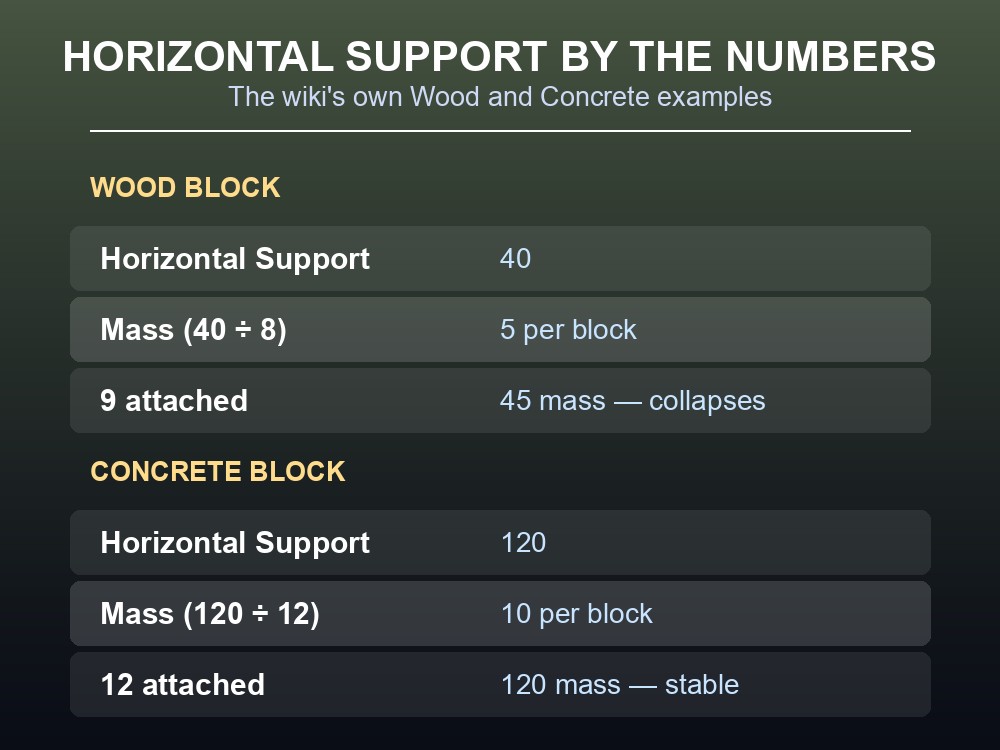
The wiki's numbers: a Wood Block has a Horizontal Support of 40 — 8 Wood Blocks on one face total mass 40 and hold, 9 total mass 45 and collapse, so each Wood Block is mass 5 (40 ÷ 8 = 5, confirmed by 9 × 5 = 45). A Concrete Block has a Horizontal Support of 120 — 12 Concrete Blocks total mass 120 and hold, so 120 ÷ 12 = 10 mass per block.
One rule matters more than the anchor's own rating: for a non-vertically-supported block, the limit "applies to the total load on that block, including the mass of the block itself plus the mass of any other series of blocks attached to it." The wiki proves it: attach 9 Wood Blocks (45 mass) to a Concrete face rated 120, nowhere near its limit, and the chain still collapses — "the 1st attached Wood Block is under the load of itself plus 8 more attached Wood Blocks, for a total load of 45, which exceeds the Wood Block's horizontal support" of 40. The anchor was never the bottleneck; the first block in the chain was. A second example confirms the split rule: one Wood Block (40 support) holds 4 Concrete Blocks stable (4 × 10 = 40) but collapses at 5 (5 × 10 = 50); adding a second supported Wood Block and splitting 8 Concrete Blocks across both faces (80 total, 40 each) holds. The wiki also shows Steel Blocks split two-and-two across two faces staying stable, but never publishes Steel's own Mass or Horizontal Support numbers — undocumented here, so the Wood/Concrete figures shouldn't be assumed to generalize.
One more quirk: "sometimes, the game will allow you to attach more blocks than should be allowed to be supported. If this happens, a player walking over these extra blocks will cause the individual blocks to fall." A build that looks stable right after placement can still fail once someone walks across it.
- Watch the preview color, not just whether placement is allowed — a pink edge outline still means the block is about to fall.
- A vertically supported block never collapses on its own, however tall the stack — check what's underneath a column, not its height.
- The first block in a horizontal chain carries the combined load behind it, not the anchor's rating — a strong wall can still drop a chain whose first link is weaker.
Running your own 7 Days to Die server
Testing Structural Integrity edge cases — how far a run reaches, whether a base survives a horde digging underneath it — is easier on a server you fully control than on a public box where others are also placing and removing blocks. A gamever 7 Days to Die server runs on your schedule and takes one-click backups, so a bad experiment (or a real horde breach) is reversible in minutes. Renting one takes minutes and comes with a free trial via promo code WELCOME.
Conclusion
Structural Integrity comes down to three stats per block — Mass, Vertical Support, Horizontal Support — checked the instant you place or remove anything, with a color-coded preview telling you the outcome first. Vertical Support propagates down to Bedrock and makes a block unconditionally stable regardless of what's stacked on it; Horizontal Support is per-face and material-based, and the wiki's numbers show it — a Wood Block's 40 rating breaks down to 5 mass per block, a Concrete Block's 120 to 10, and a chain can fail at its weakest link even when the anchor has support to spare. Where the source goes quiet, like Steel's figures or the page's infobox, this guide says so rather than guessing.