
Getting Started with Your Abiotic Factor Server on gamever

Welcome to your gamever Abiotic Factor server. A dedicated server is the best way to run a co-op campaign in the GATE Cascade Research Facility — it stays online 24/7 so your group of up to six scientists can keep building, researching and surviving whether or not the host is in-game. Everything you need is on the control panel, and friends join by the server address. This guide is the quick tour plus a first-time checklist, with links to deeper guides.
The Overview tab
When you open your server you land on Overview:
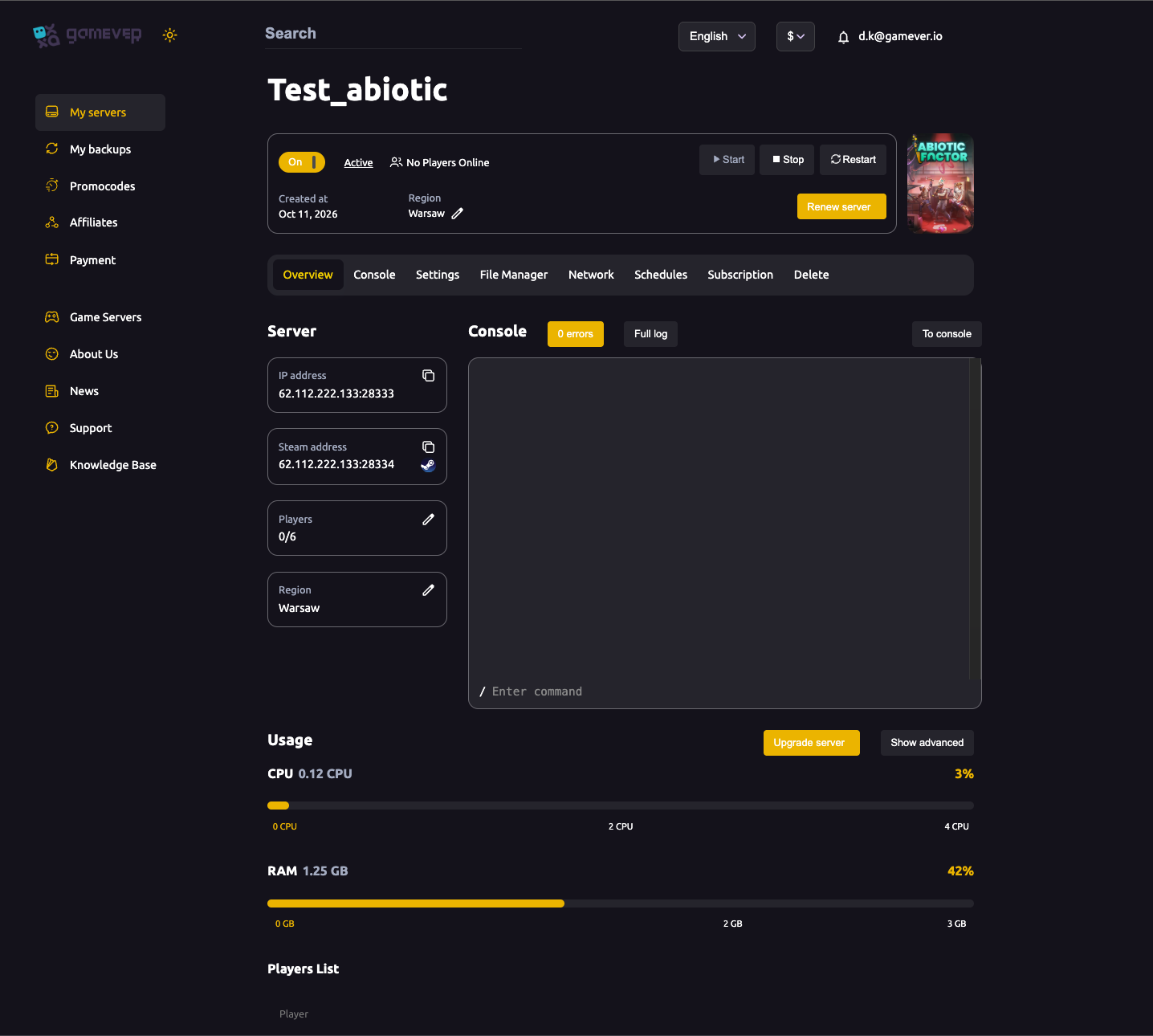
- On/Off, Start / Stop / Restart — power controls for the server.
- IP address (
62.112.222.133:28333) and Steam address (:28334) — copyable; the IP is what players use to join. - Players — your slot count, 0/6 by default (see max players).
- Region — where the server runs; keep it close to your group.
- Console — a live server log with an Enter command box.
- Usage — live CPU and RAM meters, with Upgrade server if you need more power.
The tab bar: Overview · Console · Settings · File Manager · Network · Schedules · Subscription · Delete.
What each tab is for
| Tab | Use it to |
|---|---|
| Settings | Set the server name, password and world name, plus your FTP login — see server settings and password & privacy. |
| File Manager | Browse the config folder, manage save/world files and reset the server — see upload a world and reset & wipe. |
| Network | Your Server, Steam and FTP addresses (28333 / 28334 / 28545). |
| Schedules | Automated restarts — see scheduled restarts. |
| Subscription / Delete | Billing and removing the server. |
How your friends join (co-op setup)
Abiotic Factor doesn't need a host player staying online — your server is always up. To play together:
- Share the IP address from Overview (
62.112.222.133:28333). - In Abiotic Factor, each player opens Multiplayer and joins by that address (direct connect). The Steam address (
:28334) is the query port the client uses to find the server. - If you've set a server password, they enter it to connect.
That's the whole co-op setup — no one has to host from their own PC.
Your first-time checklist
- Wait for Active. On first boot the server prepares Abiotic Factor; give it a few minutes and watch the Console.
- Set your server name and world name on Settings — see server settings.
- Decide public or private with a server password.
- Set a daily scheduled restart to keep the server fresh.
- Know where your save lives so you can back it up.
- Share the IP and start your run.
Sizing your plan
Abiotic Factor is a six-player co-op game, so it's lighter to host than a big open-world survival title, but a full squad plus a large, built-up facility still adds up:
- CPU drives smoothness as more players and systems (power grids, machines, NPCs) run at once.
- RAM grows with your save over a long campaign.
- Watch the Overview → Usage meters with your group on and hit Upgrade server if they run hot (see fixing lag).
Additional Tips
- Players join by IP — share
62.112.222.133:28333; no one needs to host from their PC. - Be patient on first boot — the Console activity is normal; wait for Active.
- Set a password early if you want a private run — see password & privacy.
- Turn on a scheduled restart so a long campaign stays smooth.
- Most gameplay tuning is in-game, set when you create or load the world — the panel handles the server, not the ruleset (more in server settings).
Conclusion
Your gamever Abiotic Factor server is ready the moment it reaches Active: set a name and world name, decide on a password, schedule a restart, and share the IP. The panel keeps the server running around the clock so your team can focus on surviving the facility — work through the checklist and your co-op world is live.
Rent your Abiotic Factor server at gamever.io — instant setup, 24/7 co-op, a browser console and easy upgrades, all in one panel. Free trial, promo code WELCOME.