
Fixing "Incompatible Version" on Your Valheim Server After an Update
A Valheim server and the players joining it must run the exact same build. When they don't, the game shows an "Incompatible version" message and refuses the connection. This almost always happens right after a Valheim update: one side has the new build and the other is still on the old one. This guide shows how to confirm which side is behind, update your gamever server, roll back when the server should stay on an older build, and rule out a mod-version clash — all from the control panel.
Why it happens
Iron Gate ships Valheim through Steam, and after a patch the two halves of a connection rarely move in lockstep:
- Your game (client) updated, the server didn't yet. Steam auto-updates the game you play, but the dedicated-server build can take a while to propagate after a patch ships. For a few hours it's normal for players to be ahead of servers.
- The server updated, a player didn't. A player who hasn't restarted Steam (or who opted into a beta branch) can be left behind.
- A mod is pinned to the old build. A BepInEx or ValheimPlus plugin compiled against the previous version can block the connection even when the game versions line up.
The fix is simply to get both sides onto the same build — so first find out which side is stale.
Step 1 — Confirm server vs client version
Compare the two builds before changing anything:
- Client: launch Valheim and read the build number in the bottom-right of the main menu.
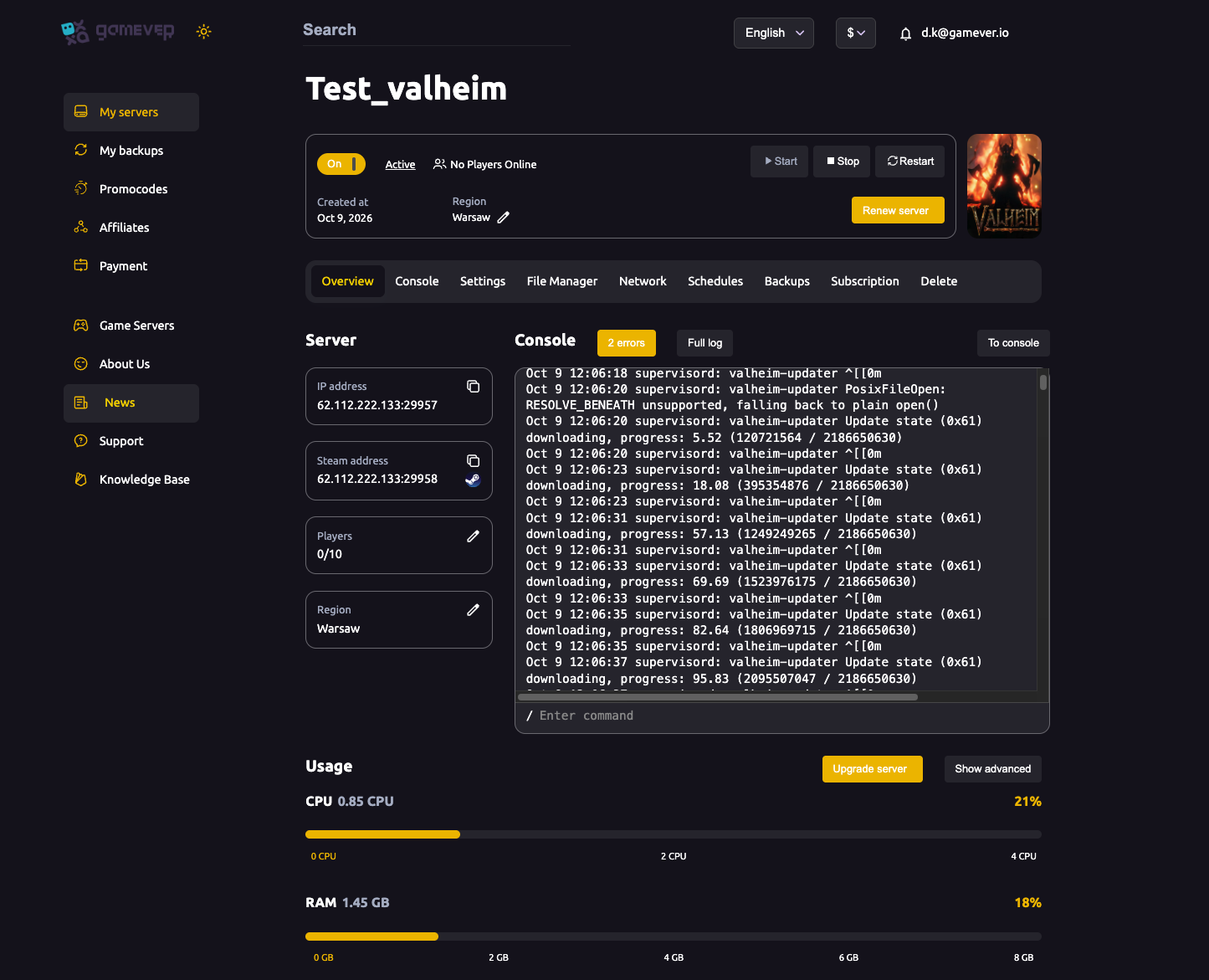
- Server: the boot log on the panel Overview tab prints the version the server is running when it starts.
If the client number is higher than the server's, the server is behind and needs to update (Step 2). If the client is lower, that player needs to let Steam finish updating the game and restart it.
Step 2 — Update the server build
On gamever your Valheim server checks for the current build every time it boots, so you don't download or patch anything by hand — you just restart it:
- Open the Overview tab.
- Click Restart.
- Watch the live console: on startup the server pulls the latest build and prints the new version.
If the patch only shipped moments ago, the server build may not have reached Steam's servers yet — wait a little and restart again. If several restarts still leave the server on the old version well after the patch, open a Support ticket so we can check the update on our side.
Step 3 — Roll back instead, if the server should stay put
Sometimes you don't want the newest build — a fresh Valheim update often breaks mods until their authors catch up, so a modded server is better held on the previous build until then. You can't pick an arbitrary old version, but Steam beta branches let you pin a specific build, and gamever exposes that as a dropdown.
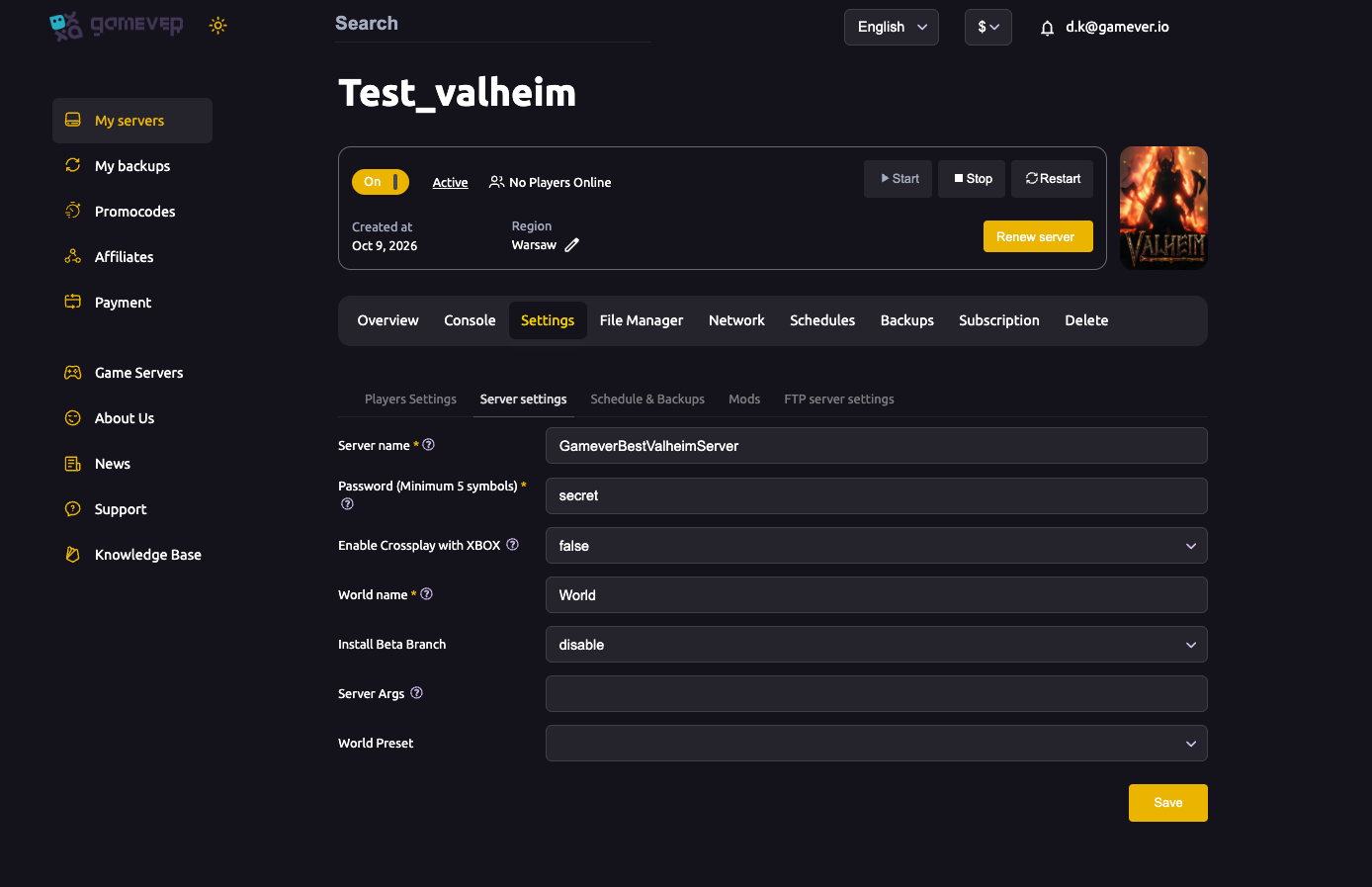
The catch is the same golden rule: server and every player must be on the same branch, so each player has to opt their game into the matching branch under Steam → Valheim → Properties → Betas. For the full switch-and-roll-back procedure — and why to back up first — see our beta branch & rollback guide. Because a newer save may not load cleanly on an older build, take a backup before any branch change (see backup & restore).
Step 4 — Rule out a mod-version clash
If the server and all clients are provably on the same build but "Incompatible version" (or an instant disconnect) persists, suspect a mod:
- A BepInEx plugin or ValheimPlus built for the previous Valheim version can block connections after the game updates.
- Server and every player must run the same mods at the same versions — a single out-of-date
.dllon either side breaks the join. - Update your plugins to their current releases, or, to isolate a culprit, remove plugins from
/home/server/BepInEx/plugins/one at a time (via File Manager / FTP) and retest.
Keeping a modded server working through a patch is covered end-to-end in our install & update mods guide.
Additional Tips
- Same build, both sides — the whole error is just a version mismatch; everything else is finding which side is stale.
- Give Steam time after a patch — server builds can lag the client by hours; wait, then restart.
- Restart = update on gamever — there's no manual patch step; the server grabs the build on boot.
- Back up before rolling back — a newer world may not reload on an older build.
- One mod at a time when hunting a plugin that's blocking connections.
- Still stuck after the server's updated? Open a Support ticket rather than guessing.
Conclusion
"Incompatible version" sounds alarming but it's the simplest error Valheim has: the server and the player are on different builds. Compare the two version numbers, Restart the server from the Overview tab to pull the current build, pin a beta branch when you'd rather hold an older one, and check your mod versions if the game builds already match. Line both sides up and everyone's back in the world.
Rent your Valheim server at gamever.io — updates pull on restart, beta branches and backups are one click away, and Support is there when a patch day gets messy. Free trial, promo code WELCOME.