
Factorio server-settings.json: Every Setting Explained
Your gamever Factorio server is already installed and running — your job is to configure it, not to build it from scratch. The most important settings are exposed as plain fields in the control panel under Settings → Server Settings, and the deeper tuning lives in server-settings.json, which you edit through the File Manager. This guide maps the panel fields first, then walks the JSON file key by key so you know exactly what each one does before you change it. Everything here is done through the panel; ports are assigned for you on the Network tab, so there's nothing to port-forward.
Settings → Server Settings (the panel fields)
Open the Settings tab and the Server Settings sub-tab. These are the controls you'll touch most often — they manage which save loads and how the server boots.
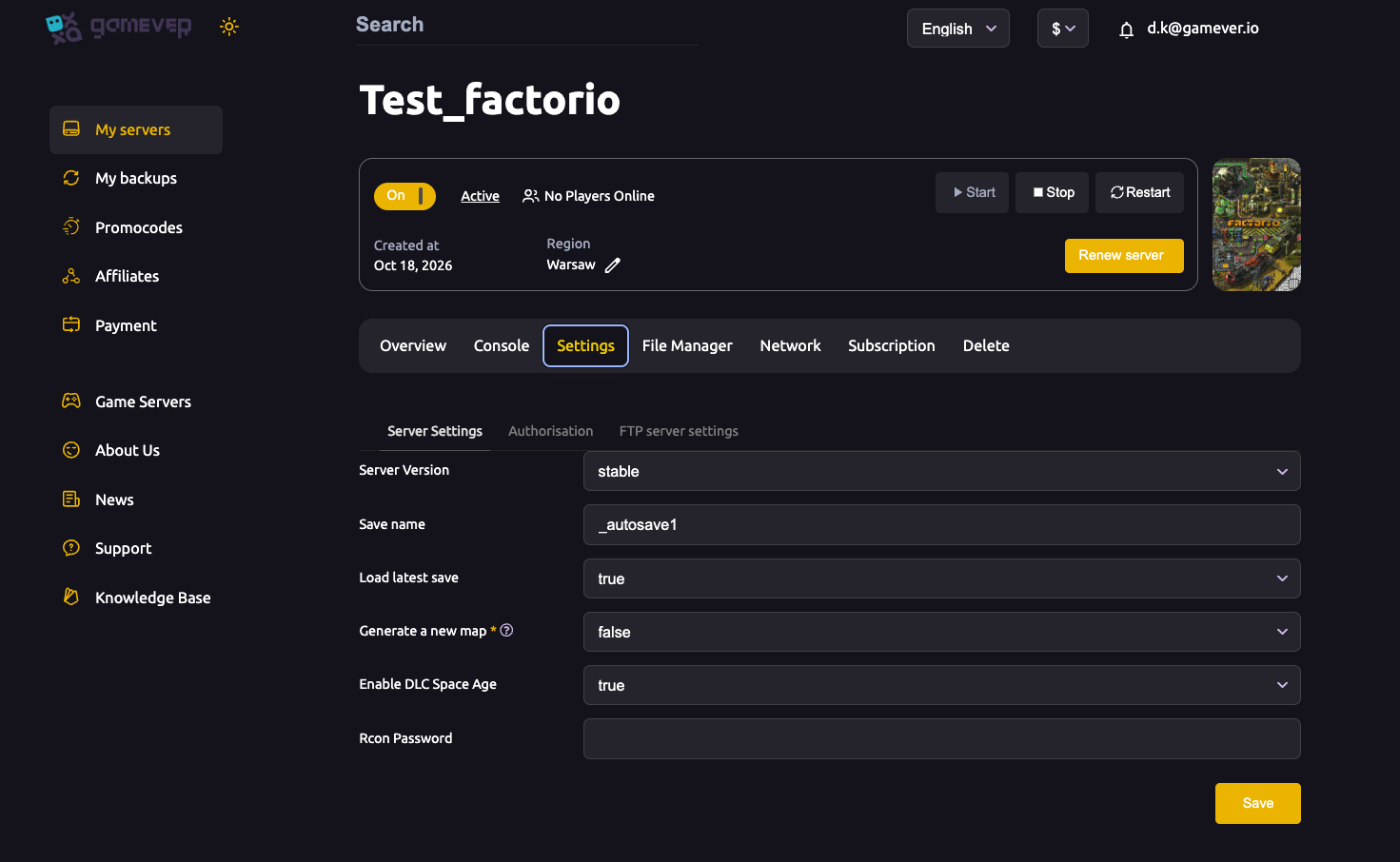
| Field | Type | What it does |
|---|---|---|
| Server Version | dropdown | Pins which build the server runs — stable or experimental. |
| Save name | text | Which save file the server loads, e.g. _autosave1. |
| Load latest save | dropdown | true / false — load the most recent save instead of the named one. |
| Generate a new map | dropdown | true / false — create a fresh map on the next start. |
| Enable DLC Space Age | dropdown | true / false — run the server with the Space Age expansion. |
| Rcon Password | text | Sets the RCON password; the RCON address itself is shown on the Network tab. |
After changing any field here, click Save, then Restart from the Overview to apply. Factorio does support RCON on our platform — set a password in the Rcon Password field and you can issue console commands remotely to the RCON address on the Network tab.
To list your server publicly and to pull mods from the mod portal, you'll also need the Authorisation sub-tab, which takes your factorio.com username and an auth token (generate the token from your factorio.com profile — never use your account email or password here).
server-settings.json in the File Manager
The panel fields cover the boot behaviour, but the server's identity, player limits, autosave rhythm and public-listing credentials all live in server-settings.json. Open the File Manager and browse to /home/server/config/.
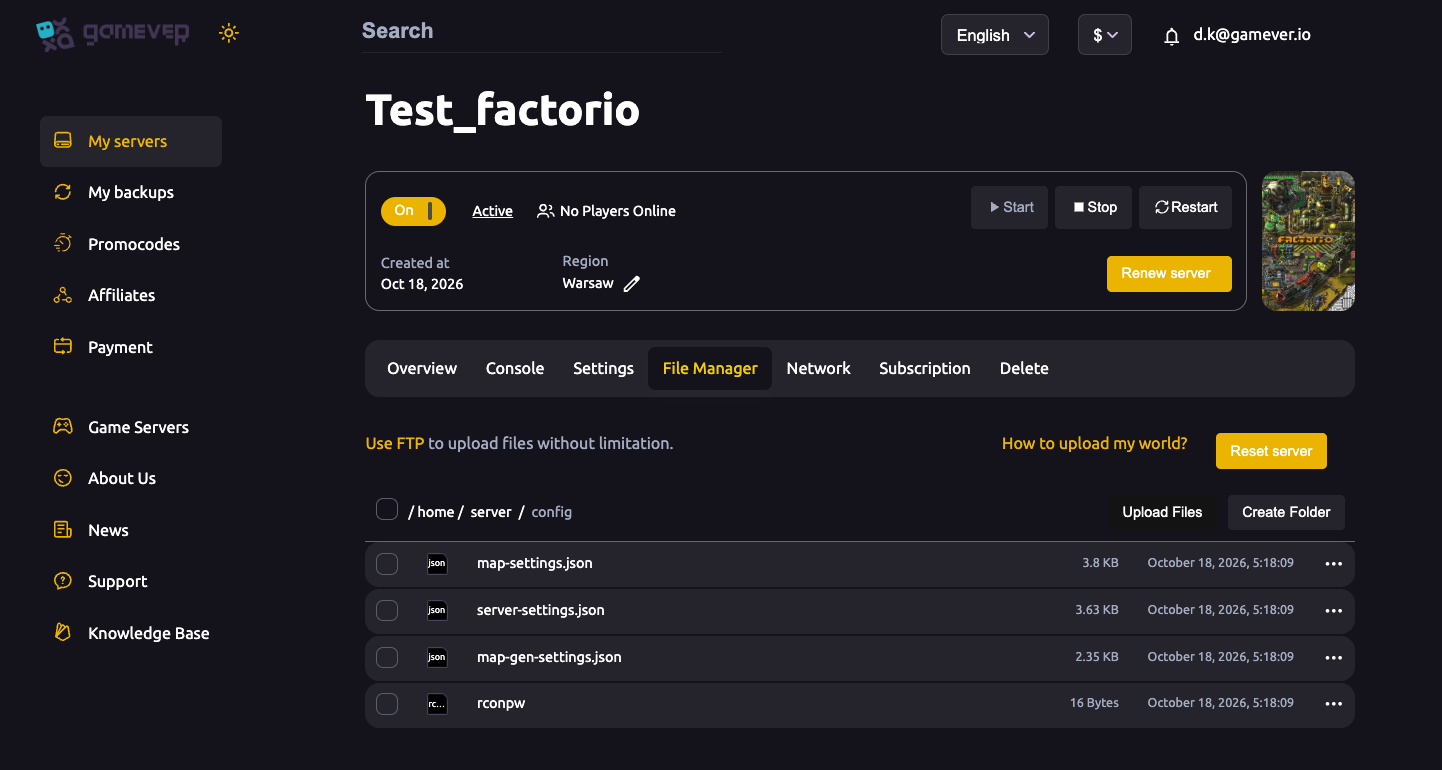
Alongside server-settings.json you'll find map-settings.json (pollution, biters, enemy evolution), map-gen-settings.json (terrain, ore and map size — read only at map creation), and rconpw (the RCON password file). Mods live in a separate mods/ folder with its mod-list.json.
This file is strict JSON. A single trailing comma — a comma after the last item in a list or object — will stop the server from booting. Edit carefully, and never leave a dangling comma.
The keys, explained
| Key | Meaning |
|---|---|
name | The server name shown in the in-game public server browser. |
description | A longer description shown in the browser listing. |
tags | A JSON array of tag strings, e.g. ["pvp", "modded"]. |
max_players | Maximum concurrent players. Set it to 0 for no limit. |
visibility | An object with public and lan boolean flags controlling where the server is listed. |
game_password | The join password for the server; leave it empty for an open server. |
require_user_verification | Whether joining players must be verified against their factorio.com account. |
username / token | Your factorio.com credentials, needed to list the server publicly and download mods. Prefer the token over a plain password — this file is stored as readable text. |
autosave_interval | How often the server autosaves, in minutes. |
autosave_slots | How many rolling autosave files to keep before the oldest is overwritten. |
afk_autokick_interval | Minutes of inactivity before an idle player is kicked; 0 (or unset) disables it. |
auto_pause | When true, the game pauses while no players are connected. |
A few of these overlap with the in-game browser listing fields, so for the public-facing details it helps to read the focused guides: set your server name and description, set a join password and make your server public.
Editing safely
Because Factorio reads most of these values at boot, follow the same routine every time:
- Stop the server from the Overview before you open the file.
- Edit
server-settings.jsonin the File Manager (or pull it over FTP, using the login on the FTP server settings sub-tab). - Double-check the JSON — no trailing commas, every string in double quotes, every brace and bracket closed.
- Save the file, then Start the server and watch the Console for a clean boot. A JSON error shows up here immediately.
Additional Tips
- Validate before you save. Paste the file into any JSON validator if you're unsure — a single syntax slip blocks the whole server from starting.
- Keep a known-good copy. Download
server-settings.jsonvia the File Manager or FTP before a big edit, so you can roll back in seconds. game_passwordvs.visibility. A password restricts who can join;visibility.publiccontrols whether the server appears in the browser at all. They're independent — set both deliberately.- Use the token, not the password. The
tokenfield avoids storing your factorio.com password as plain text in the config. map-gen-settings.jsonis one-shot. Terrain and ore settings there only apply when a new map is generated — changing them won't alter an existing save.- RCON is live. Once the Rcon Password is set, the Console tab shows active RCON connections and gives you a command box for
/promote,/ban,/kickand the rest (confirm exact command syntax on wiki.factorio.com/Multiplayer).
Conclusion
Factorio keeps its configuration refreshingly simple: a handful of boot controls in Settings → Server Settings, and one strict-JSON file, server-settings.json, holding the server's name, player cap, autosave rhythm, visibility and credentials. Edit it from the File Manager at /home/server/config/, stop the server first, keep the JSON clean, then Save and Start. Do that and your factory runs exactly the way you want it — no port-forwarding, no self-install, just the settings that matter.
Rent your Factorio server at gamever.io — full File Manager and FTP access, RCON enabled, and ports assigned automatically so you can get straight to building. Free trial, promo code WELCOME.