
Factorio Server Ports and Firewall Explained
Self-install guides for a Factorio server are full of nervous advice about port forwarding, firewall rules and router settings. Here's the good news: on a server you rent from gamever, none of that is your job. Your ports are assigned by us and opened automatically — you never touch a router, and there is nothing to forward. This guide explains what Factorio's ports do, where to read your own server address in the control panel, and how to hand that address to friends so they can join.
How ports work on a hosted server
A networked game needs a "port" — think of it as the specific door on the server that game traffic comes through. When you self-host at home, you have to open that door manually in your router (port forwarding) and your firewall, which is where most home-hosting headaches come from.
On gamever, your server runs in our data centre with the correct ports already open on our side. We assign each server its own port numbers automatically, so you will never port-forward and never edit a firewall rule. The only thing you ever need to do is read your assigned address and share it — and that lives on one tab.
The Network tab: your server's address
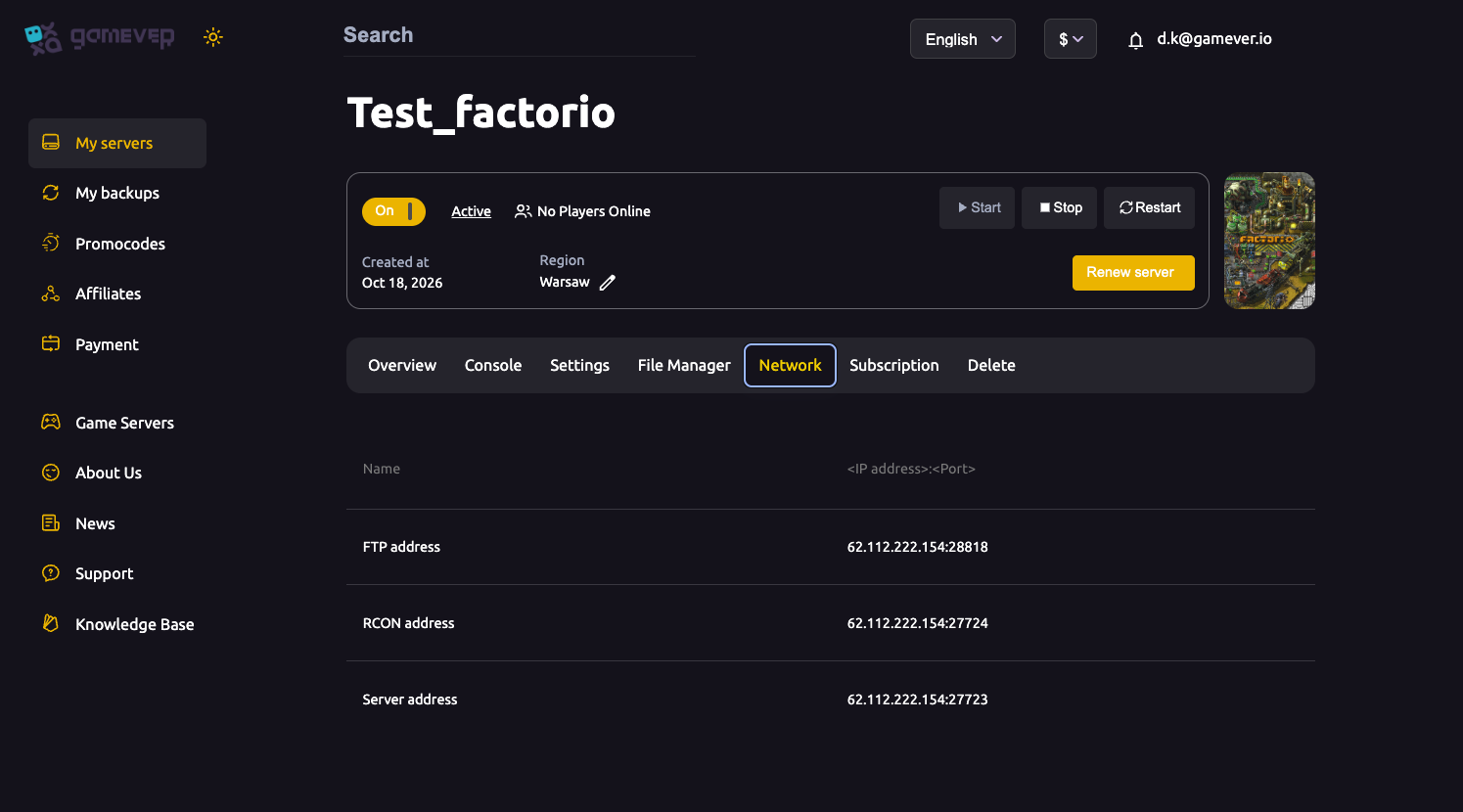
Everything you need is on the Network tab in the control panel. It lists the addresses your server is reachable on, each as IP:port. You simply read your own values here — don't copy the examples below, which are just illustrations.
| Address on the Network tab | Example | What it's for |
|---|---|---|
| Server address | IP:27723 | The game port — this is what players use to join via Direct Connect. Factorio game traffic is UDP. |
| RCON address | IP:27724 | A separate port for remote console (RCON) tools. Not needed to play; see RCON below. |
| FTP address | IP:28818 | For connecting an FTP client to manage files — not a game port. |
A quick note on the game port for context: Factorio's own default game port is UDP 34197 (per wiki.factorio.com). You'll see that number mentioned in community guides and the game's own docs. On our hosting, though, the panel assigns your server a different number automatically — so always go by the Server address on your Network tab, not by 34197.
UDP, and why it matters for Factorio
Factorio communicates over UDP for gameplay (the Factorio wiki notes the game uses UDP). That's already configured on our end, so there is nothing for you to enable. The practical upshot for you is simple: when a friend joins, they use the Server address exactly as shown (IP:port) — the protocol is handled automatically.
RCON is a separate port
Factorio supports RCON (Remote Console), a way to send server commands from an external tool, and our panel exposes it on its own port — the RCON address on the Network tab. This is entirely separate from the game port:
- Game port (Server address) = how players connect to play.
- RCON port (RCON address) = how admin tools send console commands remotely.
You set the RCON password under Settings → Server Settings → Rcon Password, then Save. Most players never need RCON — you can run the same commands straight from the Console tab in the panel. It's there if you want to wire up an external admin tool, but it is optional.
Giving friends your address (Direct Connect)
To let friends join directly:
- Open the Network tab and copy your Server address (the full
IP:port). - Send it to your friends.
- In Factorio, each player opens Multiplayer → Connect to address, pastes the
IP:port, and connects.
That's the whole process — no port forwarding on anyone's end. If you've also set a game password under Settings, pass that along too.
If a connection fails
Because the ports are already open on our side, a failed join is almost never a port problem. Work through these in order:
- Is the server actually running? Check the Overview tab — the status toggle and console preview tell you if it's up. Start or Restart it if needed.
- Right address? Re-copy the Server address from the Network tab; make sure your friend used Connect to address, not a public-browser search, and didn't drop the
:port. - Password set? If you set a game password in Settings, the player needs it to join.
- Public listing not showing? Appearing in the in-game public server browser needs a factorio.com username + token on the Settings → Authorisation tab. That's only for the public list — Direct Connect by address works without it.
- Server won't boot after a config edit? Factorio's JSON config is strict — a single trailing comma stops the server from starting. Stop the server before editing config files, and keep the JSON valid.
For a fuller walkthrough of join problems, see why players can't connect to your Factorio server.
Additional Tips
- Bookmark the Network tab — it's the one place your live address lives, and it's always current.
- Share the exact
IP:portfrom the Server address, including the port, not just the bare IP. - You never port-forward with us — if a guide tells you to open a router port, that guide is written for home self-hosting, not hosted servers.
- Use the Console tab for day-to-day admin commands instead of setting up RCON — it's simpler and already connected.
- Keep RCON private — if you do enable it, use a strong Rcon Password, since that port accepts remote commands.
- Restart after Settings changes — click Save, then Restart from the Overview tab to apply.
Conclusion
Ports and firewalls are the hardest part of self-hosting Factorio — and on a gamever server they simply aren't your problem. We assign and open your ports automatically; your only task is to read the Server address on the Network tab and share it, while players join via Multiplayer → Connect to address. RCON lives on its own port if you want remote admin tooling, and a failed connection is almost always the server being down or a wrong address rather than a port issue.
Rent your Factorio: Space Age server at gamever.io — ports assigned and opened for you, no forwarding, no firewall fiddling, just copy your address and play. Free trial, promo code WELCOME.