
Does Icarus Support Crossplay?

Short answer: there is no console crossplay in Icarus, because there is no console version of Icarus. The game is PC-only on Steam, so "cross-platform play" in the usual Xbox-to-PlayStation-to-PC sense doesn't apply. What does matter for a server you rent from gamever is simpler — anyone on PC can join your world as long as they own the game and any DLC map you're running. This FAQ explains what Icarus actually supports, and how a friend connects to your gamever server through the control panel's Network details.
Is there an Icarus console version?
No. Per the official Steam store page, Icarus is published by RocketWerkz for Windows PC only — the listed system requirement is Windows 10 (64-bit), and there is no Mac, Linux, PlayStation, Xbox or Switch release. Because the game only exists on one platform, there is nothing to "cross" between.
| Platform | Available? | Notes |
|---|---|---|
| Windows PC (Steam) | Yes | The only platform; Windows 10 64-bit or newer |
| Mac / Linux | No | Not sold on Steam for these OSes |
| PlayStation / Xbox / Switch | No | No console version exists |
| Console ↔ PC crossplay | N/A | There is no console build to cross-play with |
So when people ask "does Icarus have crossplay?", the honest answer is that the question is moot: it's a single-platform PC game, and every player — host and joiners alike — is on the same platform already.
What a player actually needs to join your server
Since everyone is on PC, joining comes down to two things:
- The same game. Every player needs Icarus on Steam, ideally on the same patch as your server. Icarus updates frequently, so if a join fails, check that the joiner has updated their client.
- Any DLC map you're running. Icarus ships with Olympus as the base map. RocketWerkz also sells paid expansion maps (for example the Styx expansion listed on Steam). Icarus loads one prospect — one world — at a time, so if your active prospect is on a DLC map, each player must own that DLC to join. If you're all on Olympus, no DLC is required.
There's no account-linking, no platform invite system, and no console entitlement to worry about — just matching game versions and matching DLC ownership.
How anyone on PC joins your gamever server
Players connect to your server using its address, which the panel assigns for you and shows on the Network tab. You never port-forward or set a port — our panel handles that.
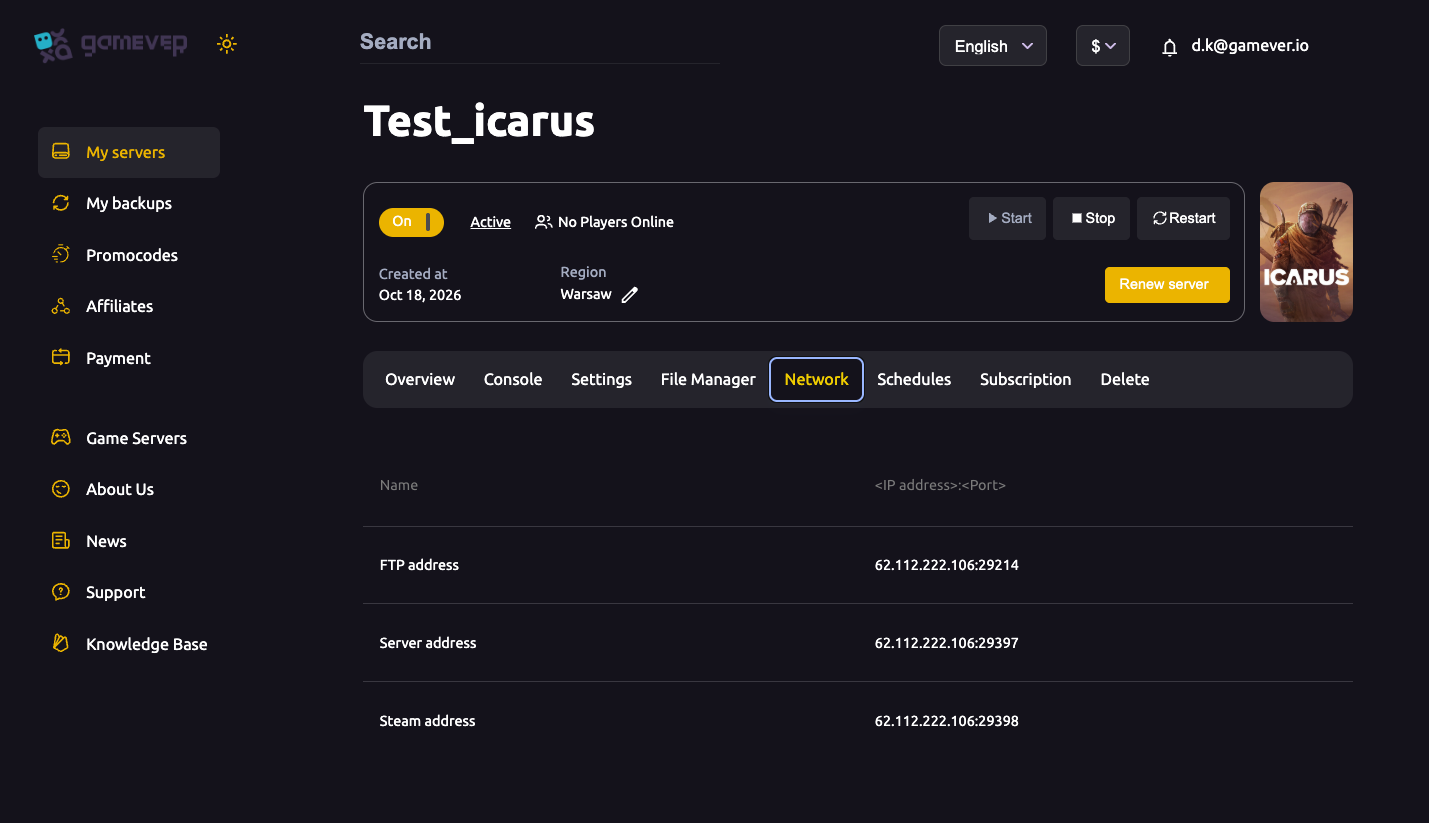
| Field | Example | What it's for |
|---|---|---|
| Server address | IP:29397 | The address players use to connect |
| Steam address | IP:29398 | Icarus's Steam query port (panel-assigned) |
| FTP address | IP:29214 | File access for admins, not for joining |
To get a friend in, give them the Server address exactly as it appears on your Network tab (the IP and port together), then have them:
- Launch Icarus and go to the multiplayer / Join screen.
- Use Direct Connect and paste the Server address (IP and port) from your Network tab, or find your server in the in-game browser by its Server name.
- Enter the Server password if you've set one under Settings (leave it blank for an open server).
That's the whole process — identical for every player, because they're all on PC. For a full walkthrough with screenshots, see how to connect and join your Icarus server.
Additional Tips
- Match versions first. The most common "can't join" cause is a client that hasn't updated to the server's patch — update Steam before troubleshooting anything else.
- Check DLC before switching maps. If you move your prospect to a paid expansion map, anyone without that DLC will be locked out until they buy it. Keep the group on Olympus if you want zero barriers.
- Set an admin password. On the Settings page, a blank Server admin password means any joiner can claim admin — always set it before sharing your address.
- Name your server in the panel. Use the Server name field under Settings so your server is easy to spot in the in-game browser; this is the supported way to name it.
- Share the Network address, not a guess. Always copy the live Server address from your own Network tab — the port is panel-assigned and specific to your server.
Conclusion
Icarus doesn't need crossplay because it never left the PC: it's a Windows-only Steam title from RocketWerkz, with no console edition to bridge to. For your gamever server that's good news — every player is on the same platform, so getting friends in is just a matter of matching game versions, owning any DLC map you're running, and pasting your Network tab's Server address into Direct Connect. See how to connect and join your Icarus server for the step-by-step.
Rent your Icarus server at gamever.io — panel-assigned addresses, no port forwarding, and full File Manager and FTP access. Free trial, promo code WELCOME.