
Core Keeper Server Settings and ServerConfig.json Reference
Your Core Keeper server runs on gamever hardware, so there is nothing to install and no dedicated-server executable to wrangle — you configure everything from the control panel. Most day-to-day options live on the Settings tab, and the few that Core Keeper only keeps in its config file are a short edit away in the File Manager. This reference walks every panel field in order, then covers the ServerConfig.json keys the panel does not expose, with the verified spellings from the official Core Keeper wiki. Where a setting needs the whole server to restart, we say so.
The Settings tab
Open your server, click Settings, and you get a single page of fields. Core Keeper mods are delivered through mod.io (not Steam Workshop), which is why the mod-related fields come first. Fill in what you need, then click Save at the bottom and Restart from the Overview tab so the server re-reads them.
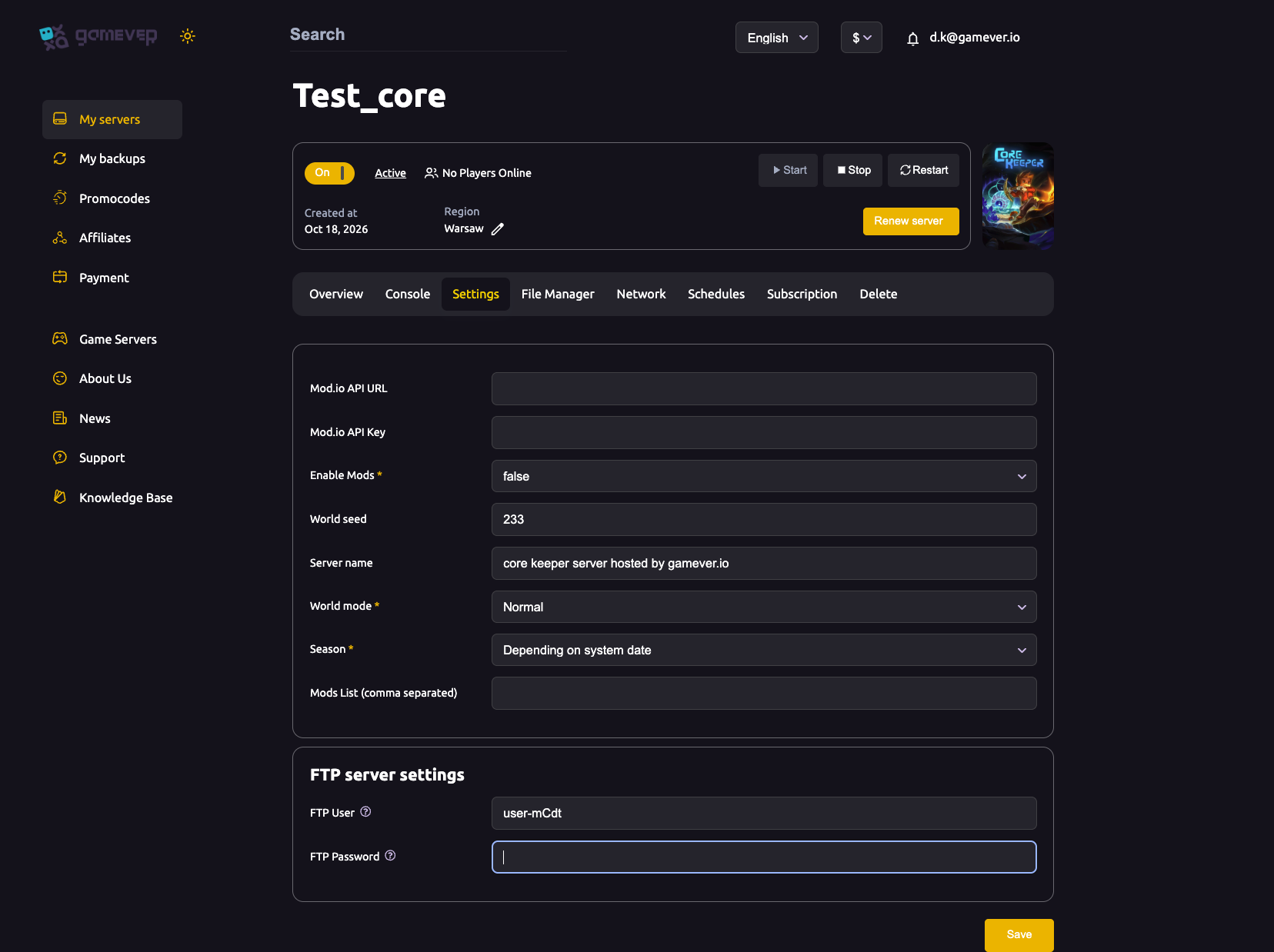
| Field | Type | What it does |
|---|---|---|
| Mod.io API URL | text | The mod.io API endpoint used to fetch mods. Leave blank unless you are enabling mods. |
| Mod.io API Key | text | Your personal mod.io API key, paired with the URL above to authorise downloads. |
| Enable Mods * | dropdown | true or false — the master switch for mod loading. |
| World seed | text | The generation seed, e.g. 233. Blank or 0 picks a random seed, and it is only read when the world is first created — changing it later has no effect on an existing world. |
| Server name | text | The display name for your server, e.g. "core keeper server hosted by gamever.io". |
| World mode * | dropdown | The world type/difficulty; "Normal" is shown by default. Pick the mode from the dropdown rather than editing it by hand. |
| Season * | dropdown | Controls seasonal events, e.g. "Depending on system date". |
| Mods List (comma separated) | text | The mod.io mod IDs you want loaded, separated by commas. |
Below those is an FTP server settings block showing your FTP User and FTP Password — the credentials for connecting an FTP client. The FTP host and port are on the Network tab (Core Keeper uses UDP, and the panel assigns the port for you, so there is never anything to port-forward). After any change here, Save, then Restart.
Changing the world or difficulty? See world mode for what each option changes in the game.
Settings the panel does not expose: ServerConfig.json
A handful of lower-level options are not on the Settings page. For those, Core Keeper keeps a ServerConfig.json file you edit directly through the File Manager (Upload Files, breadcrumb path, and an FTP note for larger transfers). The File Manager opens on /home/configs/, where you will find the mods and modloader folders alongside Admins.json and ServerConfig.json.
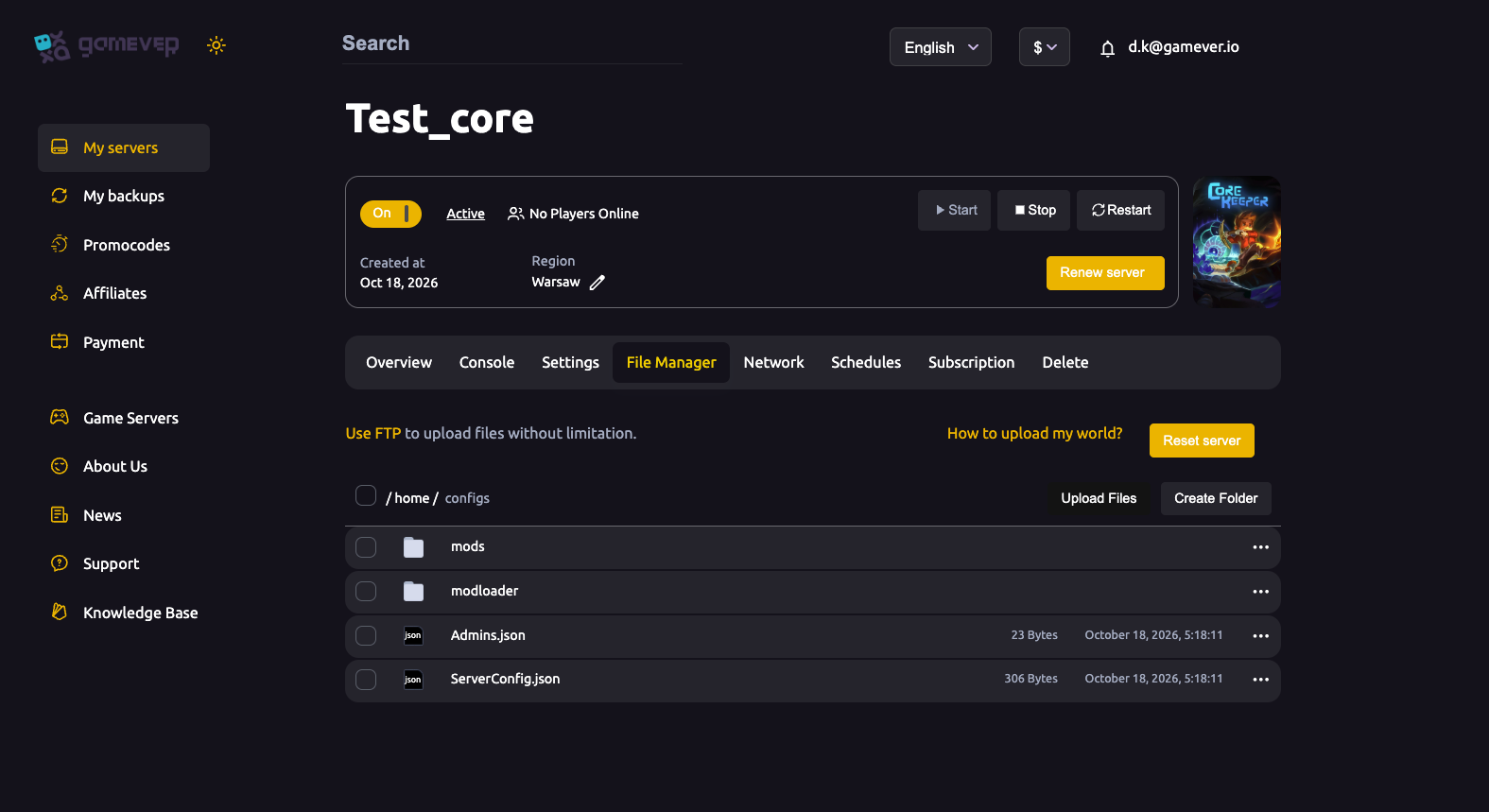
Because the server only reads this file at boot, the safe procedure is stop the server, edit the file, then start it again — editing a file the running server has open can be lost or ignored. The keys below are the ones documented on the official Core Keeper wiki; quote them exactly, as JSON keys are case-sensitive.
| Key | Purpose | Values |
|---|---|---|
gameId | The connection ID clients paste to join a multiplayer session. | Must be at least 28 characters; a shorter or blank value is replaced with a random string each boot. Set one here to pin a permanent Game ID. |
world | Selects which numbered save slot the server loads. | An integer (the default example is 0). |
worldSeed | The generation seed for a brand-new world. | An integer; 0 means random. Only applied when the world is first created. |
worldMode | The world type/difficulty, stored as a number. | Set difficulty through the panel's World mode dropdown rather than guessing the numeric code here. |
maxNumberPlayers | The maximum simultaneous players. | 1–100. Core Keeper's co-op is balanced around roughly 8 players. |
worldName | The world's display name used by local games when none is provided. | Any Unicode string. |
The file also carries network-tuning keys (maxNumberPacketsSentPerFrame, networkSendRate) and a seasonOverride value that forces a seasonal event regardless of the calendar date — leave these at their defaults unless you have a specific reason to change them. For raising the player cap specifically, see change max players.
A note on passwords: the official server-config reference does not document a password key, so a Core Keeper server is kept private by controlling who has the Game ID (and by direct-connect) rather than a server password. See server password for how access control actually works on Core Keeper, and Admins.json in the same folder for who holds admin rights.
Additional Tips
- Find your Game ID in the Console. Each boot the Console prints a session line in the form
IP;port;gameId;password; the gameId there is exactly what players paste to join. - Seed is a one-time thing. Setting
World seedorworldSeedonly matters at world creation. To use a new seed you need a fresh world/save slot, not an edit to the existing one. - Mods need all three fields. Enabling mods means a valid Mod.io API URL, Mod.io API Key,
Enable Modsset totrue, and the mod IDs in Mods List — missing any one of them stops mods from loading. - Back up before you edit. Grab a copy of your world save (the numbered
.world.gzipfile) andServerConfig.jsonvia My backups or FTP before changing the config. - Panel first, file second. If a setting exists on the Settings tab, change it there — only drop into
ServerConfig.jsonfor the keys the panel does not surface. - Restart to apply. Panel fields need a Save then a Restart; config-file edits need a full stop, edit, start.
Conclusion
Core Keeper splits its configuration cleanly: the mod.io fields, world seed, server name, world mode and season live on the Settings tab (Save, then Restart to apply), while the lower-level options — gameId, world, worldSeed, worldMode, maxNumberPlayers and worldName — sit in ServerConfig.json under the File Manager at /home/configs/, applied with a stop-edit-start. Stick to the verified key names, remember that the seed and Game ID both behave specially, and you can tune your world exactly how your group wants it.
Rent your Core Keeper server at gamever.io — full panel and File Manager access, so every setting here is yours to change. Free trial, promo code WELCOME.