
Can't Connect to Your Icarus Server? Troubleshooting Guide

A server you rent from gamever is already installed, networked and ready — you manage it from the control panel rather than building it from scratch. So when Icarus won't let you or a friend in, the fix is almost never something exotic: it's usually the server still booting, a version mismatch after a patch, the wrong address or password, or simply joining through the right method. This guide walks the common causes in order, all from your panel, and shows you how to join reliably with Direct Connect. Ports are assigned and handled by us, so there's nothing to forward.
A quick note before you start: the Icarus dedicated server is a Windows-only application and the game is PC-only with no crossplay. Everyone joining needs the game on a compatible PC platform.
First: is the server actually up?
Open the Overview tab. Check that the On/Active toggle is on and the server shows as running. If it was recently started, restarted or updated, give it a minute — Icarus loads its world (prospect) before it will accept joins, and trying to connect during boot looks exactly like a failure.
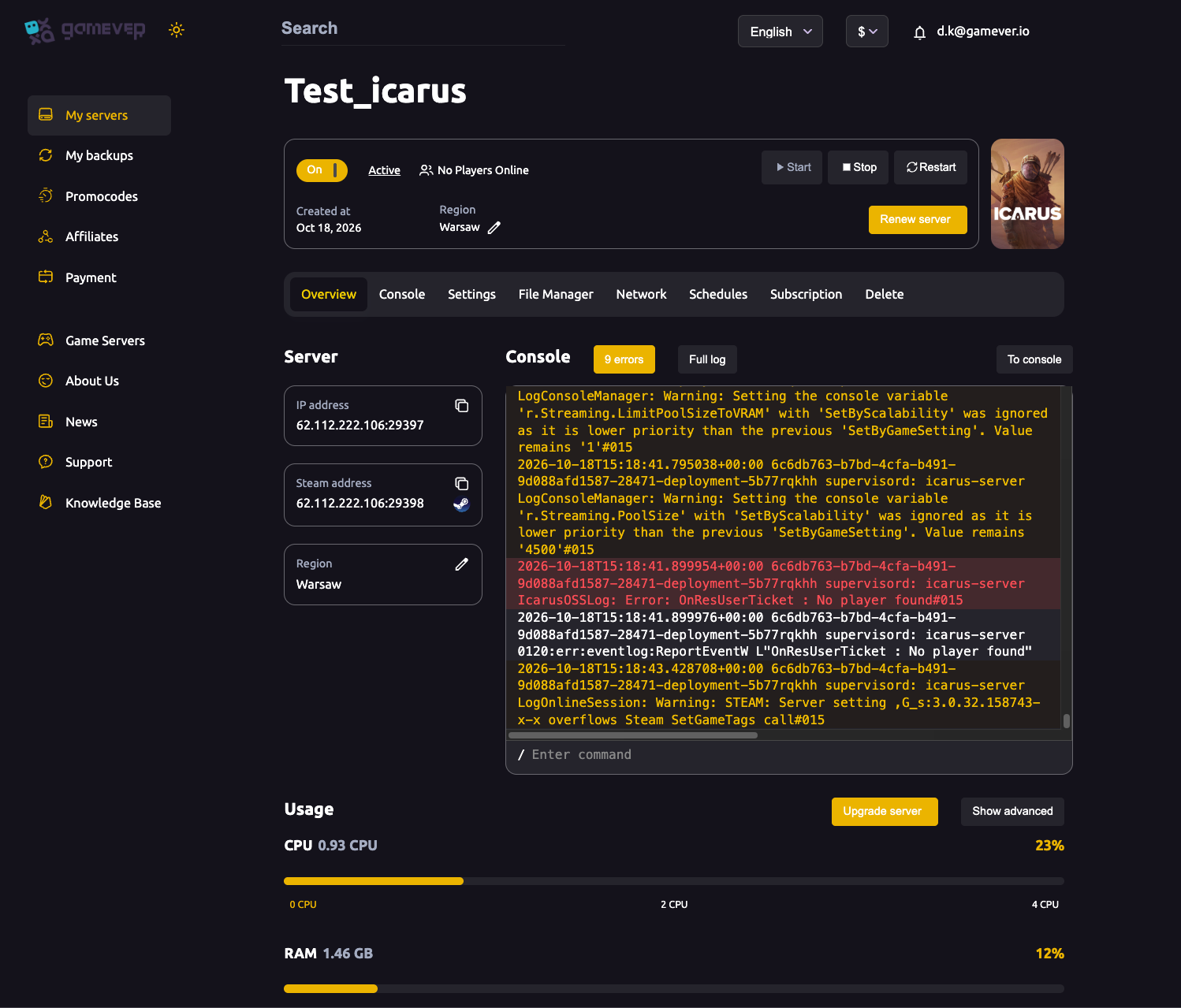
If it's stuck or behaving oddly, the quickest reset is Restart from the Overview tab. The Overview console preview also carries an error counter and a Full log link — if the count is climbing, open the full log before anything else, because a boot error there will explain a lot.
One Icarus-specific trap: a server with no prospect loaded will accept a connection and then bounce the player straight back out. If players reach the server but can't actually land, make sure a prospect (world) is loaded — see creating and joining a prospect for how that works.
Read your real connection details on the Network tab
Don't guess the address. Open the Network tab and read the values assigned to your server.
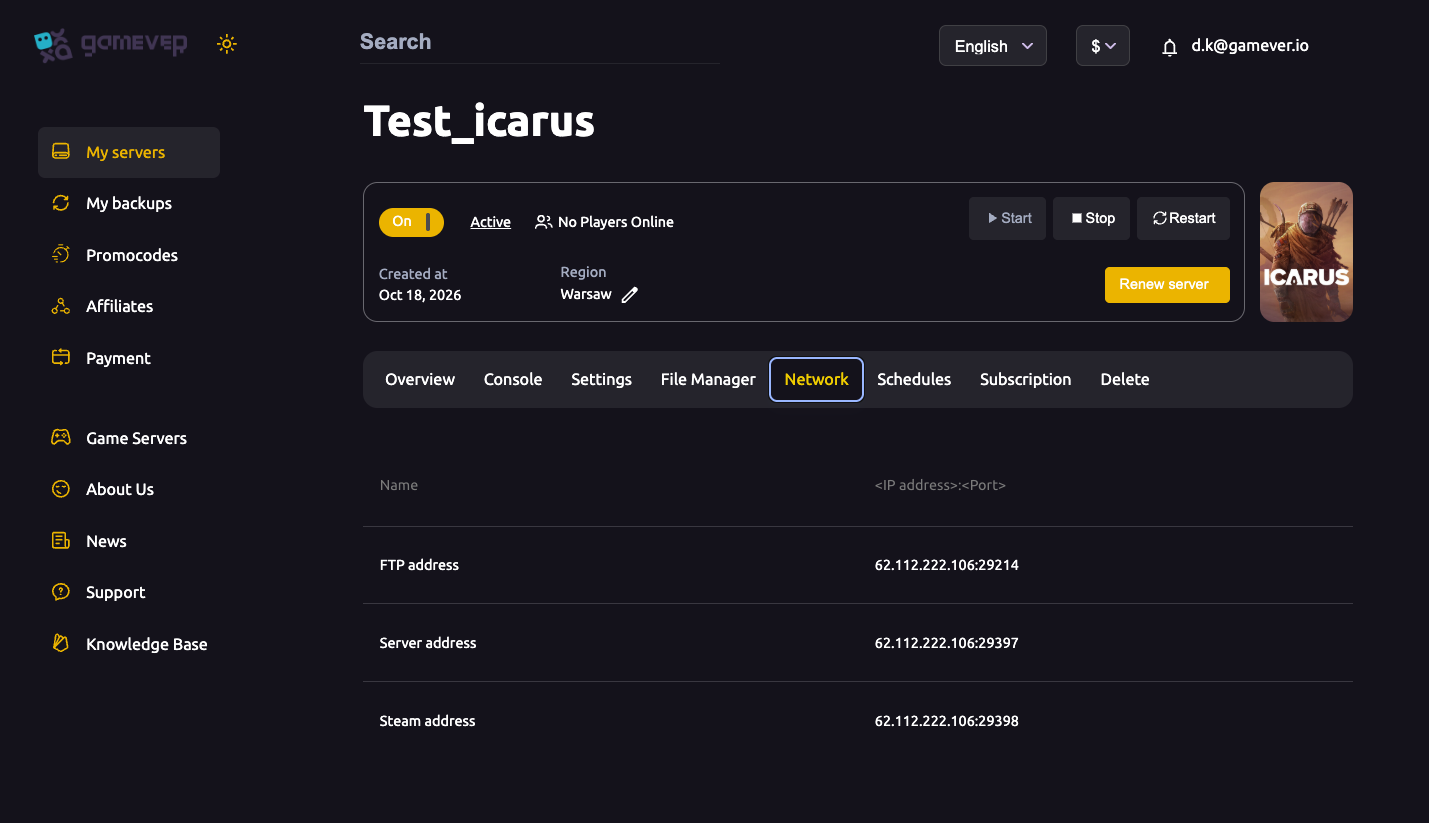
| Field | Example | Use it for |
|---|---|---|
| Server address | IP:29397 | The address players enter in Direct Connect — this is the one you want. |
| Steam address | IP:29398 | The Steam query port; not the address you connect to. |
| FTP address | IP:29214 | File Manager / FTP access, not game joining. |
The single most common address mistake is pasting the Steam address instead of the Server address. Players join on the Server address shown here. We assign and open these ports for you — there is no router or port-forwarding to configure on your end.
Joining with Direct Connect
If the server doesn't appear in the in-game browser, that's not a dead end — Direct Connect by address is the most reliable way in, and it often works even when the browser listing lags. In Icarus, click Play, select your character, then Join, open the Dedicated Servers view, and choose Direct Connect. Enter your Server address (the IP:29397-style value from the Network tab) and confirm. If a join password is set, you'll be prompted for it.
Check the join password
If joins fail with a password or authorisation error, confirm the Server password on the Settings page. In the panel's Settings, the Server password is the join password — if it's blank the server is open; if it's set, every player needs the exact value, and it's case-sensitive. Share the current one with your group, and remember that after changing it you must click Save and then Restart from the Overview tab for it to take effect.
(The separate Server admin password is not the join password — it's what lets you run admin commands in-game. Leaving it blank is a security risk, since any joiner could claim admin, so keep it set.)
Version mismatch after an update
This is the big one after any Icarus patch. Icarus updates frequently, and the server and every client must be on the exact same build. A mismatch usually shows up as a plain timeout or a silent failure to join, with no clear error message — which is why it's easy to misread as a network problem.
To clear it:
- Make sure the server is updated to the current build and fully restarted (check the Console / Full log for a clean start-up).
- Have each player verify their game files in Steam so their client is on the latest build.
- If anyone is on a beta/experimental branch, make sure the server and all clients are on the same branch — a client on a different branch won't match.
Once server and clients report the same version, the join should go through.
Still stuck? Read the Console
The Console tab is a live server console with command entry, and it's your best diagnostic. Watch it (or the Overview Full log) as a player tries to join — boot errors, a missing prospect, or authentication problems surface here in plain text, and they'll point you straight at the cause rather than leaving you guessing.
Additional Tips
- Give it a minute after any restart or update. Icarus loads its prospect before accepting joins; a connection during boot looks like a failure but isn't.
- Copy the Server address, not the Steam address. The
IP:29397-style value on the Network tab is the one for Direct Connect. - Keep everyone on the same build. After a patch, update the server and have players verify files in Steam before blaming the network.
- Use Direct Connect when the browser is empty. It frequently works even when the server hasn't shown up in the list yet.
- Set the admin password. Blank means any joiner can claim admin — always give it a value under Settings.
- Let the Console do the talking. A climbing error counter or a Full log line tells you more than any amount of reconnecting.
Conclusion
Most Icarus "can't connect" problems come down to five things: the server still booting, no prospect loaded, the wrong address, the wrong password, or a version mismatch after a patch. Work through them from the panel — confirm On/Active and Restart on Overview, read the real Server address on the Network tab, check the Server password under Settings, watch the Console or Full log for errors, and make sure your client and the server are on the same version. Ports are assigned and handled by us, so there's nothing to forward. For the full join walkthrough see connecting and joining a prospect, and if a patch broke things see updating your server.
Rent your Icarus server at gamever.io — panel-assigned ports, a live Console for quick diagnosis, and one-click restarts when a drop goes sideways. Free trial, promo code WELCOME.