
Best ARK Server Settings: Ready-Made PvE, PvP & Boosted Presets

Not sure where to set your rates? Start from a preset. Below are three balanced starting points — casual PvE, boosted PvE, and competitive PvP — with concrete values you can copy in, plus what each knob does so you can adjust to taste. For the full reference on every setting, see our server settings guide and Game.ini guide.
Reminder:
1.0= official/vanilla rate. The rate multipliers and most rules live in GameUserSettings.ini[ServerSettings]; breeding and per-level tuning live in Game.ini[/script/shootergame.shootergamemode]. Don't put a Game.ini setting in GameUserSettings.ini — it'll just be ignored.
Preset 1 — Casual PvE (balanced, "vanilla+")
For a relaxed PvE server that still feels like ARK — progression is a bit faster, taming isn't a second job, but the game keeps its bite.
GameUserSettings.ini → [ServerSettings]
| Setting | Value |
|---|---|
serverPVE | True |
XPMultiplier | 2.0 |
HarvestAmountMultiplier | 2.0 |
TamingSpeedMultiplier | 5.0 |
ResourcesRespawnPeriodMultiplier | 1.0 |
bAllowFlyerCarryPvE | True |
DayCycleSpeedScale | 1.0 |
Game.ini → [/script/shootergame.shootergamemode]
| Setting | Value |
|---|---|
MatingIntervalMultiplier | 0.5 |
EggHatchSpeedMultiplier | 10.0 |
BabyMatureSpeedMultiplier | 10.0 |
BabyCuddleIntervalMultiplier | 0.5 |
Preset 2 — Boosted PvE (family / casual fun)
For groups who want to skip the grind and just build, tame and explore. Tames and babies come fast; harvesting is generous.
GameUserSettings.ini → [ServerSettings]
| Setting | Value |
|---|---|
serverPVE | True |
XPMultiplier | 5.0 |
HarvestAmountMultiplier | 5.0 |
TamingSpeedMultiplier | 10.0 |
ResourcesRespawnPeriodMultiplier | 0.5 |
bAllowFlyerCarryPvE | True |
PlayerCharacterFoodDrainMultiplier | 0.7 |
PlayerCharacterWaterDrainMultiplier | 0.7 |
Game.ini → [/script/shootergame.shootergamemode]
| Setting | Value |
|---|---|
MatingIntervalMultiplier | 0.3 |
EggHatchSpeedMultiplier | 30.0 |
BabyMatureSpeedMultiplier | 30.0 |
BabyCuddleIntervalMultiplier | 0.3 |
BabyImprintAmountMultiplier | 2.0 |
Want it even faster? Many family servers run EggHatch/BabyMature at 50 so a baby is adult in a single play session.
Preset 3 — Competitive PvP (balanced)
For PvP that rewards skill, not just no-life grinding. Rates are boosted enough to keep raids and replacement tames feasible, but not so high that nothing has value.
GameUserSettings.ini → [ServerSettings]
| Setting | Value |
|---|---|
serverPVE | False |
XPMultiplier | 3.0 |
HarvestAmountMultiplier | 3.0 |
TamingSpeedMultiplier | 5.0 |
PlayerDamageMultiplier | 1.0 |
DinoDamageMultiplier | 1.0 |
StructureResistanceMultiplier | 1.0 |
EnableCryopodNerf | True |
Game.ini → [/script/shootergame.shootergamemode]
| Setting | Value |
|---|---|
MatingIntervalMultiplier | 0.5 |
EggHatchSpeedMultiplier | 15.0 |
BabyMatureSpeedMultiplier | 15.0 |
DinoTurretDamageMultiplier | 1.0 |
MaxNumberOfPlayersInTribe | 6 |
TribeSlotReuseCooldown | 3600 |
PvP balance tips: keep
StructureResistanceMultiplierat 1.0 so bases stay raidable, cap tribe size to stop mega-tribes snowballing, and leave damage multipliers near vanilla — turret and dino-turret damage is where most PvP "balance" arguments actually happen.
How to apply these on gamever
The gamever panel splits these across Settings sub-tabs:
serverPVE,bAllowFlyerCarryPvEand PvE/PvP rules → PVPE Settings.DifficultyOffset/OverrideOfficialDifficulty→ Difficulty Settings.- The rate multipliers (
XPMultiplier,TamingSpeedMultiplier,HarvestAmountMultiplier, the survival drains, tribe size, etc.) → Other settings (a long list — scroll or use the in-page search).
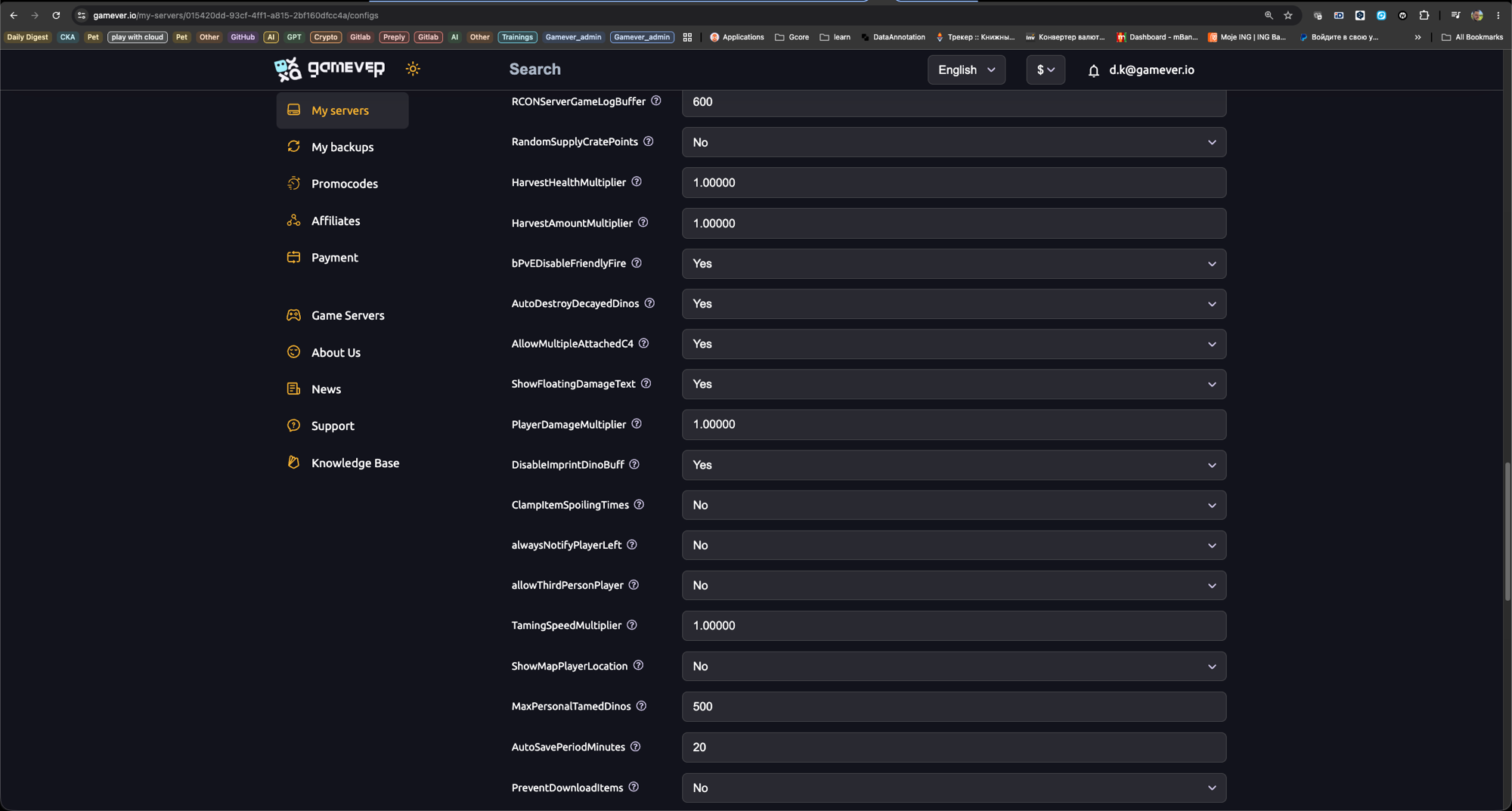
Set the values, Save, and restart — no file editing for any of the above.
The breeding multipliers are the exception.
MatingIntervalMultiplier,EggHatchSpeedMultiplier,BabyMatureSpeedMultiplierand the cuddle/imprint settings are not in the panel form — they live in Game.ini. To use them, set Settings → Server Settings → Disable settings below to Yes, then add them toGame.iniin the file manager at/home/server/ShooterGame/Saved/Config/LinuxServer/Game.ini(see our Game.ini guide).
Either way: change one block, restart, test. It's far easier to spot a bad value than to debug ten at once.
Conclusion
A preset gets you a server that feels right on day one — then nudge the handful of multipliers your community cares about. Casual PvE for a relaxed world, boosted PvE to skip the grind, balanced PvP for fights that mean something. Tweak from there and you'll dial in exactly the ARK you want.
Rent your ARK server at gamever.io and apply any of these from a one-click control panel — adjust rates, save, restart, online 24/7. Free trial, promo code WELCOME.