
ARK Server Settings Explained: Every Key GameUserSettings.ini Command

An ARK dedicated server has hundreds of options, but you only need a couple dozen to fully shape your world — taming speed, XP, day length, PvP rules, structure limits and more. This guide decodes the most important server settings, tells you exactly which file each one goes in, and gives sensible values to start from. It applies to both ARK: Survival Evolved and ARK: Survival Ascended, whose settings are nearly identical.
Where settings go (3 places)
ARK reads its configuration from three places, and putting a setting in the wrong one is the #1 reason a change "doesn't work":
- Command line — startup arguments like the map name,
?listen, and a few flags. Set once when the server launches. - GameUserSettings.ini, under the
[ServerSettings]header — the bulk of the everyday options below. This is where you'll spend most of your time. - Game.ini, under
[/script/shootergame.shootergamemode]— advanced tuning (per-level stat multipliers, breeding, engram overrides, stack sizes via mods).
On a gamever server, both files live in the web file manager at:
/home/server/ShooterGame/Saved/Config/LinuxServer/GameUserSettings.ini
/home/server/ShooterGame/Saved/Config/LinuxServer/Game.ini
Open the file manager in your control panel, navigate to that folder, and edit either file right in the browser.
Important — keep your manual edits. By default the panel writes these
.inifiles from your panel settings on every restart, which wipes anything you typed by hand. Before editingGameUserSettings.ini(orGame.ini) directly, go to Settings → Server Settings and set Disable settings below to Yes ("Disable settings overwriting. You can manually edit or upload your GameUserSettings.ini file."). With it on, your hand-edited values stay put. Either manage settings entirely from the panel form, or switch on Disable settings below and manage the files yourself — don't mix the two.
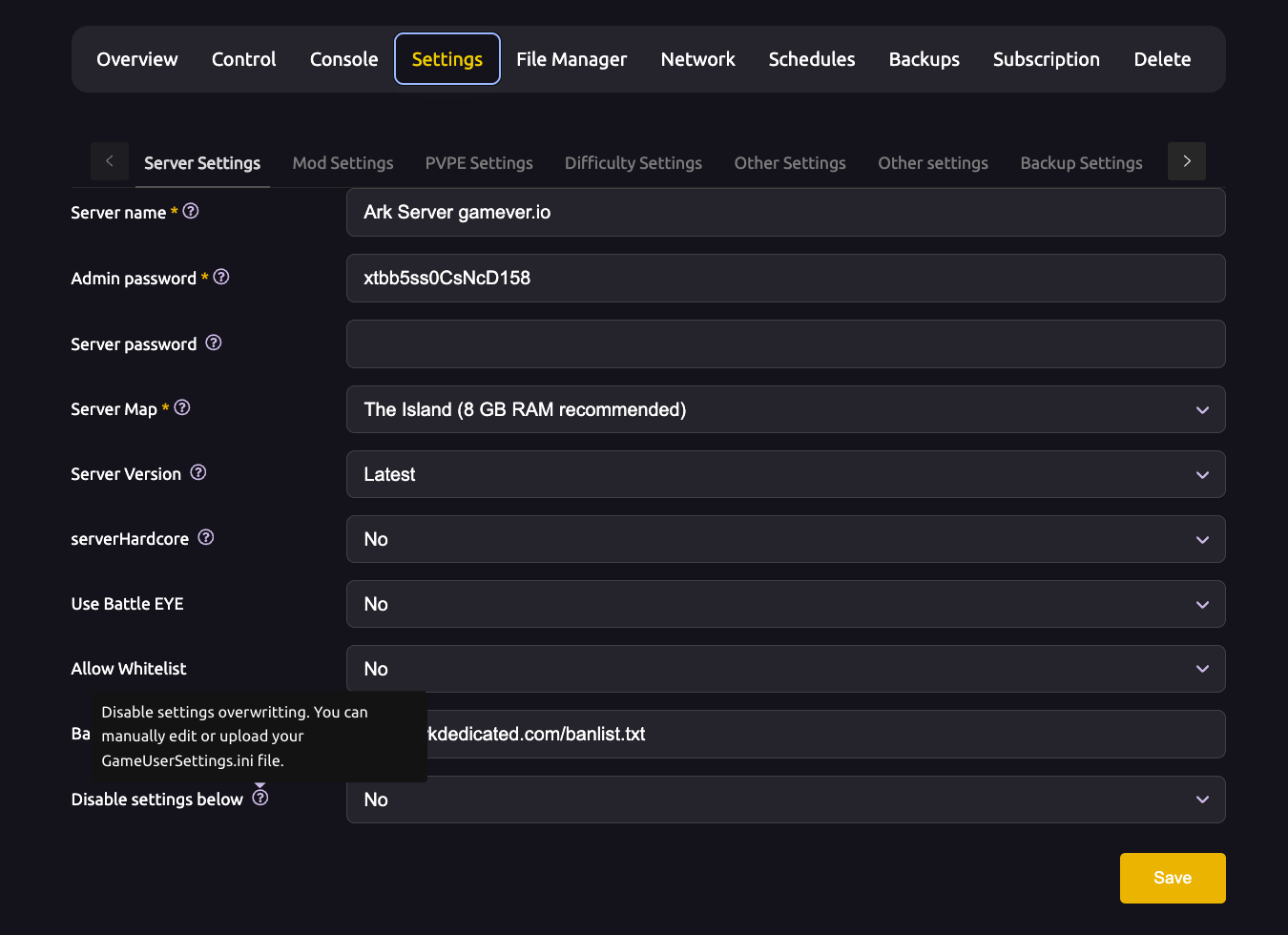
Essential server setup
These define who can join and the basic ruleset.
| Setting | Default | What it does |
|---|---|---|
SessionName | — | The server name shown in the browser. |
MaxPlayers | 70 | Max simultaneous players. (Goes under [/script/engine.gamesession].) |
ServerPassword | none | Password required to join. Leave blank for an open server. |
ServerAdminPassword | none | Password to unlock admin/cheat commands in the in-game console. Always set this. |
serverPVE | False | True disables PvP and runs the server as PvE. |
serverHardcore | False | True makes characters revert to level 1 on death. |
DifficultyOffset + OverrideOfficialDifficulty | 0.2 | Controls max wild creature level. Set OverrideOfficialDifficulty=5.0 for level 150 wild dinos. |
Rates & progression (the fun knobs)

The multipliers most servers tweak first. 1.0 = vanilla/official rate; higher is faster.
| Setting | Default | What it does |
|---|---|---|
XPMultiplier | 1.0 | Experience gained by players, tribes and dinos. |
TamingSpeedMultiplier | 1.0 | Taming speed. Higher = faster tames. |
HarvestAmountMultiplier | 1.0 | Resources gathered per hit (wood, berries, meat, metal…). |
HarvestHealthMultiplier | 1.0 | "Health" of nodes — higher means you get more before a tree/rock is depleted. |
ResourcesRespawnPeriodMultiplier | 1.0 | Respawn rate of nodes. Lower = faster respawns. |
MatingIntervalMultiplier | 1.0 | Cooldown between breeding. Lower = breed more often. (Game.ini) |
BabyMatureSpeedMultiplier | 1.0 | How fast babies grow up. Higher = faster. (Game.ini) |
EggHatchSpeedMultiplier | 1.0 | How fast fertilized eggs hatch. (Game.ini) |
Heads-up: the three breeding rates marked (Game.ini) above go in
Game.iniunder[/script/shootergame.shootergamemode], notGameUserSettings.ini— put them in the wrong file and they're silently ignored. Everything else in this table lives inGameUserSettings.ini[ServerSettings]. See our Game.ini guide for the full breeding set.A popular "boosted but balanced" starting point: XP 2x, Harvest 2x, Taming 3–5x, Maturation 5–10x.
Day & night cycle

| Setting | Default | What it does |
|---|---|---|
DayCycleSpeedScale | 1.0 | Overall speed of the full day/night cycle. Lower = longer days and nights. |
DayTimeSpeedScale | 1.0 | Length of daytime only. |
NightTimeSpeedScale | 1.0 | Length of nighttime only. Lower it to make nights shorter and less punishing. |
Combat: damage & resistance

| Setting | Default | What it does |
|---|---|---|
PlayerDamageMultiplier | 1.0 | Damage players deal. |
DinoDamageMultiplier | 1.0 | Damage wild and tamed dinos deal. |
StructureDamageMultiplier | 1.0 | Damage from structures (e.g. spike walls). |
PlayerResistanceMultiplier | 1.0 | Damage players take. Higher = players take more damage. |
DinoResistanceMultiplier | 1.0 | Damage dinos take. |
StructureResistanceMultiplier | 1.0 | Damage structures take — lower it for tankier bases. |
Survival drains (hunger, thirst, stamina, healing)
Raise a drain to make survival harder; raise a recovery to make it easier.
| Setting | Default | What it does |
|---|---|---|
PlayerCharacterFoodDrainMultiplier | 1.0 | How fast players get hungry. |
PlayerCharacterWaterDrainMultiplier | 1.0 | How fast players get thirsty. |
PlayerCharacterStaminaDrainMultiplier | 1.0 | How fast player stamina drains. |
PlayerCharacterHealthRecoveryMultiplier | 1.0 | Player heal rate. Higher = heal faster. |
DinoCharacterFoodDrainMultiplier | 1.0 | How fast dinos get hungry (also affects taming hold time). |
DinoCharacterHealthRecoveryMultiplier | 1.0 | Dino heal rate. |
Structures, dinos & decay
| Setting | Default | What it does |
|---|---|---|
MaxTamedDinos | 5000 | Global cap on tamed dinos across the server — raise/lower for performance (hosts set their own default; gamever ships 8000). |
TheMaxStructuresInRange | 10500 | Max structures allowed within a (hard-coded) range — the practical base-size limit. |
DisableStructureDecayPvE | False | True stops the gradual 7-day decay of structures on PvE. |
DisableDinoDecayPvE | False | True stops ownership decay, so others can't claim your dinos. |
bAllowFlyerCarryPvE | False | True lets mounted flyers pick up other dinos/players in PvE. |
AlwaysAllowStructurePickup | False | True removes the timer on the quick-pickup system (pick up structures any time). |
PerPlatformMaxStructuresMultiplier | 1.0 | Scales how many structures fit on platform saddles/rafts. |
Quality-of-life & misc
| Setting | Default | What it does |
|---|---|---|
AutoSavePeriodMinutes | 15.0 | Minutes between automatic world saves. |
allowThirdPersonPlayer | False | True enables third-person view. |
ShowMapPlayerLocation | False | True shows each player their exact position on the map. |
globalVoiceChat | False | True makes voice chat server-wide instead of proximity. |
alwaysNotifyPlayerJoined / alwaysNotifyPlayerLeft | False | Announce joins/leaves in chat. |
EnableCryopodNerf | False | True applies "cryosickness" to creatures just deployed from cryopods (PvP balance). |
AdminLogging | False | True logs all admin commands to in-game chat for transparency. |
Admin access & whitelisting
- Set
ServerAdminPassword, then in-game open the console and typeenablecheats <password>to use admin commands. - To make admins permanent without sharing the password, add their Steam IDs to AllowedCheaterSteamIDs.txt in the server's
/home/server/ShooterGame/Saved/folder (one ID per line). AdminLogging=truerecords every admin action to chat — good for co-managed servers.
Additional Tips
- Change one block at a time. Tweak rates, restart, test — it's far easier to spot a bad value than to debug ten at once.
- Editing files? Set "Disable settings below" to Yes first. If you edit the
.inifiles directly in the file manager, turn that option on (Settings → Server Settings) or your changes vanish on the next restart. ?vs no?. Command-line options use?Setting=value;.inioptions useSetting=valueunder their header — don't mix the styles.- PvE vs PvP options are separate. Many decay/building rules only apply in one mode (note the
PvE/PvPin the name). - Back up
GameUserSettings.iniandGame.inibefore big changes so you can roll back instantly.
Conclusion
Master these couple-dozen settings and you control every dial that matters in ARK — progression speed, difficulty, day length, PvP rules and base limits — without wading through the full hundreds of options.
Rent your ARK server at gamever.io and change any of these settings from a one-click control panel — no manual file editing, instant restarts, and your world stays online 24/7. Free trial, promo code WELCOME.