
ARK Server Ports and Firewall Explained
If you've ever self-hosted a game server, you'll remember the pain of port forwarding and firewall rules. On a gamever ARK server you skip all of that — every port your server needs is assigned and opened for you. This guide explains what each address on your server is for, where to find them, and why you don't have to touch a firewall.
Where your ports live
Open your server and click the Network tab. You'll see a short list of addresses, each in IP:port form:
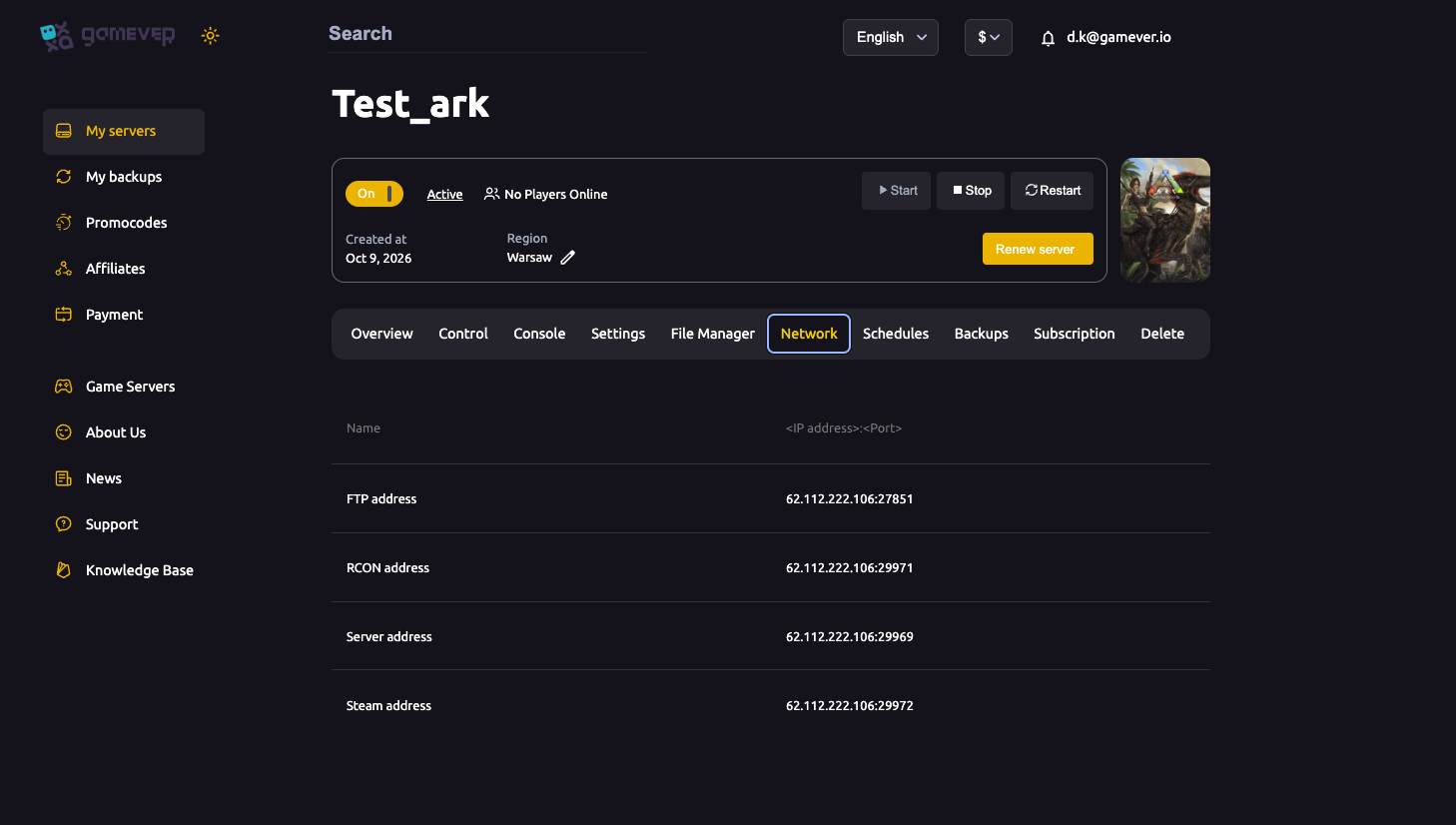
| Address | What it's for |
|---|---|
| Server address | The game port — this is what players connect to in-game. |
| Steam address | The Steam query port, used by the server browser to list and ping your server. |
| RCON address | Remote console (for tools/bots). See our RCON guide. |
| FTP address | For uploading files and worlds (see the FTP upload guide). |
Each one is a full IP:port you can copy straight from the panel.
Do you need to open ports or configure a firewall?
No. gamever runs your server on infrastructure where the required ports are already open and mapped to your instance. There is no port forwarding to do (that only applies when hosting on your own home connection) and no firewall rules for you to add. The addresses on the Network tab are reachable from the internet as-is.
How players connect
- In-game "Join by IP": give players your Server address (
IP:port). In ARK, this goes in the Steam server list "favourites" by IP, or via the Epic/console add-server flow. - Server browser: your server is listed and pinged through the Steam address (query port), so it also shows up when players search the unofficial list.
If a player still can't see or join the server, it's almost never a port problem on a managed host — it's usually a version mismatch, a password, or the server still booting. Our can't-join fix guide walks through those.
The ports behind the scenes
For reference, a stock ARK dedicated server uses a game port (default 7777, plus 7778), a Steam query port (default 27015) and an RCON port (default 27020). On gamever these defaults are remapped to the per-server ports shown on your Network tab — so always use the numbers the panel gives you, not the generic defaults, when a tool or player asks for a port.
Additional Tips
- Copy addresses from the Network tab, never assume 7777/27015/27020 — your instance uses its own assigned ports.
- No port forwarding needed — that's a self-hosting concern; a managed server is already reachable.
- Give players the Server address for a direct join; the Steam address is what lists you in the browser.
- Can't connect isn't usually ports — check version, password and that the server finished starting first.
- RCON uses its own address — point external tools at the RCON address, not the game port.
Conclusion
On gamever you never wrestle with ports or firewalls for ARK. Everything your server needs is opened for you and listed on the Network tab — game, query, RCON and FTP, each as a ready-to-copy IP:port. Hand players your Server address and they're in.
Rent your ARK server at gamever.io — all ports opened and managed for you, no forwarding, no firewall headaches. Free trial, promo code WELCOME.