
ARK Admin Commands & Console Cheats: The Essential List

ARK's console gives admins huge control — spawn any creature, hand out items, teleport, fly, manage players, and clean up your world. This guide covers how to unlock admin access and the most useful commands, with the exact syntax. Works on ARK: Survival Evolved and ARK: Survival Ascended (a few commands differ between versions).
Two ways to run commands
1. The gamever web console (easiest). Your control panel has a built-in server console (on the Overview and Console tabs, with an Enter command box). It's already authenticated as the server, so you don't need enablecheats — and you type commands without the cheat / admincheat prefix. Just enter the bare command, e.g. Broadcast Server restarting in 5 min or SaveWorld. This is the quickest way to run server-management and world commands.
For the most common actions there's an even simpler option: the Control tab gives you ready-made fields with Submit buttons — ServerChat, Broadcast, Ban player, Unban player (enter a Steam nickname/ID) and Save server — no command syntax to remember at all.
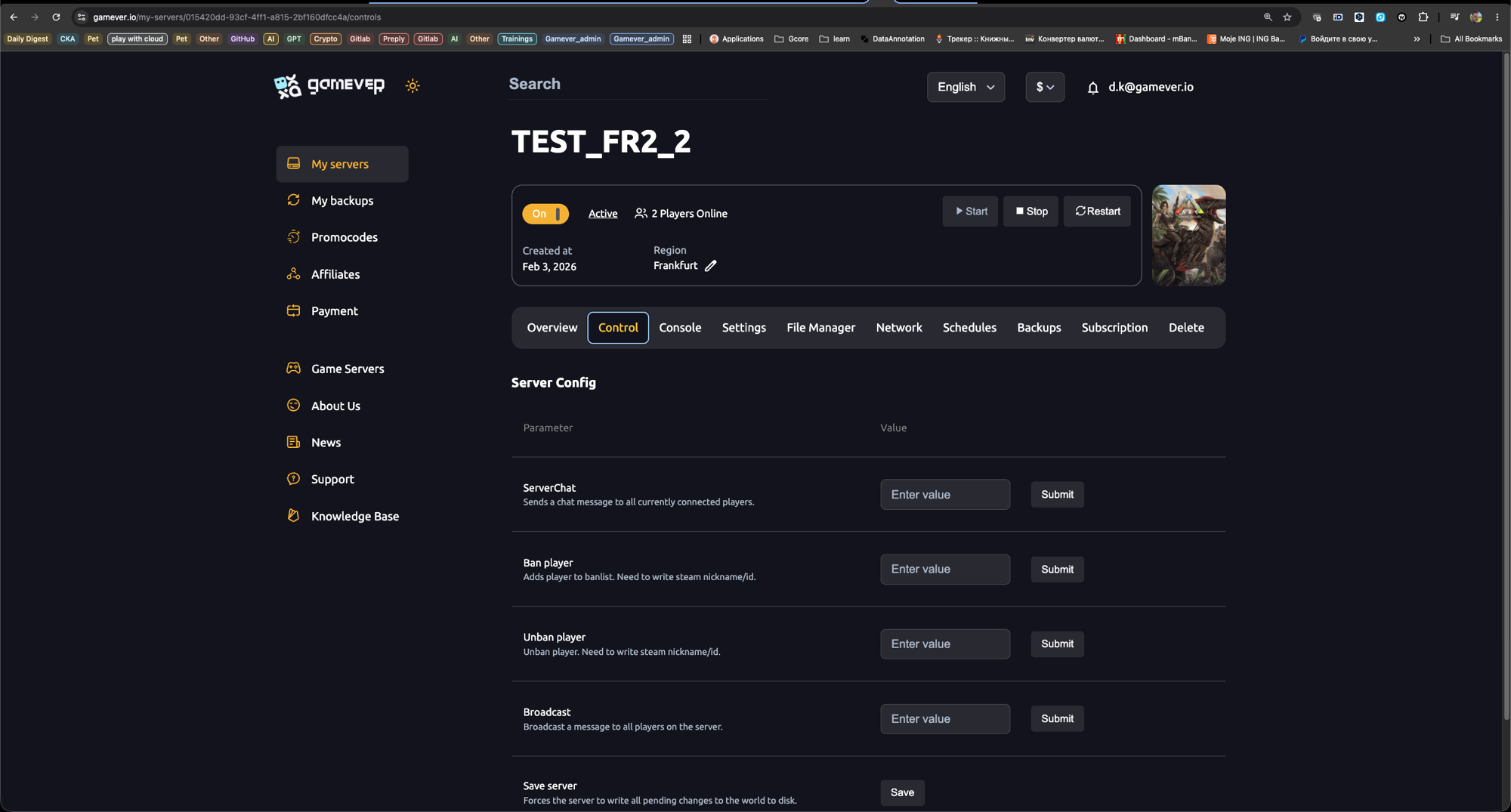
2. The in-game console. For player-side cheats (god mode, fly, spawning items on your character), you run commands inside the game:
- Set a
ServerAdminPasswordin your server settings first (see our server settings guide). - In-game, open the console: Tab on PC, or the pause-menu console on console platforms.
- Type
enablecheats YourAdminPasswordand press Enter. You now have admin rights for the session. - In single-player, you don't need a password — cheats are already enabled.
About the
cheat/admincheatprefix: the prefix shown in the tables below is for the in-game console (admincheatruns the command without showing it in chat). In the gamever web console you can drop the prefix entirely — type just the command itself.
Server management
| Command | What it does |
|---|---|
cheat SaveWorld | Forces the server to save the world to disk right now. |
cheat Broadcast <msg> | Sends a big on-screen message to every player. |
cheat ServerChat <msg> | Sends a normal chat message to all players. |
cheat SetTimeOfDay hh:mm | Sets the world clock (e.g. cheat SetTimeOfDay 09:00). |
cheat SetDay <n> | Jumps to a specific day number. |
cheat KickPlayer <SteamID> | Disconnects a player. |
cheat BanPlayer <SteamID> / UnbanPlayer | Adds/removes a player from the ban list. |
cheat RenameTribe <old> <new> | Renames a tribe. |
cheat DoExit | Shuts the server down cleanly (saves first if configured). |
Player cheats
| Command | What it does |
|---|---|
cheat God | Toggles god mode — invulnerable to damage (drowning still applies). |
cheat Fly / cheat Walk | Enables free-flight / turns it back off. |
cheat Ghost | No-clip — walk through walls and terrain. |
cheat InfiniteStats | Refills and locks health, stamina, food, water and oxygen. |
cheat LeaveMeAlone | God + InfiniteStats + enemies ignore you, all at once. |
cheat GiveEngrams | Unlocks every crafting recipe. |
cheat GiveItemNum <id> <qty> <quality> <blueprint 0/1> | Spawns an item by its numeric ID. |
admincheat GFI <part-of-name> <qty> <quality> <bp> | Spawns an item by name keyword — easier than IDs. |
cheat AddExperience <amount> 0 1 | Grants XP to you (or your mount). |
cheat ToggleInfiniteAmmo | Unlimited ammo for all weapons. |
cheat Suicide | Kills your character (useful to reset a stuck spawn). |
Spawning & taming creatures
| Command | What it does |
|---|---|
admincheat Summon <classname> | Spawns a wild creature at your location. |
admincheat SummonTamed <classname> | Spawns an already-tamed creature (not on your tribe). |
admincheat GMSummon "<classname>" <level> | Spawns a tamed, rideable creature on your tribe at a set level. |
cheat ForceTame | Instantly tames the creature you're looking at. |
cheat ForceTameAOE <radius> | Force-tames every creature in range. |
cheat DoTame | Tames the target as if you'd tamed it normally (keeps level bonuses). |
cheat SetImprintQuality <0-1> | Sets imprint % on the baby you're looking at. |
cheat SetBabyAge <0-1> | Sets the age/growth of a baby. |
cheat DestroyWildDinos | Wipes all wild creatures (they respawn) — great for forcing fresh spawns. |
cheat DestroyAllEnemies | Destroys all non-player creatures, including tamed — use with care. |
Teleporting
| Command | What it does |
|---|---|
cheat Fly then cheat Teleport | Moves you forward until you hit something. |
cheat TPCoords <lat> <lon> <height> | Teleports to GPS-style coordinates. |
cheat TeleportToPlayer <id> | Teleports you to a player by ID. |
cheat TeleportPlayerNameToMe <name> | Brings a player to you by name. |
cheat TP <location> | Quick-teleport to named map spots (e.g. an obelisk). |
Additional Tips
- Use
GFIoverGiveItemNum— typing part of an item's name is far easier than memorizing numeric IDs. admincheathides the command from chat; plaincheatmay show it. On a public server, preferadmincheat.DestroyWildDinosis your friend after changing spawn settings — it forces the new config to take effect immediately.- Be careful with
DestroyAllEnemies— it removes tamed creatures too, not just wild ones. - Grab Steam/EOS IDs with
cheat ListPlayersbefore kicking or banning. - Disable cheats by reconnecting — admin mode lasts only for the current session.
Conclusion
With admin access you can build, test and manage an ARK world in seconds — spawn the exact dino you need, teleport across the map, hand out gear, and keep your server tidy. Bookmark this list and you'll rarely need to look anything up mid-session.
Rent your ARK server at gamever.io and manage admins, passwords and restarts from a simple control panel — your world stays online 24/7 for the whole tribe. Free trial, promo code WELCOME.